Do these 3 things before closing this tab:
1Repair Windows errors before they cause bigger problems2Scan for outdated or missing drivers - takes under a minute3Clear out junk files and repair common Windows errorsIntelbras Mibo Smart has evolved beyond a camera viewer into the company’s central app for supported security and smart-home products. It can bring Mibo cameras together with devices such as locks, switches, lights, video doorbells and gate controllers, plus scenes, automations and sharing. “Unifies” means control in one Intelbras app—not universal compatibility with every connected-home brand, or identical features on every model.
What Mibo Smart brings together
Intelbras markets Mibo Smart as a smart-home application, while cameras and video services remain a major part of its features. The app’s supported product categories include:
- Mibo security cameras and video doorbells;
- digital and smart locks;
- smart switches and lights;
- gate controllers and infrared controllers for compatible appliances;
- other supported Intelbras connected-home products.
Within the app, users can view live camera feeds, review recordings, control compatible devices remotely, create scenes and automations, and share devices or environments with other people. Intelbras also describes integrations with Alexa, Google Home and Samsung SmartThings. The breadth of control depends on the exact product and feature: check the model’s documentation before buying rather than assuming every Intelbras device works the same way. Intelbras’ Mibo Smart overview and its App Store listing describe the platform and supported categories.
This is a gradual expansion, not a clearly documented one-day replacement of a camera-only app. Intelbras app release notes show features such as automations, cloud services, voice-assistant support and camera interface changes arriving across updates. As of August 18, 2026, the Google Play listing reported an update on July 8, 2026; availability, compatibility and release details can vary by platform and region. See the Intelbras support and changelog page for current guidance.
Quick wins for a faster PC:
Scan for outdated or missing drivers - takes under a minuteDriver Scan →Clear out junk files and repair common Windows errorsFree Scan →Fix the driver behind crashes, sound loss and screen glitchesFind Drivers →#1 Best Overall
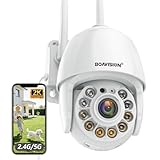
- Motion Tracking allows camera to automatically track moving objects and begin recording
- Built-in floodlight and alarm siren activates with motion detection to scare away intruders
- 1080P video with 4x digital zoom, night vision and 350° pan, 120° tilt
- Works with iOS, Android, Mac OS, Windows via WiFi connectivity
- Integrates with third party software like Blue Iris, iSpy, Synology, TinyCam
What you can do in the app—and what still varies
Cameras, recordings and remote control
Mibo Smart supports live viewing and playback for compatible cameras. Recordings may be stored on a camera’s microSD card or through Mibo Cloud, a separate paid service. For supported products, users can also control locks, lights and other connected devices from the app. Remote access and cloud features require the relevant device and service to be available online.
Scenes, automations and sharing
A scene is a group of actions that a user starts—for example, switching off lights and locking a door. An automation runs in response to a supported condition, such as a schedule or device event. The available triggers and actions depend on the model, firmware and configuration; not every camera or smart-home product supports every routine. Some routines may rely on internet access or Intelbras services. Release notes describe local saving for certain virtual automations and parallel functions with the MCA 1002 hub, but that does not establish that all automation runs locally.
Sharing lets family members or guests access selected environments or devices, but it should not be treated as identical to giving them the owner’s account. Playback, cloud recordings, settings and automation management may require different permissions. Confirm access for the particular device and role you intend to share.
Voice assistants, Izy and tablets
Intelbras lists Alexa, Google Home and SmartThings integrations, but supported commands and device types vary. For Alexa camera viewing, the Mibo Smart account must be linked to Amazon; Intelbras documents an iM8 exception for its Alexa integration module. Its Alexa compatibility notes are a useful model-level check.
Free tools Windows power users keep installed
One-click scans. No signup required.
Rank #2
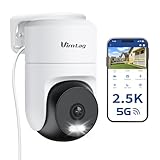
- 𝟑𝟔𝟎° 𝐕𝐢𝐬𝐮𝐚𝐥 𝐂𝐨𝐯𝐞𝐫𝐚𝐠𝐞, 𝐒𝐦𝐚𝐫𝐭 𝐌𝐨𝐭𝐢𝐨𝐧 𝐓𝐫𝐚𝐜𝐤𝐢𝐧𝐠 & 𝐂𝐫𝐢𝐬𝐩 𝟐.𝟓𝐊 𝐐𝐇𝐃: Remotely control pan/tilt for 360° horizontal and 90° vertical coverage. This outdoor camera for home security features smart motion tracking that auto-tracks moving objects in real time. 2560×1440 QHD resolution exceeds standard 1080p, while 8x digital zoom lets you inspect faces and license plates. A security camera outdoor for monitoring your house
- 𝐒𝐦𝐚𝐫𝐭 𝐀𝐈 𝐃𝐞𝐭𝐞𝐜𝐭𝐢𝐨𝐧, 𝐂𝐮𝐬𝐭𝐨𝐦 𝐀𝐜𝐭𝐢𝐯𝐢𝐭𝐲 𝐙𝐨𝐧𝐞𝐬, 𝟐-𝐖𝐚𝐲 𝐀𝐮𝐝𝐢𝐨 & 𝐒𝐢𝐫𝐞𝐧: AI accurately distinguishes people, pets, and vehicles—ignoring false alarms from leaves or bugs. Set up to 4 custom activity zones. These house cameras outdoor let you talk to visitors via built-in mic and speaker, while bright LED spotlights plus a loud siren actively deter intruders. A reliable outside camera for home security
- 𝐏𝐥𝐮𝐠-𝐈𝐧 𝐏𝐨𝐰𝐞𝐫, 𝐃𝐮𝐚𝐥-𝐁𝐚𝐧𝐝 𝐖𝐢𝐅𝐢, 𝐅𝐮𝐥𝐥-𝐂𝐨𝐥𝐨𝐫 𝐍𝐢𝐠𝐡𝐭 𝐕𝐢𝐬𝐢𝐨𝐧 & 𝐈𝐏𝟔𝟔 𝐖𝐚𝐭𝐞𝐫𝐩𝐫𝐨𝐨𝐟: Reliable 5GHz/2.4GHz Wi-Fi with a 9.8ft power cable ensures 24/7 recording and non-stop monitoring. This outdoor security camera features full-color night vision (65ft range) via IR and white LEDs. IP66 waterproof for rain and dust. A versatile outdoor wifi camera for driveway, front door, porch, backyard, patio, garage, apartment, or chicken coop
- 𝐓𝐰𝐨 𝐒𝐭𝐨𝐫𝐚𝐠𝐞 𝐎𝐩𝐭𝐢𝐨𝐧𝐬, 𝐍𝐨 𝐌𝐨𝐧𝐭𝐡𝐥𝐲 𝐅𝐞𝐞 & 𝐄𝐚𝐬𝐲 𝐒𝐞𝐭𝐮𝐩: Save footage to a microSD card (up to 512GB) or use cloud storage with a 30-day free trial. This no subscription security camera's AI detection and alarm features work with NO monthly subscription required. Setup takes minutes—download Canny Cam app, scan the QR code, and mount on desk, ceiling, or wall. A practical choice among cameras for home security
- 𝐀𝐥𝐥-𝐢𝐧-𝐎𝐧𝐞 𝐀𝐩𝐩, 𝐖𝐨𝐫𝐤𝐬 𝐰𝐢𝐭𝐡 𝐀𝐥𝐞𝐱𝐚 & 𝐔𝐒-𝐁𝐚𝐬𝐞𝐝 𝐂𝐮𝐬𝐭𝐨𝐦𝐞𝐫 𝐒𝐮𝐩𝐩𝐨𝐫𝐭: Manage up to 32 home security cameras from the Canny Cam app on iOS/Android. Share access with family, use smart playback tagging. This in home camera works with Alexa for hands-free voice control. Need help? Call our US-based support team at +1 (978) 437-5767, Mon–Fri 9am–6pm ET
The app listing also describes integration with Izy Smart, where supported Izy products can be mirrored and controlled. That is not proof that every Izy product has the same capabilities in Mibo Smart. On tablets, Intelbras documents live and recorded video viewing, answering video doorbells, opening or closing digital locks, and controlling lights. Adding or removing products and managing subscriptions require the smartphone app, according to the tablet manual.
How to add a supported device
Setup differs by product, but Intelbras manuals for several smart-home devices describe a common Wi-Fi pairing flow. Check the device manual first: these are common requirements, not a guarantee for every model.
- Install Mibo Smart from the relevant app store, then create an account or sign in.
- Connect the phone to the intended 2.4 GHz Wi-Fi network, enable Bluetooth and, if the product’s setup flow requires it, temporarily disable mobile data.
- Power the device and put it into pairing mode as described in its model-specific manual.
- In Mibo Smart, tap the + icon in the upper-right corner. Let the app detect the product or select its device category, then tap Add.
- Choose the Wi-Fi network, enter its password and wait for the device to connect to Intelbras’ cloud service.
- Finish by naming the product and assigning it to an environment.
For current product-specific instructions, use the Mibo Smart manual. Before purchasing, verify that the exact model is supported in your region and that it offers the integration or automation you need.
Local recording, Mibo Cloud and subscription costs
The app download and basic device-control functions do not by themselves require a Mibo Cloud subscription. Camera recording options are separate:
Rank #3

- Easy to Install & Magnetic or Wall Mount: No wiring, no drilling.True Wireless, The security camera wireless outdoor now includes a magnetic mount for easy, no-drill installation. Snap it on in one minute with the magnetic mount or fix it with screws. Fit for bedrooms, front doors, yards, or garages. The design blends with decor, making it for indoor use without damaging walls. (Magnetic mount included)
- 130° Angle View & 2K Color Night Vision & Spotlight: The outdoor camera wireless features a new 2K lens, 130-degree wide-angle design, offering 4x the clarity of 1080P cameras with wider coverage. Outdoor security camera with advanced infrared light and spotlight, enjoy sharp color night vision even in low light
- 2.4G WiFi & Wireless & 2-Way Talk & Instant Siren: This battery-powered outdoor security camera is completely wireless, eliminating the need for cables and frequent charging. It offers long standby time with continuous recording capabilities. The built-in antenna ensures a stable 2.4G WiFi connection(Note: Does not support 5G Wi-Fi)
- 7-Day Loop Cloud Storage & Live View & Multi-People Share: Get a 7-day cloud loop recording with a 6-second video, Your privacy is safeguarded through encrypted cloud. You can also use a max 128GB Memory card (not included) for storage. Stay informed with live streaming, and share access with multiple devices so your entire family can monitor together
- AI Analysis/Smart Assistant Compatible/Custom Mode: The WiFi camera outdoor wireless uses AI analysis to identify people, pets, vehicles, and packages. support customize up to 6 detection areas for better accuracy and fewer false alarms. Quickly activate the siren to deter intruders within 1 second. Compatible with Alexa for a seamless smart home experience
| Option | What it does | Important qualification |
|---|---|---|
| microSD card | Stores recordings locally on a compatible camera. | Requires a supported card and the camera to remain available; it is not an off-site backup. |
| Mibo Cloud | Stores compatible camera recordings remotely and provides cloud playback features. | Paid plans, generally subscribed per device; plan availability and price depend on region and storefront. |
Intelbras says cloud recordings can remain available if a camera is damaged, stolen or disconnected. The manual also describes faster playback, background backup and background audio in supported circumstances. It identifies cloud recordings as MP4 and card recordings as DAV. These features and formats should be checked against the camera and app version in use. See the Mibo Cloud manual.
Intelbras’ terms state that plans are exclusive to each device, so multiple cameras may require multiple subscriptions. Prices are regional and can change; the current plan screen in the app is the practical reference. As examples only, Intelbras’ Brazilian iOS terms page listed the following prices in August 2026:
| Brazil plan listed | Price shown |
|---|---|
| 3 days of video, monthly | R$17.90 |
| 7 days of video, monthly | R$18.90 |
| 30 days of video, monthly | R$39.90 |
| 3 days of video, annual | R$209.90 |
| 7 days of video, annual | R$209.90 |
| 30 days of video, annual | R$439.90 |
These are Brazilian terms-page examples, not U.S. rates or global prices. The U.S. App Store listing displays different in-app purchase options; storefront prices observed there in August 2026 should not be treated as a universal Intelbras price list. Check the Brazilian plan terms, Mibo Cloud service terms and the in-app plan screen for current local details.
Independent reader supportYour contribution helps us test, update, and keep practical guides available for everyone.Limitations to consider before building around Mibo Smart
- Compatibility is selective. The ecosystem is centered on Intelbras products and named integrations. It is not evidence of general compatibility with all third-party devices, or of broad Matter, Zigbee or multi-vendor support.
- Some functions depend on the cloud. Remote access and cloud video require connectivity and vendor services. A microSD card can provide local recording on supported cameras, but does not remove every dependency on the app, account or firmware.
- Plans can multiply with cameras. Per-device cloud subscriptions may be less convenient for a household with several cameras.
- Assistant support is not a complete substitute. Alexa, Google Home and SmartThings can expose supported controls, but setup, subscription management and model-specific functions may remain in Mibo Smart.
- Platform details differ. Store listings may show different system requirements, plan names and prices. As of August 18, 2026, Google Play listed Android 7 or later; check the current listing for your platform and region.
- Access limits need model-level confirmation. An App Store developer response refers to a limit of seven simultaneous camera-image accesses. That statement is not evidence of a universal limit for every Mibo product; verify it for the particular camera and service.
Intelbras’ Google Play listing reports encryption in transit, but that statement alone does not establish end-to-end encryption, local-only processing or the results of a comprehensive security audit. Users with strict privacy or local-control requirements should evaluate the exact device and service rather than infer those properties from the app description.
Crashes, No Sound, or Screen Glitches?
Random freezes, missing sound and display glitches usually trace back to one bad driver. Find and replace yours safely.Free scan · under a minuteWindows Errors? Fix Them Before They Spread
Repair common Windows errors and clear accumulated junk for a smoother, more stable PC - no reinstall needed.Free scan · no reinstallRank #4

- 【Always On for Uninterrupted Security】 This indoor outdoor camera, equipped with 2.4GHz & 5GHz dual-band WiFi and the latest WiFi 6 technology, ensures fast and stable connections. Powered via plug-in cable, it remains operational 24/7, eliminating the need for charging and providing constant surveillance for your home
- 【2.5K Resolution with Vivid Color Night Vision】Experience clear visibility day or night with sharp 2.5K resolution. The outside cameras for home security feature full-color night vision, enhanced by a built-in LED light, making it ideal for monitoring driveways, garages, front doors, and backyards, ensuring you never miss a detail in house camera outdoor
- 【Samart Detection for Enhanced Security】Stay informed about what matters most with advanced smart detection capabilities. This outside cameras for home security accurately detects motion, people, or sound up to 33 feet away. Whether monitoring your front porch, side gate, or backyard, you'll receive instant alerts, keeping you one step ahead of any suspicious activity.Call +1 (978) 437-5767 for expert support with setting up and optimizing Vimtag cameras, available Monday to Friday, 9:00 AM - 6:00 PM (ET)
- 【All-Weather Performance for Year-Round Protection】Designed to endure rain, snow, heat, and cold, this IP65-rated pet camera delivers reliable outdoor performance. Its plug-in power source guarantees continuous operation, providing peace of mind and 24/7 protection regardless of the weather conditions
- 【Remote Access & Real-Time Sharing】With the mobile app, you can access the baby camera's video anytime, anywhere, view real-time footage, and even share monitoring content with family, keeping you informed about your home dynamics while you're away. The built-in two-way audio makes it easy to greet visitors, warn intruders, or communicate with loved ones from wherever you are
Troubleshooting common setup problems
The device does not appear during pairing
- Confirm the phone is on the product’s required 2.4 GHz Wi-Fi network and Bluetooth is enabled.
- Check that the device is powered and in pairing mode; enter the Wi-Fi password carefully.
- If the setup flow calls for it, disable mobile data temporarily. Move the device nearer to the router and reset it only as directed in its model manual.
The device connects but goes offline
Check Wi-Fi signal strength, router connectivity, saved credentials and power. A 5 GHz-only network will not satisfy products whose documentation specifies 2.4 GHz. Do not assume every Mibo device supports 5 GHz.
A cloud plan does not appear active
Make sure you are signed into the account that purchased the plan and check its status in the app. Intelbras’ manual notes that an incorrect phone clock can interfere with plan changes or cancellation; enable automatic date and time before retrying.
A voice assistant cannot find a device
Confirm the Mibo Smart account is linked to the correct assistant account, the product is online and assigned to the right environment, and the exact model supports the requested assistant feature. Refresh device discovery or relink the service if needed; some camera models have integration exceptions.
Who is Mibo Smart a good fit for?
Mibo Smart is most compelling for households already using Mibo cameras or planning an Intelbras-centered installation. It offers one first-party place to manage supported security and home-control devices, with optional cloud recording and selected voice-assistant integrations.
Recommended Free Tools
It is a less natural fit for mixed-brand homes that need broad interoperability, buyers who require fully local operation, or users who want advanced automation logic independent of a vendor ecosystem. Before adding products, verify model compatibility, automation behavior and any cloud costs that matter to your setup.
Quick Recap
Product prices and availability are accurate as of the date/time indicated and are subject to change. Any price and availability information displayed on Amazon at the time of purchase will apply.




