Do these 3 things before closing this tab:
1Clear out junk files and repair common Windows errors2Fix the driver behind crashes, sound loss and screen glitches3Repair Windows errors before they cause bigger problemsShort answer: The 8BitDo Retro 108 N Edition is a full-size, 108-key mechanical keyboard that delivers the strongest NES-era look and includes programmable “Super Buttons,” but it does not include a joystick in the box. The related Super Stick is a separately sold extension. Choose the Retro 108 if you want a distinctive, clicky, full-size board with three connection modes; choose a compact alternative such as Lofree Block 98 for broader official device support, or a customizable board such as Keychron Q1 Pro if switch and firmware flexibility matter more than the Nintendo-inspired design.
What the 8BitDo Retro 108 actually is
The 8BitDo Retro 108 is the 108-key, full-size member of 8BitDo’s retro mechanical keyboard family. The N Edition uses an NES-inspired color and control layout; a Fami Edition is also listed. The same product family includes an 87-key tenkeyless layout, so “Retro keyboard” listings can refer to different physical sizes. The 108 model keeps the number pad and navigation cluster that many office, spreadsheet and desktop users expect.
As an Amazon Associate I earn from qualifying purchases.
RTINGS describes the design as inspired by NES and Famicom systems, while noting that variant differences matter when comparing the original tenkeyless board with the later Retro 108 editions. In practical terms, this is an aesthetic-led full-size keyboard first: its visual language, dedicated controls and bundled buttons are central to the experience, while alternatives can provide a smaller footprint or deeper customization.
The Tool Desk
Outbyte PC Repair FREEClear out junk files and repair common Windows errorsFree Scan →Outbyte Driver Updater FREEFix the driver behind crashes, sound loss and screen glitchesFind Drivers →Does the Retro 108 include a joystick?
No joystick is identified as included with the Retro 108 package in 8BitDo’s product specifications. The box includes the keyboard and one Dual Super Buttons set, plus the cable, 2.4 GHz wireless adapter, manual and stickers. 8BitDo names the Super Stick and Super ABXY among compatible extensions, but those are separate accessories rather than evidence that a joystick ships in the keyboard box.
#1 Best Overall
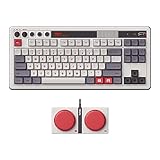
- Inspired by the classics. Compatible with Windows 10(1903) or above, and Android 9.0 or above.
- 87-key layout. Kailh Box Switch V2 White. Dye-sub PBT keycaps.
- Top mount style. Hot-swappable PCB. Support n-key rollover.
- Dual Super Buttons - offer large, programmable keys. Map anything to the Super Buttons instantly without using software.
- Classic power status LED, with independent control panel.
The distinction matters because “keyboard and joystick” can describe two different shopping plans:
- Keyboard-only purchase: you receive the Retro 108 and the included Dual Super Buttons set, not a thumbstick.
- Expanded control setup: you add the separately sold Super Stick or Super ABXY extension if you want a physical arcade-style control beside the keyboard.
Check the contents and accessory status on the official product page before ordering, because accessory bundles and regional listings can change.
Retro 108 specifications at a glance
| Feature | 8BitDo Retro 108 N Edition | What it means for you |
|---|---|---|
| Layout | 108 keys; full-size | Includes number pad, navigation keys and dedicated function row; requires more desk width than compact boards. |
| Switches | Kailh Box White Switches V2 | Clicky, tactile typing character with an audible click; not a quiet office switch. |
| Switch replacement | Hot-swappable PCB | Compatible switches can be changed without soldering, subject to socket and switch compatibility. |
| Keycaps | Dye-sublimation PBT | Thick PBT caps with legends designed to resist wear better than many basic ABS sets. |
| Plate and construction | Aluminum plate; top-mount construction | A metal plate supports the switches; top-mount design affects the board’s sound and flex characteristics. |
| Rollover | N-key rollover | Multiple simultaneous key presses can be registered without common ghosting limits. |
| Controls | Volume knob, programmable controls, Dual Super Buttons | Useful for media or macros without reaching for software menus, depending on your configuration. |
| Connections | Bluetooth, 2.4 GHz wireless, wired USB | Supports a cable connection, low-latency receiver use and Bluetooth pairing. |
| Battery | 2,000 mAh rechargeable; up to 200 use hours after a four-hour charge | These are manufacturer-stated figures, not independent battery measurements; actual runtime varies with connection mode and lighting. |
| Officially listed operating systems | Windows 10 (1903 or later) and Android 9.0 or later | 8BitDo’s cited page does not officially confirm macOS, iPadOS or iOS support. |
All specifications in the table come from 8BitDo’s product listing and should be treated as manufacturer specifications. The official page is the appropriate reference for firmware, control assignments and any later revision.
Free tools Windows power users keep installed
One-click scans. No signup required.
How the three connection modes differ
Wired USB
Connect the supplied cable to a computer for the simplest setup and charging at the same time. Wired mode avoids wireless pairing and is the safest choice when troubleshooting input, updating firmware or working in an environment where radio devices are restricted.
Rank #2

- Inspired by the classics. Compatible with Windows 10(1903) or above, and Android 9.0 or above.
- Programmable keys, Dual Super Buttons, and Super Stick, with independent control panel.
- 87 keys. Top mount style with Kailh Box White Switches.
- Double-Shot ABS keycaps with SA profile. (C64 Edition only)
- Hot-swappable PCB. Support n-key rollover.
2.4 GHz wireless
Insert the supplied 2.4 GHz adapter into the host device and select the keyboard’s 2.4 GHz mode. This is generally the most console- or desktop-friendly wireless option because the dedicated receiver handles the link without requiring the operating system’s Bluetooth menu.
Bluetooth
Use Bluetooth when you want to move between compatible computers or Android devices without occupying a USB port. Pairing steps and device slots can depend on the keyboard’s current firmware, so follow the manual supplied with your revision rather than assuming every key combination from an older 8BitDo model applies.
Compatibility: what is confirmed and what is not
8BitDo’s official compatibility statement for the Retro 108 specifies Windows 10 version 1903 or newer and Android 9.0 or newer. That is narrower than many modern mechanical keyboards’ marketing language. If you use Windows or Android, the listed support is clear. If your primary machine is a Mac, iPad or iPhone, do not treat generic Bluetooth capability as official confirmation: the cited 8BitDo page does not list those platforms.
For a mixed-device household, verify the exact operating system and connection mode before buying. Basic keyboard input may work on an unlisted platform, but that is different from documented support for configuration software, macros, firmware tools or every special control. Lofree Block 98 is the stronger documented choice when Apple-device compatibility is a requirement because its official listing names Windows, Android, macOS, iPadOS and iOS.
Rank #3

- Inspired by the classics. Compatible with Windows 10(1903) or above, and Android 9.0 or above.
- 108-key full layout. Integrated numpad and function key shortcuts.
- Kailh Box White Switches V2. Dye-sub PBT keycaps. Top mount style. Hot-swappable PCB. Support n-key rollover.
- Dye-sublimation PBT keycaps with MDA-like height.
- Fast-mapping on programmable buttons (no software needed).
How to choose between the Retro 108 and alternatives
| Decision point | Retro 108 N Edition | Lofree Block 98 | Keychron Q1 Pro |
|---|---|---|---|
| Physical size | 108-key full-size | 98-key compact layout | 75% compact layout |
| Design priority | NES-inspired appearance and dedicated retro controls | Retro-styled compact board | Customization-focused; not positioned as an NES-styled board |
| Switch character | Kailh Box White V2 clicky switches | Linear switches | Supports common 3-pin and 5-pin MX switches |
| Hot-swap | Yes | Yes | Yes, with the stated 3-pin/5-pin MX compatibility |
| Wireless and wired modes | Bluetooth, 2.4 GHz and USB | Bluetooth 5.0, 2.4 GHz and USB-C | Wireless and wired operation are part of the Q1 Pro product positioning |
| Official OS list | Windows 10 (1903+) and Android 9.0+ | Windows, Android, macOS, iPadOS and iOS | Refer to the current product page for the supported host and software details |
| Bundled programmable controls | Dual Super Buttons included; Super Stick and Super ABXY sold separately | No equivalent 8BitDo Super Button bundle stated on the cited page | No equivalent retro-button bundle stated on the cited page |
| Price and stock snapshot | $119.99 USD listed for N and Fami editions; official shop showed sold out when retrieved in 2026 | Current price not stated in the cited source | Current price not stated in the cited source |
The comparison is about documented characteristics, not a universal ranking. Layout, switch feel, operating-system coverage and accessory requirements can outweigh brand or appearance.
Lofree Block 98: the compact, cross-platform alternative
Lofree Block 98 keeps a near-full layout while reducing the footprint to 98 keys. It uses a compact arrangement that places navigation functions closer together than on a traditional 108-key board, which can free desk space without removing the number pad entirely.
Its listed switches are linear rather than the Retro 108’s clicky Kailh Box White V2 switches. Linear switches offer a smooth press without a tactile bump or deliberate click, making the Block 98 a better starting point for users who share an office or prefer a quieter keystroke. The board is hot-swappable, so switch experimentation remains possible.
Lofree lists Bluetooth 5.0, 2.4 GHz and USB-C connectivity, white LED backlighting, and support for Windows, Android, macOS, iPadOS and iOS. Those named Apple platforms are the clearest reason to choose it over the Retro 108 when one keyboard must serve a MacBook, iPad and phone as well as a Windows PC. You give up the 8BitDo’s NES-specific styling and bundled Super Buttons, but gain a smaller footprint and broader documented OS range.
Rank #4

- Inspired by the classics. Compatible with Windows 10(1903) or above, and Android 9.0 or above.
- Connect via Bluetooth, wireless 2.4G, or wired.
- 87-key layout. Kailh Box Switch V2 White. Dye-sub PBT keycaps.
- Top mount style. Hot-swappable PCB. Support n-key rollover.
- Dual Super Buttons - offer large, programmable keys. Map anything to the Super Buttons instantly without using software.
Keychron Q1 Pro: the customization-first alternative
The Keychron Q1 Pro is best understood as a customization comparison rather than a retro-design substitute. Its 75% layout is substantially smaller than either the 108-key Retro 108 or 98-key Block, so it removes the dedicated number pad in exchange for desk space.
Keychron’s product page identifies compatibility with common 3-pin and 5-pin MX switches. That makes the Q1 Pro a sensible route for enthusiasts who want to select a preferred switch type, tune the board over time and build around a compact layout. It does not provide the NES-inspired shell, Super Buttons or included retro accessory concept that defines the 8BitDo package.
Pick the Q1 Pro when your first question is “Which switches, keymap and firmware workflow can I build?” Pick the Retro 108 when the first question is “Which full-size keyboard looks and feels like a Nintendo-era control panel?”
Recommended Free Tools
What the Retro 108 is like for everyday work and gaming
For office and productivity use
The number pad and navigation cluster make the 108 suitable for spreadsheets, accounting and data entry without a separate keypad. The volume knob provides a physical adjustment control, while N-key rollover helps when several shortcuts are held together. The trade-off is width: measure the distance between your mouse area, monitor stand and desk edge before committing to a full-size board.
Best Value

- 8BITDO RETRO 87-KEY WIRELESS RGB MECHANICAL GAMING KEYBOARD - XBOX EDITION
The Kailh Box White V2 switches are clicky. That audible feedback can make deliberate typing satisfying, but it may disturb a nearby colleague or household member. If quiet operation is essential, a linear-switch alternative is a safer starting point than trying to silence a clicky switch with keycaps alone.
For gaming and emulation
The retro styling and programmable Super Buttons are the obvious attraction for an emulation or living-room setup. The keyboard itself is not a joystick: the separately sold Super Stick is the relevant add-on when a stick control is required. The 2.4 GHz receiver can keep a cable off the desk, while wired USB offers the most straightforward troubleshooting path.
Do not assume that the included buttons automatically provide a complete controller layout for every game. Their usefulness depends on how the keyboard exposes programmable inputs and how the game or emulator maps them. Configure and test the intended controls before relying on them for a tournament, presentation or accessibility workflow.
Setup checklist for a new Retro 108
- Confirm the exact edition and layout. Check that the listing says Retro 108 and identifies N or Fami, rather than the 87-key model.
- Inventory the package. Look for the keyboard, one Dual Super Buttons set, cable, 2.4 GHz adapter, manual and stickers. A Super Stick should not be expected unless the seller explicitly lists it as a separate bundle item.
- Charge before wireless setup. Use the supplied cable and allow the battery to charge. The manufacturer’s “up to 200 use hours” figure assumes its stated test conditions and is not a guarantee for every lighting or connection setting.
- Choose a connection. Use USB for initial testing, the adapter for 2.4 GHz wireless, or Bluetooth for a compatible device that you want to pair without a receiver.
- Verify the host operating system. Windows 10 (1903+) and Android 9.0+ are the officially listed targets. For an unlisted platform, treat any basic input as unofficial until you have confirmed the needed functions.
- Test every special control. Check the volume knob, Dual Super Buttons, function-layer keys and any programmed shortcuts in the application where you intend to use them.
- Keep the manual with the keyboard. Pairing, mode switching and programmable-control instructions can vary by firmware and revision; the supplied manual is more reliable than a key combination copied from another model.
Common buying mistakes and how to avoid them
- Confusing “108” with the tenkeyless model: confirm the key count and the presence of the number pad in product photos and specifications.
- Assuming a joystick is included: the official contents list names Dual Super Buttons, not a Super Stick. Budget for the stick accessory separately if you need one.
- Assuming Mac support: the cited 8BitDo compatibility list names Windows 10 (1903+) and Android 9.0+, not macOS, iPadOS or iOS.
- Expecting silent typing: Kailh Box White V2 is a clicky switch. Choose a linear board if shared-space noise is a concern.
- Reading battery life as a guarantee: “up to 200 use hours with a four-hour charge” is a manufacturer claim. Wireless mode, lighting and usage patterns change runtime.
- Trusting an old price or stock badge: the official US shop showed $119.99 and sold out at retrieval. Price and inventory can change by region and date.
Price, stock and regional buying advice
The 8BitDo Official Shop listed both N and Fami 108-key editions at $119.99 USD and marked them sold out when the listing was retrieved in 2026. That is a dated US-shop snapshot, not a permanent MSRP or an availability promise. Check the current regional listing, shipping terms and return policy before paying a premium on a secondary marketplace.
When comparing an alternative, include the cost of any required accessories. A Retro 108 buyer who wants a stick control needs to account for the separately sold Super Stick; a compact board buyer may instead need an external number pad if their workflow depends on one. The cheapest listing is not necessarily the lower-cost setup once those requirements are included.
Which keyboard should you buy?
Choose the 8BitDo Retro 108 N Edition if:
- You specifically want an NES-inspired full-size keyboard with a number pad.
- You enjoy an audible, clicky switch and want the option to hot-swap later.
- You will use Windows 10 (1903+) or Android 9.0+ and value Bluetooth, 2.4 GHz and wired USB options.
- The included Dual Super Buttons are useful to you, and you understand that the Super Stick is a separate accessory.
Choose Lofree Block 98 if:
- You want to keep a near-full layout while reclaiming desk width.
- You prefer linear switches and still want a hot-swappable board.
- You need a manufacturer-listed path for macOS, iPadOS or iOS as well as Windows and Android.
Choose Keychron Q1 Pro if:
- You prefer a 75% layout and can work without a dedicated number pad.
- Switch selection, 3-pin/5-pin MX compatibility and long-term customization matter more than retro styling.
- You want to build a personalized mechanical keyboard rather than buy an accessory-led NES aesthetic.
The Retro 108 is the most distinctive choice, not the most universally suitable one. Its full-size footprint, clicky switches and narrower official OS list are deliberate trade-offs for the NES-inspired design, dedicated controls and bundled buttons.
Sources and current specifications
Verify details against the 8BitDo Retro 108 product page, the 8BitDo Official Shop listing, the RTINGS review, the Lofree Block 98 product page and the Keychron Q1 Pro product page. Product revisions, firmware, regional compatibility, pricing and stock can change after publication.
Quick wins for a faster PC:
Repair Windows errors before they cause bigger problemsFix Now →Scan for outdated or missing drivers - takes under a minuteDriver Scan →Clear out junk files and repair common Windows errorsFree Scan →Quick Recap
Product prices and availability are accurate as of the date/time indicated and are subject to change. Any price and availability information displayed on Amazon at the time of purchase will apply.

