Crashes, No Sound, or Screen Glitches?
Random freezes, missing sound and display glitches usually trace back to one bad driver. Find and replace yours safely.Free scan · under a minutePC Slower Than It Used to Be?
A free scan shows the junk files, broken settings and background clutter dragging Windows down - then fixes them in one click.Free scan · Windows 10 & 11The right budgeting tool depends on how much work you want to do: assign every dollar a job, use digital envelopes, or let an app organize spending automatically. The available 2026 comparisons support eleven named options—not fourteen—so this guide covers those eleven without padding the list with unverified picks.
How to choose an easy budgeting tool
“Easy” can mean less manual entry, a clearer plan, or simpler coordination with another person. Start by choosing the workflow you are most likely to keep using, then check whether the tool handles the specific task you care about.
As an Amazon Associate I earn from qualifying purchases.
- Hands-on category planning: You decide in advance what available money is for, and adjust the plan as priorities change.
- Envelope budgeting: You set amounts aside by spending category, digitally or with physical cash envelopes.
- Automated visibility: Account activity is brought together so you can review spending and cash flow with less manual tracking.
- Specialized needs: Household coordination, debt payoff, investment-account views, spreadsheets, or subscription management may matter more than a generic “best app” ranking.
Before connecting accounts or paying, compare the free tier, recurring price, trial terms, and what household members can see. Prices and promotions can change; verify current terms with the provider.
11 budgeting tools and what each is suited to
| Tool | Budgeting approach or distinctive use | Best fit |
|---|---|---|
| Rocket Money | Spending categories and insights, recurring-charge detection, subscription cancellation, and bill negotiation | People who want spending visibility alongside subscription and bill-management features |
| YNAB | Hands-on zero-based planning, including preparing for non-monthly expenses | People willing to actively assign available money a purpose |
| Monarch Money | Budgeting and investment views, with household and adviser collaboration described by comparison sources | Households or people who want to collaborate and see investments alongside budgeting |
| PocketGuard | Shows an “In My Pocket” spendable amount; its paid plan can set up a debt-payoff schedule | People who want a spendable-money view or a debt-payoff schedule |
| Goodbudget | Digital envelope budgeting | People who want to organize planned spending into category envelopes |
| EveryDollar | Associated with zero-based budgeting | People looking for a zero-based budgeting workflow |
| Quicken Simplifi | Adjustable spending plan and cash-flow projection based on upcoming bills | People who want a forward-looking view of spending and bills |
| Tiller | Google Sheets or Excel templates populated with account spending and balances; daily balance emails | People who prefer spreadsheet-based budgeting |
| Empower | Free dashboard focused on investment-account views and aggregation | People prioritizing investment visibility; it should not be assumed to offer the same detailed category budgeting as a dedicated budget app |
| Honeydue | Free couples app with budgets, joint-account spending, partner invitations, and in-app bill and budget discussion | Couples who want to coordinate budget and joint-account activity |
| Cleo | Listed as a budgeting app with AI-powered insights | Readers curious about AI-oriented budgeting insights; the available comparisons provide limited detail for a stronger recommendation |
The distinctions above come from Rocket Money’s September 2026 comparison and Kiplinger’s September 2026 comparison. Rocket Money’s page is vendor-authored, so its rankings and product claims should be read as the company’s descriptions rather than independent consensus.
#1 Best Overall

- Effective Budget Plan Book – Take control of your finances with the SUNEE budget account book. This all-in-one budget planner allows you to plan and track your income, expenses, savings, and financial goals. Its intuitive layout and easy-to-use sections help you stay organized and make smart decisions to reach financial success. Our financial planner also included a comprehensive guidebook with valuable tips and instructions to help you get the most out of your budgeting planner.
- Full-Page Calendars – Each month’s full-page calendar provides plenty of space to track paydays, bills due dates, appointments, and important events. No more cramped boxes or tight writing areas, you can easily plan and organize your schedule at a glance.
- Colorful Pages Layout and Tabs – This vibrant budget planner features a user-friendly design for easy navigation and organization. Each month includes dedicated budget pages to set financial goals, track income, and plan expenses. Additional sections like debt trackers, savings goals, and bill payment trackers make managing your finances a breeze. The colorful backgrounds on each page offer clear, instant visibility.
- Bonus 4 Stickers and Convenient Design – This monthly budget planner is built for convenience and durability. Water-resistant cover protects against spills, while the elastic band keeps everything secure, and the dual-sided pocket offers extra storage. Plus, we’ve included 4 adorable sticker sheets to personalize your planner and make budgeting more enjoyable. Experience a budget planner that combines practicality with lasting quality.
- UNDATED DESIGN & 1 YEAR USE - Undated finance books start with 1 page-financial goals, 1 page-Mind Map, 1 page-Financial Strategy, 1 page-Tactics, 2 pages-Important Dates, 4 pages-Bill Tracker, 4 pages-Saving Tracker, 8 pages-Debt Tracker, followed by 12 Months(10 pages per month, 1 unique color for each month). 2 pages-Christmas Budgeting, 2 pages-Yearly Summary, 2 pages-Check Register and 12 pages-Notes(dotted). It is UNDATED, so you could start at any time, suitable for 1 year use.
Which budgeting app is best for beginners?
There is no single beginner choice for every money style. Kiplinger describes Quicken Simplifi as a beginner pick, with an adjustable spending plan and cash-flow projection tied to upcoming bills. A person who wants fewer manual decisions may prefer that kind of forward-looking spending view; someone who wants to decide deliberately where available money goes may prefer a hands-on method.
If you want to make a plan yourself
YNAB’s method asks users to give available money a job and plan for expenses that do not arrive every month. The company also describes its digital method as an adaptation of traditional category-based cash envelopes. Its explanation is at YNAB’s method page. This approach offers control, but it requires active participation rather than simply reviewing categorized transactions.
Rank #2

- Effective Budget Planning - Take control of your finances with the budget account book. This comprehensive planner allows you to plan and track your income, expenses, savings, and financial goals in one convenient place. With its intuitive layout and easy-to-use sections, you can stay organized and make informed decisions to achieve financial success.
- User-Friendly Layout - The budget planner features a user-friendly layout designed for easy navigation and organization. Each month, you'll find dedicated budget pages where you can set financial goals, track your income, and plan your expenses. Additional sections include debt trackers, savings goals, bill payment trackers, and more, making it simple to stay on top of your finances.
- Undated Monthly Calendar & Bonus Stickers - Featuring undated calendar each month, you'll have ample space to mark paydays, bills due, appointments, and important dates. Say goodbye to difficult writing spaces. Plus, we've included 3 cute sticker sheets that allow you to personalize your financial organizer and make budgeting more fun. Dates are not pre-printed and are completed by the user.
- Reliable and Convenient Design - Our monthly budget planner is designed for your convenience and built to last. The elastic band keeps everything securely in place, and the dual-sided pocket provides extra storage. Experience a budget planner that combines practicality and durability.
- Master Budgeting with Ease - Our financial planner includes a complete guidebook that provides valuable insights and instructions for optimal usage. From setting financial goals to tracking expenses, this guidebook offers step-by-step guidance and practical tips. Whether you're new to budgeting or an experienced user, this resource will help you make the most of your budget planner, empowering you to achieve financial success.
If you want a quicker picture of spending
Automated spending visibility is a better starting point if your main goal is to see what is happening across spending categories without building a detailed plan first. Rocket Money combines that view with recurring-charge detection and subscription and bill features. Quicken Simplifi is described as projecting cash flow from upcoming bills. These are different conveniences: one includes subscription-related tools, while the other emphasizes a spending plan and projected cash flow.
What’s actually slowing this PC down?
Pick the symptom - the matching free tool is one click away.
Which budgeting app is good for couples or shared households?
Compare what is actually shared before inviting a partner: budgets, transactions, account balances, and discussions are not necessarily the same thing. Honeydue is described as a free couples app with partner invitations, joint-account spending, and in-app bill and budget discussion. Monarch Money is described as supporting household collaboration as well as adviser collaboration. Check each service’s current account-sharing and privacy controls to ensure they fit your household.
Rank #3

- Effective Budget Planning - Take control of your finances with the budget account book. This comprehensive planner allows you to plan and track your income, expenses, savings, and financial goals in one convenient place. With its intuitive layout and easy-to-use sections, you can stay organized and make informed decisions to achieve financial success.
- User-Friendly Layout - The budget planner features a user-friendly layout designed for easy navigation and organization. Each month, you'll find dedicated budget pages where you can set financial goals, track your income, and plan your expenses. Additional sections include debt trackers, savings goals, bill payment trackers, and more, making it simple to stay on top of your finances.
- Undated Monthly Calendar & Bonus Stickers - Featuring undated calendar each month, you'll have ample space to mark paydays, bills due, appointments, and important dates. Say goodbye to difficult writing spaces. Plus, we've included 3 cute sticker sheets that allow you to personalize your financial organizer and make budgeting more fun. Dates are not pre-printed and are completed by the user.
- Reliable and Convenient Design - Our monthly budget planner is designed for your convenience and built to last. The elastic band keeps everything securely in place, and the dual-sided pocket provides extra storage. Experience a budget planner that combines practicality and durability.
- Master Budgeting with Ease - Our financial planner includes a complete guidebook that provides valuable insights and instructions for optimal usage. From setting financial goals to tracking expenses, this guidebook offers step-by-step guidance and practical tips. Whether you're new to budgeting or an experienced user, this resource will help you make the most of your budget planner, empowering you to achieve financial success.
What is the best free budgeting app?
“Free” depends on which features you need. Kiplinger describes Honeydue as free, and says PocketGuard’s free tier supports a basic budget plus bill, spending, and income tracking. Empower’s free dashboard is aimed at investment-account views and aggregation, rather than being interchangeable with a detailed category-budgeting app. Confirm current feature limits and terms directly before signing up; a free tier may not include a tool’s distinctive paid feature.
Independent reader supportYour contribution helps us test, update, and keep practical guides available for everyone.Choose by the money task you need to solve
For debt payoff
PocketGuard is the clearest match among these options if you want the app to set up a debt-payoff schedule: Kiplinger describes that feature as part of its paid plan. Check the current plan details before relying on it.
Rank #4

- ALL-IN-ONE B5 BUDGET PLANNER: With 15+ Functional Inserts –it covers every money-management pain point for beginners & pros. Stop juggling messy notebooks or incomplete trackers! The budget planner includes, monthly budget, bill expense detail, debt tracker, bill tracker, saving tracker...matches 90% of "how to manage money" search queries
- DURABLE BUDGET BOOK: Our budget organizer features a PVC waterproof cover and elastic band—no more ruined pages, made of 100GSM thick paper—no smudges or ghosting, coming with a heavy-duty double spiral binding—lays flat for easy writing. Built for daily use: toss it in your work bag, backpack, or purse without worry
- CONVENIENT B5 SIZE (7.3”X10.15”): No more choosing between "too small to write" or "too bulky to carry"! The B5 budget planner gives ample space to log expenses, note bill due dates, or map financial goals—without being cumbersome. Fits easily in laptop bags, backpacks, or purses—perfect for "on-the-go budget tracking
- UNMATCHED VALUE & COMPREHENSIVE GUIDEBOOK: Comes with 5 practical, high-quality freebies crafted, plus a comprehensive user guide that takes the guesswork out of financial planning. You’ll get: PVC waterproof colorful monthly tabs & wide range of label stickers, a ribbon bookmark, an elastic pen holder, a elastic band, an inner pocket, and a detailed step-by-step user guide handbook
- VISUAL CLARITY & LESS FATIGUE: Unlike plain black-and-white budget planners, our vivid color highlights reduce eye strain during long budgeting sessions, helping you track expenses, savings, and bills quickly and accurately. It’s the perfect fit for working professionals, international students, family financial managers, freelancers, new graduates, retirees
For spreadsheets
Tiller is intended for people who want to work in Google Sheets or Excel. Kiplinger describes templates populated with account spending and balances, plus daily balance emails. Its spreadsheet format can suit someone who likes customizing a worksheet, but is less appealing if the goal is to avoid spreadsheets altogether.
The Tool Desk
Outbyte PC Repair FREERepair Windows errors before they cause bigger problemsFix Now →Outbyte Driver Updater FREEFix the driver behind crashes, sound loss and screen glitchesFind Drivers →For investments
Empower is presented as a free dashboard for investment-account views and account aggregation. That focus makes it a more appropriate shortlist candidate for tracking investments than for someone seeking detailed category-by-category budget planning.
Best Value
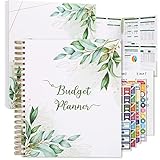
- Keep Track of Your Finances: Manage your personal and family’s finances with this monthly budget planner! Intuitive, comprehensive and fun, this budgeting planner allows you to keep track of your debts, expenses and bills, organize your spending and saving and optimize your budget for achieving your financial goals!
- Large Budgeting Planner: Our budget notebook features a large design of 8.5 x 11-inch that provides enough space for budgeting, financial planning and spending tracking but also for monthly reviews and building strategies for optimizing your budget!
- Well-Organized for Your Convenience: This budget book planner features an easy yet efficient template that includes a monthly budget with customizable categories, a debt tracker, a bill tracker, an expenses tracker as well as a section for financial goals and monthly review that will make things easier when it comes to budget planning!
- 12-Month Budget Management: Our budgeting book features a spiral-bound hardcover design made with high-quality 120gm thick paper and a 12-month undated design that allows you to start budget planning at any time of the year!
- Chic, Practical, Giftable: Featuring a superb boho cover and packed in a matching gift box, this budget book journal makes a lovely gift for a friend, family member or co-worker! The budget journal includes a special pocket for bills, receipts or other documents and comes with 5 stickers that will make your planning more fun and effective!
For subscriptions and recurring bills
Rocket Money’s comparison describes recurring-charge detection, subscription cancellation, and bill negotiation alongside spending categories and insights. Those features may be useful when recurring charges are a specific pain point; they do not establish that every user will save money.
What do budgeting apps actually save?
There is no neutral, independently published average-savings figure established by the cited comparisons. Rocket Money says it has more than 10 million members and advertises potential annual savings of up to $740 from selected services; it notes that results vary and are not guaranteed. The figure is a company claim, not a likely or promised result for an individual user. The same comparison relays YNAB’s claim of an average $600 in the first two months and more than $6,000 in the first year; treat those numbers as YNAB claims, not independently verified outcomes. See Rocket Money’s comparison and its attributed claims.
Check pricing and sharing before committing
The September 2026 sources include prices and trial terms that may be promotional, inconsistent, or subject to change. For example, they give conflicting annual-price figures for Monarch Money, so this article does not quote an annual price for it. YNAB’s listed price and trial terms and Tiller’s listed trial and starting annual price should also be verified directly before subscribing. A low introductory offer is not the same as the recurring renewal price.
For shared use, confirm whether each person has a separate login, whether personal accounts remain private, and which transactions and budgets are visible to the other household member. For any linked-account workflow, review the provider’s current account connection and data-sharing terms before granting access.
Quick Recap
A practical way to narrow the list
- Pick your preferred effort level. Choose active category assignment, a digital envelope approach, or automated spending visibility.
- Name the job you need the tool to do. For example: debt payoff, household coordination, investments, spreadsheets, or recurring-charge management.
- Check the relevant plan details. Confirm whether the feature is free or paid, the recurring price after any promotion, and the current trial terms.
- Review sharing and privacy. This matters especially for couples and households connecting multiple accounts.
- Try the workflow before moving everything over. A tool is only useful if its routine is manageable for you; avoid committing to a paid plan until you understand how it handles your actual budgeting habits.
Product prices and availability are accurate as of the date/time indicated and are subject to change. Any price and availability information displayed on Amazon at the time of purchase will apply.

