Recommended Free Tools
A musician’s website has to do more than look good. It needs to play tracks smoothly, promote upcoming shows, sell merch, grow an email list, showcase visuals, and give bookers or press the right information fast. The best Squarespace templates for musicians and bands in 2026 combine strong design with practical features for audio, events, ecommerce, and fan conversion.
Whether you are a solo artist building a portfolio, a band promoting tour dates, a DJ sharing mixes, a producer selling beats, a music teacher booking lessons, or a live performer creating an EPK, the right template can save hours of setup and make your brand feel more professional from day one.


As an Amazon Associate I earn from qualifying purchases.
This guide compares the strongest Squarespace template options for different types of music creators, with attention to audio embedding, tour and event sections, merch sales, mailing list forms, visual storytelling, press materials, and customization flexibility.
What’s actually slowing this PC down?
Pick the symptom - the matching free tool is one click away.
What to Look for in a Squarespace Template for Musicians
The best Squarespace template for a musician is not just the one with the most dramatic homepage image. It should support the way you release music, promote shows, sell products, collect fans, and present yourself to bookers or press. A solo singer-songwriter may need a clean homepage with streaming links and tour dates, while a band may need space for mulle bios, videos, merch, and an electronic press kit. Before choosing a design, think about the actions you want visitors to take within the first few seconds: listen, watch, buy, subscribe, book, or follow.
#1 Best Overall
Audio, video, and streaming support
Music should be easy to find and easy to play. Look for templates with flexible sections where you can embed tracks from Spotify, Apple Music, SoundCloud, Bandcamp, or YouTube. Squarespace also supports audio blocks, so you can add individual songs, demos, podcast-style lessons, or previews of an upcoming release. For bands and performers, video placement matters just as much: a strong live video on the homepage can be more persuasive than a long written bio, especially for festivals, venues, wedding clients, and booking agents.
Tour dates, bookings, and event promotion
If you perform live, choose a template that can handle events without feeling buried. Tour dates should be visible from the homepage or main navigation, with clear details for venue, city, date, ticket link, age restrictions, and support acts where relevant. DJs, cover bands, classical performers, and session musicians may also need booking-focused pages with contact forms, availability prompts, testimonials, and performance packages. A template with bold call-to-action buttons makes it easier to guide visitors toward buying tickets or sending an inquiry.
- Solo artists: prioritize music embeds, mailing list signup, press photos, and a strong visual identity.
- Bands: look for layouts that support group imagery, member bios, tour dates, videos, and merch.
- DJs and producers: choose templates with room for mixes, playlists, nightlife visuals, and booking forms.
- Music teachers: focus on service pages, lesson pricing, testimonials, scheduling links, and contact forms.
- Live performers: make video, setlists, client reviews, and event inquiry forms easy to access.
Merch, ecommerce, and fan growth
For artists selling vinyl, shirts, downloads, sample packs, lesson materials, or VIP packages, ecommerce support is a major factor. Squarespace Commerce can handle physical and digital products, inventory, discounts, product variants, and checkout, but the template should still present products cleanly. Look for designs with strong product grids, large imagery, and space for short descriptions. A merch store works better when it is connected to the rest of the fan journey, such as linking a new album page to a vinyl product, a tour page to city-specific merch, or a video premiere to a limited-edition drop.
Quick wins for a faster PC:
Clear out junk files and repair common Windows errorsFree Scan →Fix the driver behind crashes, sound loss and screen glitchesFind Drivers →Repair Windows errors before they cause bigger problemsFix Now →Mailing list placement is another selection criterion that many musicians underestimate. Social platforms change constantly, but an email list gives you a direct channel for release announcements, presale codes, tour news, and merch launches. Choose a template that can place signup forms in natural locations: homepage hero, footer, announcement bar, album pages, and post-purchase screens. The form should be simple, with a clear benefit such as early tickets, unreleased demos, exclusive mixes, or lesson resources.
Visual style, EPK needs, and mobile design
Your template should match your genre and audience without making content hard to use. A cinematic, image-heavy design may suit an indie band or electronic artist, while a minimal layout may work better for a jazz musician, composer, teacher, or producer. If you need an EPK, make sure the template can organize a concise bio, press quotes, downloadable photos, music links, videos, contact details, and stage plot or tech rider information. Mobile design is just as critical: fans often arrive from Instagram, TikTok, YouTube, or a venue listing, so audio links, tickets, merch, and contact buttons need to work smoothly on a phone.
11 Best Squarespace Templates for Musicians and Bands in 2026
The best Squarespace template for a music website depends on what you need visitors to do first: listen, watch, buy, book, subscribe, or check upcoming shows. In 2026, most Squarespace 7.1 templates can be adapted for musicians, but some starting points are stronger for audio embeds, tour promotion, visual storytelling, ecommerce, and press-kit style layouts.
- Wesley — Best for bands and live performers who need a strong homepage with room for hero photography, featured videos, tour dates, and a clear call to action. Its bold visual layout works well for rock bands, indie groups, and acts with strong live imagery.
- Paloma — Best for solo artists, singer-songwriters, and producers who want an editorial, story-led site. It is especially useful if your brand depends on mood, biography, visuals, and long-form content around releases or creative process.
- Rally — Best for energetic bands, DJs, and performers who want a punchy landing page. Its structure suits upcoming gigs, new singles, embedded video, and direct links to Spotify, Apple Music, YouTube, or SoundCloud.
- Hawley — Best for musicians with a premium or cinematic image. Use it for an elegant artist portfolio, album campaign, or EPK-style website with professional photos, reviews, press quotes, and booking details.
- Quincy — Best for music teachers, vocal coaches, session musicians, and private instructors. Its service-oriented layout makes it easy to present lesson packages, testimonials, scheduling links, and inquiry forms.
- Clove — Best for artists selling merch, vinyl, digital products, or limited-edition bundles. It offers a clean ecommerce foundation that can be adapted for apparel, physical music, signed posters, sample packs, or fan club items.
- Almar — Best for producers, composers, and sound designers who need a polished portfolio. Its clean sections are useful for credits, sync work, commercial projects, embedded reels, and client inquiries.
- Oranssi — Best for experimental artists, electronic musicians, and DJs with a distinctive visual identity. Its graphic style can support bold color, motion, abstract artwork, and release-focused landing pages.
- Meriden — Best for artists who publish frequent updates, tour recaps, essays, or behind-the-scenes content. It works well if your website doubles as a fan hub with announcements, newsletters, playlists, and photo stories.
- Camdez — Best for minimalist musicians who want a simple site that loads quickly and directs visitors to listen, follow, or book. It suits emerging artists who need a professional presence without a large content archive.
- Vester — Best for established acts that need a flexible, campaign-ready website. It can support multiple pages for music, videos, tour dates, merch, press, contact, and mailing list growth without feeling cluttered.
For most musicians, Wesley, Rally, and Vester are the safest all-purpose choices because they can support releases, events, video, press content, and merch in one structure. If your site is mainly for selling, start with Clove. If your site is mainly for booking lessons or session work, Quincy or Almar will usually be easier to shape into a conversion-focused website.
Do these 3 things before closing this tab:
1Clear out junk files and repair common Windows errors2Fix the driver behind crashes, sound loss and screen glitches3Repair Windows errors before they cause bigger problemsBefore choosing, preview each template on desktop and mobile with your actual assets in mind. A template that looks impressive with professional editorial photography may feel empty if you only have cover art and a few live shots. Conversely, a minimal template can become powerful when paired with a strong hero image, an embedded featured track, a short artist statement, and clear buttons for Listen, Tour Dates, Book, and Join the Mailing List.
Best Squarespace Templates by Musician Type
The best Squarespace template for a musician depends less on genre and more on what the site needs to do every week: stream tracks, promote shows, sell merch, collect booking inquiries, or present a polished press kit. A solo songwriter usually needs a different layout than a wedding band, DJ, producer, or music teacher. Use the template’s structure as a starting point, then match its strongest pages to your main goal.
Solo artists and singer-songwriters
Solo artists typically benefit from templates with strong imagery, a clear biography section, embedded audio, and simple calls to action. Templates such as Paloma, Wesley, and Hester work well because they put the artist’s identity front and center without making the site feel crowded. A strong homepage can include a hero photo, latest single, short bio, tour dates, and a mailing list signup, giving visitors everything they need in one scroll.
Bands and live performers
Bands need room for mulle priorities: upcoming gigs, videos, press quotes, music, photos, and merch. Waverly, Rally, and Vandam are good fits for bands because they support bold visuals and event-focused layouts. For live performers, prioritize a homepage section for tour dates, a gallery that shows stage energy, and a contact page built for booking requests. If the band plays weddings, corporate events, or festivals, add a dedicated “Book Us” page with performance options, testimonials, and a short inquiry form.
The Tool Desk
Outbyte Driver Updater FREEFix the driver behind crashes, sound loss and screen glitchesFind Drivers →Outbyte PC Repair FREEClear out junk files and repair common Windows errorsFree Scan →DJs, producers, and electronic artists
DJs and producers often need a site that feels visual, fast, and media-driven. Templates like Vandam, Hester, and Ortiz suit electronic artists because they can showcase bold artwork, mixes, embedded players, and nightlife photography. A DJ site should make it easy to hear a recent mix, view past event photos, check availability, and follow social channels. Producers may also want pages for beat licensing, production credits, client work, and contact forms for collaboration requests.
Music teachers, coaches, and lesson studios
Music educators need clarity more than flash. Templates such as Almar, Clove, and Hester are useful for lesson-based websites because they can organize services, pricing, testimonials, locations, and scheduling links. A teacher’s homepage should quickly explain who the lessons are for, what instruments or styles are taught, and how a student can book a trial session. If you sell digital products, such as sheet music, exercises, or video lessons, choose a template that pairs well with Squarespace Commerce.
Composers, session musicians, and EPK-focused artists
Composers, instrumentalists, and session players often need a professional portfolio rather than a fan-oriented site. Paloma, Wesley, and Hester work well for clean EPK-style presentations with credits, reels, reviews, and downloadable assets. Build pages around proof: selected works, placements, client names, performance clips, press photos, and contact details. For session musicians, include instruments, recording setup, turnaround times, and links to stems or examples where appropriate.
Rank #3
| Musician Type | Best Template Fits | Primary Site Goal |
|---|---|---|
| Solo artists | Paloma, Wesley, Hester | Promote releases, bio, mailing list, shows |
| Bands | Waverly, Rally, Vandam | Tour dates, videos, photos, merch, bookings |
| DJs and producers | Vandam, Ortiz, Hester | Showcase mixes, visuals, events, collaborations |
| Music teachers | Almar, Clove, Hester | Explain lessons, build trust, drive inquiries |
| Composers and session players | Paloma, Wesley, Hester | Present credits, reels, EPK assets, contact options |
If you fit more than one category, choose the template that supports your income source first. A producer who earns from licensing needs clearer ecommerce and portfolio pages, while a touring artist needs dates, media, and fan capture. The right template should make your next action obvious to visitors, whether that is listening, booking, buying, joining your list, or sharing your music.
Feature Comparison: Audio, Events, Merch, and Mailing Lists
Once you have narrowed your Squarespace template options by style and artist type, compare them by the features that directly affect fan engagement and revenue. A visually impressive homepage matters, but a musician website also needs to make songs easy to play, shows easy to find, products easy to buy, and email signup hard to miss. The best template is usually the one that lets you place these elements near the top of the page without making the site feel crowded.
| Template | Audio | Events | Merch | Mailing List | Best Use |
|---|---|---|---|---|---|
| Paloma | Strong for embedded tracks and playlists | Basic event links or dedicated tour page | Works with a simple shop section | Good newsletter placement | Solo artists and singer-songwriters |
| Wav | Excellent for music-first layouts | Good for release shows and DJ dates | Suitable for drops and limited merch | Strong call-to-action areas | DJs, producers, and electronic artists |
| Rally | Works well with embedded players | Strong for announcements and tour updates | Can support a compact merch store | Good for fan capture on content pages | Bands with frequent updates |
| Mariana | Best with featured tracks or video embeds | Good for performance schedules | Moderate ecommerce support | Clean signup blocks | Vocalists, performers, and visual artists |
| Alameda | Secondary focus, best with a media page | Can link to appearances or launches | Very strong ecommerce layout | Good for product-focused signups | Artists selling merch, vinyl, or apparel |
For audio, look for templates that give you room for a featured track, album embed, or streaming links without hiding them below several image sections. Squarespace supports audio blocks, embeds from services such as Spotify, SoundCloud, Bandcamp, and YouTube, plus buttons linking to Apple Music or other streaming platforms. If your new release is the main objective, choose a template with a strong hero section and place the play button, album artwork, and streaming links in the first screen.
For events, the best templates make tour dates scannable. Fans should be able to see the city, venue, date, and ticket link without clicking through mulle pages. Bands and live performers may want a dedicated Tour or Shows page, while DJs and producers can often use a compact upcoming dates section on the homepage. If you perform often, choose a layout that handles long lists gracefully and keeps past dates from cluttering current bookings.
Merch and mailing lists deserve equal attention because they turn casual visitors into customers and repeat listeners. Templates such as Alameda are better for larger product catalogs, while music-focused templates like Wav or Paloma work well for a smaller shop featuring vinyl, shirts, posters, digital downloads, or bundles. Add email signup blocks near high-intent areas: below a music embed, after tour dates, on the merch page, and inside the footer. A clear offer such as “Join the list for presale tickets and new releases” usually performs better than a generic newsletter label.
Free tools Windows power users keep installed
One-click scans. No signup required.
- Choose audio-first layouts if streams, singles, or albums are your main promotional goal.
- Choose event-forward layouts if bookings, ticket sales, or tour promotion drive most of your traffic.
- Choose ecommerce-heavy layouts if merch, vinyl, lessons, sample packs, or digital products are central to your income.
- Choose flexible editorial layouts if you need space for an EPK, press quotes, videos, announcements, and long-form updates.
How to Customize a Squarespace Music Website
Once you’ve chosen a Squarespace template, the next step is shaping it around your sound, audience, and goals. A solo singer-songwriter may need an intimate homepage with a featured video and newsletter signup, while a touring band may need prominent dates, merch, and an electronic press kit. Start by replacing demo content with your strongest assets: a high-resolution hero image, a short artist statement, embedded tracks, upcoming shows, and a clear call to action such as Listen Now, Book Us, or Join the Mailing List.
Use the homepage as a fast introduction to your music. Keep the first screen simple: artist name, genre cue, strong visual, and one primary action. If your latest release is the main focus, feature an album cover, streaming links, and a short description above the fold. If live performance is your strongest selling point, lead with tour dates, a performance video, or a booking button. Squarespace’s section-based editor makes it easy to reorder blocks, so place your most valuable conversion path before secondary content like long bios or full discographies.
Rank #4
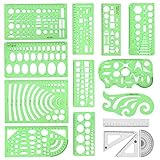
- [PACKAGE]--Including 11pcs geometric drawings templates in different shapes,4pcs Measure Tool Set,and 1 pack Plastic Zip Envelope for you to storage,can bring you a good use experience anytime, anywhere.
- [RULER MEASUREMENT]-- adopt metric system, use centimeter as scale unit, the minimum accuracy is 1mm.
- [WIDE APPLICATIONS]-- these templates and rulers can be applied in school, home, library, study room, office etc.Perfect measuring tool for students, artists, designers, architects, engineers, mathematics, network technique, fractional measurement, Contractors, or school learning,and more.
- [MATERIAL]-- Good quality plastic,Made From Flexible, Yet Sturdy Material, hard and uneasy to break,the clear plastic design allows visibility through, and the black markings make it easy to read.
- [AFTER-SALE SERVICE]--We maintain high standard of excellence and strive for 100% customer satisfaction. If you have any questions or concerns regarding your order, please feel free to reach out to us directly and we will get back to you within 12 hours during the work week.
Essential pages to build
- Home: Showcase your current release, featured video, next show, or mailing list offer.
- Music: Embed tracks from Spotify, Apple Music, SoundCloud, Bandcamp, or a Squarespace audio block where supported.
- Shows: Add tour dates, venue details, ticket links, and location information for live performers.
- Store: Sell vinyl, downloads, shirts, posters, lessons, sample packs, or VIP experiences using Squarespace Commerce.
- EPK: Include press photos, bio, music links, videos, notable credits, press quotes, and booking contact details.
- Contact: Separate booking, management, press, and general inquiries when relevant.
Branding matters as much as structure. Match fonts, colors, and imagery to the mood of your music: bold contrast for rock and electronic acts, softer palettes for acoustic artists, minimal layouts for producers, or vivid visuals for DJs and pop performers. Keep typography readable on mobile, especially for event details and merch pricing. Upload your logo, set a favicon, and use consistent cover art across banners, release sections, and social previews so visitors recognize you across platforms.
For audio and video, prioritize speed and usability. Embedded players are convenient, but too many can slow the page, especially on mobile. Feature one or two key tracks on the homepage, then place full playlists or albums on a dedicated music page. Use video strategically: a live session, music video, DJ set, or teaching sample can quickly prove your quality. If you serve booking agents, place your best performance footage near your EPK or booking section rather than burying it several clicks deep.
Customization checklist
- Replace all template images with professional photos, cover art, or live performance shots.
- Add a homepage call to action tied to your current goal: streams, tickets, bookings, merch, or email signups.
- Create an EPK page with downloadable photos, short and long bios, streaming links, and contact information.
- Connect social profiles and streaming platforms in the header, footer, or a dedicated link section.
- Set up newsletter capture through Squarespace Email Campaigns, Mailchimp, ConvertKit, or another email tool.
- Configure ecommerce settings if you sell merch, downloads, lessons, presets, or fan bundles.
- Optimize page titles, descriptions, and image alt text with your artist name, genre, city, and services.
Before publishing, test the site like a fan and like an industry contact. Check that songs play correctly, ticket links open, store checkout works, forms route to the right inbox, and the mobile layout feels polished. A well-customized Squarespace music website should make it effortless to hear your work, understand your identity, attend a show, buy something, subscribe, or get in touch.
Independent reader supportYour contribution helps us test, update, and keep practical guides available for everyone.Tips for Turning Visitors Into Fans, Bookings, and Sales
A strong Squarespace music site should move visitors toward one clear next step: listen, follow, join the mailing list, buy merch, book a show, or hire you for an event. Put your primary call to action above the fold on the homepage, especially on mobile. For a touring band, that might be “See Tour Dates”. For a DJ, it might be “Book a Set”. For a solo artist releasing new music, it might be “Listen to the New Single” or “Join the Fan List”.
Make your music easy to hear within the first few seconds. Embed a featured track, playlist, or video near the top of the page, and pair it with links to Spotify, Apple Music, YouTube, Bandcamp, or SoundCloud. If your template uses bold visuals, avoid letting oversized images bury the audio player. Visitors should not have to search through several pages just to hear what you sound like.
Build pages around real audience intent
- Fans: Add a homepage music player, upcoming shows, merch highlights, a newsletter signup, and social links.
- Bookers and venues: Create a dedicated booking or EPK page with a short bio, press photos, live videos, stage plot, contact form, and past performance highlights.
- Press and playlist curators: Include downloadable images, release links, recent press quotes, and a concise artist description.
- Students: For music teachers, feature lesson types, pricing, testimonials, scheduling options, and a simple inquiry form.
- Clients: For DJs, producers, and session musicians, show packages, sample mixes, credits, testimonials, and availability.
Your mailing list deserves more attention than a small footer form. Offer a reason to subscribe, such as early ticket access, unreleased demos, sheet music, sample packs, discount codes, or local show alerts. Place signup forms on the homepage, music page, tour page, and after blog posts or announcements. Keep the form short; an email address and optional first name are usually enough.
For bookings, reduce friction. Use a visible Contact or Book Now button in the header, then ask only for details that help you respond quickly: event date, city, venue, budget range, and type of performance. Add a few trust signals near the form, such as notable venues, client logos, press mentions, or testimonials from past organizers.
Turn traffic into revenue
- Promote merch contextually: Link shirts, vinyl, posters, and bundles from album pages, release announcements, and tour pages.
- Use limited drops: Seasonal designs, signed copies, and tour-only items can create urgency without making the site feel pushy.
- Connect ecommerce and email: Invite buyers to join the list after checkout so they hear about future releases and shows.
- Keep tickets visible: Add ticket buttons beside each date rather than sending visitors to a separate page to hunt for links.
Finally, review your site analytics after launches, releases, and tour announcements. Look at which pages people visit, where they leave, and which buttons get clicks. If fans are landing on your homepage but not reaching your music, move the player higher. If bookers visit the EPK but do not submit the form, simplify the page and make contact details easier to find.
Best Value

- 【3 Pcs Interior Design Template Set】: House Plan Template, Furniture Template, And Kitchen, Bed and Bath Template. Scale: 1/4 Inch = 1 Ft. Offers several kinds of templates for house plan, furniture, interior design and landscape.
- 【2 Pcs Circle Drawing Templates】: These circle rulers with various sizes can paint geometric patterns like different sizes of circle, can satisfy your different needs easily.
- 【Quality Material】: Made from flexible, yet sturdy plastic, it is not too hard and not too soft to allow for pencil slip. Not easy to break, convenient for you to use in daily life.
- 【Easy to Use】: Our architectural templates can be bent. You can not only use our templates on paper but also curl them to use on uneven surfaces.
- 【Widely Used】: These templates good for architecture, mathematics, network technique, fractional measurement, art design and school learning.
Frequently Asked Questions
What is the best Squarespace template for a band website?
The best Squarespace template for a band is usually one that supports strong visuals, tour dates, embedded music, merch, and an email signup without feeling crowded. Templates like Paloma, Vandam, and Atlantic-style layouts work well because they give bands room for photos, videos, press links, and show information. If your band plays live often, prioritize an events section and clear calls to action for tickets and bookings.
Can I sell music, merch, and tickets directly on a Squarespace musician website?
Yes, Squarespace supports ecommerce, so you can sell physical merch, digital products, and services from your site. For tickets, many musicians link to platforms like Eventbrite, Bandsintown, Songkick, Dice, or venue ticket pages instead of processing ticket sales directly. If merch is a major revenue stream, choose a template with clean product pages, simple navigation, and prominent shop links.
Do Squarespace music templates let me add Spotify, SoundCloud, Apple Music, or Bandcamp?
Yes, you can embed players or link out to major music platforms including Spotify, SoundCloud, Apple Music, Bandcamp, YouTube, and more. Most artists use a mix of embedded tracks, streaming platform buttons, and a dedicated music page. Keep the homepage focused on one or two featured releases so visitors are not overwhelmed.
Which Squarespace template is best for DJs, producers, or electronic artists?
DJs and producers usually benefit from templates with bold visuals, video backgrounds, event promotion, and a fast path to booking inquiries. A template with a strong homepage hero section works well for showcasing your latest mix, festival footage, or press quote. Make sure your site includes upcoming dates, a booking contact form, social links, and embedded sets from platforms like SoundCloud or Mixcloud.
Can I create an EPK on Squarespace for press, venues, and booking agents?
Yes, Squarespace is a good platform for building an electronic press kit with your bio, press photos, music, videos, tour history, quotes, and contact details. You can create a public EPK page or a private unlisted page to share with venues and promoters. Include downloadable high-resolution photos, short and long bios, streaming links, and a clear booking email so industry contacts do not have to search for essentials.
Bottom Line
The best Squarespace template for your music website depends on what you need fans, bookers, students, or clients to do next. Solo artists and bands should prioritize strong visuals, embedded audio, tour dates, and mailing list signups, while DJs, producers, teachers, and live performers may need ecommerce, booking links, EPK sections, or lesson pages.
Crashes, No Sound, or Screen Glitches?
Random freezes, missing sound and display glitches usually trace back to one bad driver. Find and replace yours safely.Free scan · under a minuteWindows Errors? Fix Them Before They Spread
Repair common Windows errors and clear accumulated junk for a smoother, more stable PC - no reinstall needed.Free scan · no reinstallChoose the template that matches your main goal first, then customize it around your music, brand, and audience. Once your tracks, shows, merch, press materials, and contact options are easy to find, your site can work as a professional home base for growing your career in 2026.
Quick Recap
Product prices and availability are accurate as of the date/time indicated and are subject to change. Any price and availability information displayed on Amazon at the time of purchase will apply.

