Do these 3 things before closing this tab:
1Fix the driver behind crashes, sound loss and screen glitches2Repair Windows errors before they cause bigger problems3Scan for outdated or missing drivers - takes under a minute日本語の指示だけで、使えるComfyUIワークフローを確実に自動生成できるとは、現時点で確認できません。日本語を画像生成用プロンプトに変換して既存ワークフローへ入力することと、指示からノードグラフそのものを組み立てることは別の機能です。
「ワークフローを作る」と「プロンプトを入れる」は別
ComfyUIは公式ドキュメントが説明するように、「生成AIのためのノードベースのインターフェース兼推論エンジン」です。ワークフローは単なる文章ではなく、モデルの読み込み、テキストのエンコード、サンプリング、画像の保存などを担うノードと、それらをつなぐグラフです。各ノードの入力や接続が、処理の内容を決めます。
As an Amazon Associate I earn from qualifying purchases.
そのため「日本語で指示したらワークフローができる」という説明には、少なくとも二つの意味があります。ひとつは日本語の内容を画像モデル向けのプロンプトに整え、既存グラフのテキスト欄に入れること。もうひとつは、必要なノードを選び、接続や設定まで含めて新しいグラフを作ることです。後者のほうが、ワークフローの自動生成に当たります。
公式のSD 3.5 Large Depthの日本語ワークフロー例では、すでに定義されたワークフロー内のCLIPTextEncodeノードにテキストを設定して送信します。これは既存グラフへのプロンプト入力を示す例であり、日本語の指示からグラフ全体を自動構築する機能の証拠ではありません。
#1 Best Overall

- System Compatibility Note: 2-slot card, 271x112x39mm, single 8-pin power, 200W TDP. Verify chassis clearance and PSU capacity before purchase.
- Dedicated Support: Please contact us directly through Amazon for any product questions or assistance you may require.
- 24GB GDDR6 on 192-Bit Bus: Massive 24GB memory with 456 GB/s bandwidth – ideal for LLMs, AI inference, 3D rendering, and generative design.
- Intel Xe2-HPG Architecture: Built on Intel's next-gen architecture with 20 Xe cores and 160 XMX engines for AI acceleration (197 INT8 TOPS).
- PCIe 5.0 Support: PCI Express 5.0 x16 interface for maximum bandwidth with the latest workstation platforms.
日本語からグラフを自動生成する技術は研究されている
自然言語のタスク説明からComfyUIワークフローを提案・構築する研究はあります。ComfyUI-Copilotの研究は、ノードやモデルの推薦、ワークフローのワンクリック構築を扱っています。また、2026年のComfyUI-R1論文も、ワークフロー生成の研究と事例を報告しています。
ただし、研究システムの存在は、一般に利用できる製品が任意の日本語指示を安定して実行可能なグラフへ変換できることを意味しません。これらの資料から、日本語への対応や成功率、現在利用可能な特定ツールの信頼性までは確認できません。利用するツールを選ぶ際は、対応言語、ComfyUIの対応バージョン、必要なモデルやカスタムノード、実際に実行できるかを個別に確かめてください。
Rank #2
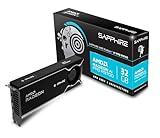
- Memory Size: 32 GB, 256-bit GDDR6
- Output: 4 x DisplayPort 2.1a
- Interface: PCI-Express 5.0 x16
- Boost Clock: Up to 2920MHz
- Game Clock: Up to 2350 MHz
候補ツールを見分けるポイント
「日本語対応」「ComfyUI連携」といった表現だけでは、どこまで自動化されるか分かりません。次の点を確認すると、プロンプト補助とグラフ生成を区別できます。
The Tool Desk
Outbyte PC Repair FREEClear out junk files and repair common Windows errorsFree Scan →Outbyte Driver Updater FREEFix the driver behind crashes, sound loss and screen glitchesFind Drivers →- 何を生成するか:日本語をプロンプトに書き換えるだけか、ノードを追加・接続してグラフまで作るか。
- 日本語が明示的に対応されているか:日本語での利用が説明・実演されているか。単にインターフェース上で入力できることとは区別します。
- 結果を確認・編集できるか:生成されたグラフやJSONを開いて修正し、保存して再実行できるか。
- 必要な環境がそろうか:使うモデルファイル、カスタムノード、ComfyUIのバージョンが利用環境に合っているか。
- どこで実行されるか:手元の環境で動くのか、アカウントやプラン、クレジット、ネット接続が必要なホスト型サービスを呼び出すのか。
確認できる資料には、これらの候補を同じ条件で比較した製品ベンチマークや、日本語の成功率を示す数値はありません。機能の説明だけでなく、実際に出力グラフを確認できるかを判断材料にしてください。
Rank #3

- NVIDIA GeForce RTX 5080; Blackwell Architecture
- 16 GB GDDR7 RAM (memory interface)
- Core/memory clock: (boost: 2805) MHz
- 1x HDMI, 3x DP, height: dual slot
- DirectX 12
生成されたワークフローは実行前に点検する
グラフが作られても、そのまま正しい結果が出るとは限りません。ComfyUIのリポジトリによれば、必要な入力がそろった有効なグラフ部分が実行対象になります。モデルやノードの不一致、接続漏れ、意図と異なるパラメーターがあれば、実行に失敗したり、期待と異なる画像になったりします。
- 必要なノードがそろい、入力と出力が意図どおりにつながっている。
- 指定されたモデルファイルとカスタムノードが手元の環境で利用できる。
- プロンプト、生成設定、出力先などの値が目的に合っている。
- ワークフローを保存し、可能なら小さな変更を加えて再実行できる。
ComfyUIのリポジトリは、生成画像のPNGを読み込んでワークフローやシード情報を復元できる場合があることも説明しています。これは後からグラフを確認する手がかりになりますが、必要なモデルやノードまで自動的に用意されるという意味ではありません。
Rank #4

- Chipset: NVIDIA GeForce GT 1030
- Video Memory: 4GB DDR4
- Boost Clock: 1430 MHz
- Memory Interface: 64-bit
- Output: DisplayPort x 1 (v1.4a) / HDMI 2.0b x 1
プロンプト欄で使える構文も、グラフ生成とは別
ComfyUIのREADMEには、プロンプト内で使える構文として、括弧による強調(既定の強調度は1.1)、{day|night}のような選択肢、embedding:embedding_filename.ptのような埋め込み参照が記載されています。これらはプロンプトの解釈を助ける機能であり、日本語の自然文からノードグラフを作る機能ではありません。
ローカル実行とホスト型サービスの違い
ComfyUIのワークフローは、自分の環境で実行することも、ホスト型の環境で実行することもできます。公式ワークフローページでは、同じワークフローをComfy CloudまたはセルフホストのComfyUIで使えると案内しています。一方、Partner Nodesの説明では、外部のホスト型AIサービスにつながるノードはアカウントへのアクセスが必要で、有料の呼び出しにはクレジットが必要とされています。これらのノードは任意で、同ページはローカル版ComfyUIをオープンソースかつ無料として説明しています。
Best Value

- Robust 4GB Memory & Quad Display Ready: Equipped with 4GB of fast GDDR5 memory to smoothly handle daily graphics tasks. Features four built-in HDMI ports, enabling a seamless quad-monitor setup directly out of the box—perfect for multi-tasking offices, digital signage, or trading desks.
- Plug-and-Play Installation & Wide Compatibility: Utilizes a standard PCI Express interface for broad compatibility with most desktop PCs. Offers straightforward plug-and-play installation and stable driver support for modern Windows and Linux operating systems, ensuring a hassle-free setup.
- Quiet, Cool & Compact Design: Engineered with a silent fan and efficient cooling system for near-silent operation, making it ideal for noise-sensitive environments. Its low-profile design fits easily into small form factor cases, with both half-height and full-height brackets included for flexible installation.
- Enhanced Multimedia & Everyday Performance: Delivers smooth 1080P video playback and supports hardware-accelerated decoding, offering an excellent experience for home theater PCs (HTPC). Provides capable performance for everyday applications, multimedia tasks.
- Complete Package & Reliable Support: Includes the graphics card, both low-profile and standard brackets, a quick start guide, and screwdriver, which make it simple and quick setup process.
Comfy CloudのAPIアクセスには、公式ページによるとAPIキー付きのプランが必要です。クラウドや外部サービスを使う場合は、現在のプラン条件、クレジット、アカウント要件、ネット接続、対応バージョンを公式のPartner Nodes案内やワークフロー案内で確認してください。利用条件や価格は変わる可能性があります。
Quick Recap
Product prices and availability are accurate as of the date/time indicated and are subject to change. Any price and availability information displayed on Amazon at the time of purchase will apply.

