Freedom251 › Softphone and calling apps

Zoiper
What Zoiper is
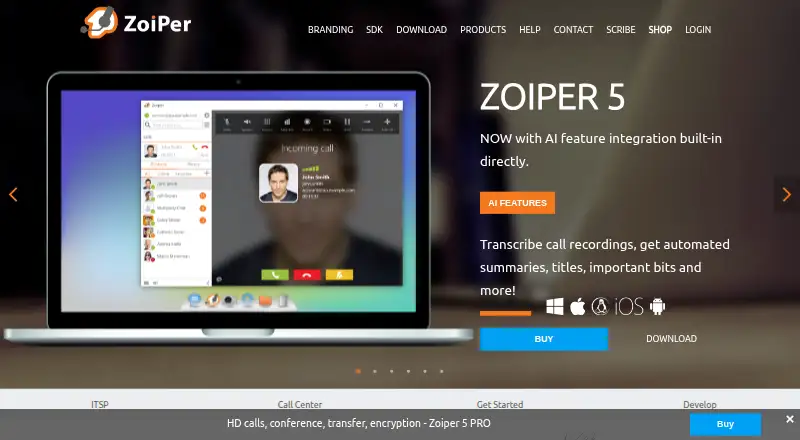
Zoiper is a VoIP softphone for voice and video calls, messaging, presence, and fax, and it works with a VoIP provider or PBX rather than depending on one service. You need a computer or smartphone and an internet connection to use it. Desktop apps are available for Windows, Mac, and Linux, with mobile apps for Android and iOS. Call tools include forwarding, attended and unattended transfer, auto-answer, recording, and SIP conferencing. Zoiper lists contact options such as LDAP, CSV import, Outlook and macOS Address Book integration, and click-to-dial connections with CRM products including Salesforce, Freshdesk, and Nimble. A built-in Banafo integration is described for transcribing call recordings and generating titles, summaries, classifications, and entity extraction. Zoiper 5 PRO lists TLS, SRTP, and ZRTP encryption protocols for voice, video, and chat. The free version is for non-commercial use, with one account and two lines. Zoiper 5 PRO costs $59.95, paid once as a one-time payment; mobile team licensing is €29.88 a year per user, billed annually, for teams of at least 10.
Who it suits
Zoiper suits individuals or organizations looking for VoIP calling across desktop and mobile, with messaging, fax, and contact integrations. Its free plan is limited to non-commercial use; team licensing is arranged through sales for groups of 10 or more.
What it does well
- Apps for Android, iOS, Windows, Mac, and Linux
- Includes call recording and SIP conferencing
- CRM click-to-dial integrations are listed
- Banafo integration transcribes call recordings
What to know first
- Free plan is for non-commercial use
- Free plan allows one account and two lines
- PRO license is per seat and operating system
- Team mobile licensing requires at least 10 users
Limits
Zoiper 5 Free is for non-commercial use and allows one account and two lines. Zoiper 5 PRO is licensed per seat and operating system, with one license reset allowed each week. Mobile team licensing starts at 10 users and is arranged through sales.
Plans
| Plan | Billed and limits | Price |
|---|---|---|
| Zoiper 5 Free | Free VoIP softphone for non-commercial use · 1 account · 2 lines | Free |
| Zoiper mobile team licensing | €29.88 per user per year (= €2.49 per user/month, billed annually) · iOS and Android · 10 users and up · team licenses arranged through sales | €29.88 a year |
| Zoiper 5 PRO | one-time payment · Per seat and operating system · perpetual license · Windows, Mac, Linux | $59.95, paid once |
As zoiper.com lists them, read 30 Sept 2026. The maker's own page has the final word.
Getting started
- Choose a computer or smartphone running Android, iOS, Windows, Mac, or Linux.
- Arrange an internet connection and a VoIP provider or PBX.
- Select Zoiper 5 Free, Zoiper 5 PRO, or mobile team licensing for 10 users or more.
- Install the app for your platform and configure it for your VoIP service.
Verdict
Zoiper combines softphone calling with messaging, fax, contact integrations, and call-management features across desktop and mobile. Check the free-plan limits and license terms against your intended use and devices.
Questions
Is Zoiper free?
Zoiper 5 Free is listed as free. It is for non-commercial use and includes one account and two lines.
What does Zoiper cost for paid use?
Zoiper 5 PRO is $59.95, paid once as a one-time payment. Mobile team licensing is €29.88 a year per user, billed annually, for teams of 10 users or more and arranged through sales.
Which platforms does Zoiper support?
Zoiper offers mobile apps for Android and iOS and Zoiper 5 desktop apps for Windows, Mac, and Linux.
What do I need to use Zoiper?
You need a computer or smartphone, an internet connection, and a VoIP provider or PBX.
Does Zoiper support call recording?
Yes. Call recording is listed among its features. Zoiper also describes a Banafo integration for transcribing VoIP recordings.
Who is responsible for Zoiper product and website data?
Zoiper's privacy policy identifies Securax EOOD as the data controller and gives its registered address as Sofia, Bulgaria.
Facts from Zoiper's own pages
- AI transcription
- Zoiper describes a built-in Banafo integration for transcribing VoIP call recordings and producing titles, summaries, call classifications, and entity extraction. · zoiper.com, 30 Sept 2026
- Call features
- The feature list includes call forwarding, attended and unattended transfer, auto-answer, call recording, and SIP conferencing. · zoiper.com, 30 Sept 2026
- Company history
- Zoiper's press kit says the company emerged from VoIP's popularity in 2003. · zoiper.com, 30 Sept 2026
- Contacts and CRM
- The feature list includes Outlook and macOS Address Book integration, LDAP contacts, CSV import, and click-to-dial CRM integrations including Vicidial, CallPro, Nimble, Freshdesk, and Salesforce. · zoiper.com, 30 Sept 2026
- Desktop
- Zoiper 5 is available for Windows, Mac, and Linux. · zoiper.com, 30 Sept 2026
- Headquarters
- Sofia, Bulgaria · zoiper.com, 23 Sept 2026
- License limit
- Zoiper 5 PRO is licensed per seat and operating system, with one license reset allowed each week. · zoiper.com, 30 Sept 2026
- Mobile
- Zoiper offers mobile apps for Android and iOS. · zoiper.com, 30 Sept 2026
- Privacy
- Zoiper's privacy policy identifies Securax EOOD as the data controller for the Zoiper website and products and gives its registered address as Sofia, Bulgaria. · zoiper.com, 30 Sept 2026
- Product
- Zoiper is a service-independent VoIP softphone for making voice and video calls and using messaging, presence, and fax features. · zoiper.com, 30 Sept 2026
- Provisioning
- Zoiper Biz provisioning remotely automates user configuration and is described as useful for VoIP service providers and call centers. · zoiper.com, 30 Sept 2026
- Security
- Zoiper 5 PRO lists TLS, SRTP, and ZRTP encryption protocols for voice, video, and chat communications. · zoiper.com, 30 Sept 2026
- Support
- Zoiper says technical support requests usually receive service within one business day. · zoiper.com, 30 Sept 2026
- VoIP setup
- Zoiper requires a computer or smartphone, an internet connection, and a VoIP provider or PBX. · zoiper.com, 30 Sept 2026
Where Zoiper stands on Freedom251
- Softphone and calling apps#16 of 33