Freedom251 › Softphone and calling apps
MobileVOIP
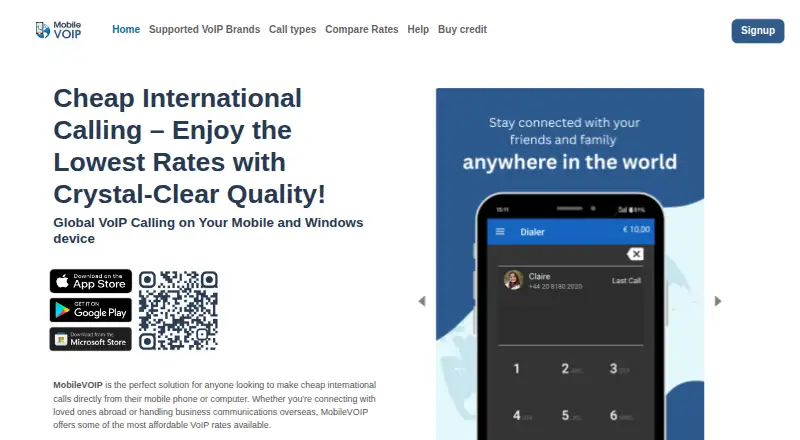
What MobileVOIP is
MobileVOIP is a free-to-download app for making international calls from a mobile phone or computer. It supports Android, iOS, and Windows, and the site says calls can reach almost any country. Users select a supported VoIP brand, register or use an existing account, and sign in with that brand’s credentials. MobileVOIP lists supported providers and offers destination-based rate comparisons. Standard VoIP calling requires mobile data or Wi-Fi and uses the selected provider’s rates. Call Back is available when internet service is weak or when reducing data use matters; it charges for both call legs and a setup fee. In selected countries, Local Access combines a local-call charge with the destination tariff. The app also sends text messages. Calling is not described as a single fixed price: rates come from the chosen provider, may change without notice, and can include setup fees. Destinations marked FREE may have conditions. The privacy policy says contact, purchase, device, location, and usage information may be collected, with sensitive data such as card numbers protected by SSL. Data may be stored in the EU and Switzerland or shared with service partners.
Who it suits
MobileVOIP suits people who want international calling from Android, iPhone, iPad, or Windows using a chosen VoIP provider. It also fits users who need text messaging, rate comparison, callback, or local-access alternatives.
What it does well
- Free app downloads for Android, iPhone, and Windows
- Calls supported to almost any country
- Compare supported provider rates by destination
- Callback option for weaker internet connections
- Text messaging included
What to know first
- Calling uses the selected provider’s rates
- Call Back charges both call legs and a setup fee
- Standard VoIP requires mobile data or Wi-Fi
- Rates may change without notice
Limits
Standard VoIP calls require a working mobile data or Wi-Fi connection. Call Back and Local Access add separate charges, and provider rates or setup fees can vary.
Getting started
- Download MobileVOIP for Android, iPhone, iPad, or Windows
- Choose a supported VoIP brand
- Register with that brand or use an existing account
- Sign in with the provider’s VoIP credentials
- Compare destination rates before calling
Verdict
Choose MobileVOIP if you want a free app that connects your own VoIP provider account to international calling and messaging. Its rate-comparison tool and callback or local-access options add flexibility. Look elsewhere if you need fixed calling prices independent of provider rates.
Questions
Is the MobileVOIP app free?
Yes. The app is free to download on iPhone, Android, and Windows; calling uses the selected provider’s rates.
Which platforms are supported?
MobileVOIP supports Android, iOS, and Windows, with legacy iPhone/iPad and Android downloads available.
How do I place calls?
Choose a supported VoIP brand, register or use an existing account, and sign in with that provider’s credentials.
Does MobileVOIP support texting?
Yes. The app supports sending text messages.
What does Call Back cost?
Call Back charges for both call legs and a setup fee.
How is personal data handled?
The policy says contact, purchase, device, location, and usage information may be collected. Sensitive information such as card numbers is protected using SSL, and data may be stored in the EU and Switzerland or shared with service partners.
Facts from MobileVOIP's own pages
- App cost
- The MobileVOIP app is available to download for free. · mobilevoip.com, 9 Oct 2026
- Call Back
- Call Back can be used with a weak internet connection or to reduce data use; it charges for both call legs and a setup fee. · mobilevoip.com, 9 Oct 2026
- Callback option
- The callback option can be used with a weaker internet connection, and charges apply for both call legs plus a setup fee. · mobilevoip.com, 9 Oct 2026
- Calling coverage
- The site says the app supports calls to almost any country. · mobilevoip.com, 9 Oct 2026
- Coverage
- The site says the service supports calls to almost any country. · mobilevoip.com, 9 Oct 2026
- Data handling
- The privacy policy says personal data may be stored in the EU and Switzerland and shared with partners involved in providing the services. · mobilevoip.com, 9 Oct 2026
- Downloads
- The site provides legacy app downloads for iPhone/iPad and Android when users cannot access the app market. · mobilevoip.com, 9 Oct 2026
- Free app
- The site describes the app as free to download on iPhone, Android, and Windows; calling uses VoIP provider rates. · mobilevoip.com, 9 Oct 2026
- Local access
- In selected countries, users can call through a local access number and pay for a local call plus the destination tariff. · mobilevoip.com, 9 Oct 2026
- Messaging
- The MobileVOIP app also supports sending text messages. · mobilevoip.com, 9 Oct 2026
- Privacy and security
- The privacy policy says personal data may include contact, purchase, device, location, and usage information, and that sensitive information such as card numbers is protected using SSL encryption. · mobilevoip.com, 9 Oct 2026
- Privacy data
- The privacy policy says the service may collect contact, purchase, usage, device, and geographical information. · mobilevoip.com, 9 Oct 2026
- Provider accounts
- Users choose a supported VoIP brand, register or use an existing account, and sign in with that brand’s VoIP credentials. · mobilevoip.com, 9 Oct 2026
- Purpose
- MobileVOIP is a free app for making international calls using supported VoIP providers. · mobilevoip.com, 9 Oct 2026
- Rate caveats
- The rate comparison page says an additional setup fee may apply, rates can change without notice, and destinations marked FREE may have conditions. · mobilevoip.com, 9 Oct 2026
- Rate comparison
- The site offers a tool to compare supported VoIP brands' rates by destination and notes that setup fees may apply and rates can change without notice. · mobilevoip.com, 9 Oct 2026
- Security
- The privacy policy says sensitive information such as card numbers is encrypted and communication uses SSL. · mobilevoip.com, 9 Oct 2026
- Support
- Users can create a helpdesk ticket by providing an email address and selecting their VoIP brand. · mobilevoip.com, 9 Oct 2026
- Supported providers
- MobileVOIP lists supported VoIP brands and lets users compare their rates by destination. · mobilevoip.com, 9 Oct 2026
- Text messaging
- The app also supports sending text messages. · mobilevoip.com, 9 Oct 2026
- VoIP calls
- VoIP calls connect over mobile data or Wi-Fi and use the rates charged by the user's VoIP brand. · mobilevoip.com, 9 Oct 2026
Where MobileVOIP stands on Freedom251
- Softphone and calling apps#14 of 33