Freedom251 › Commodore 64 Emulators
Zinc64
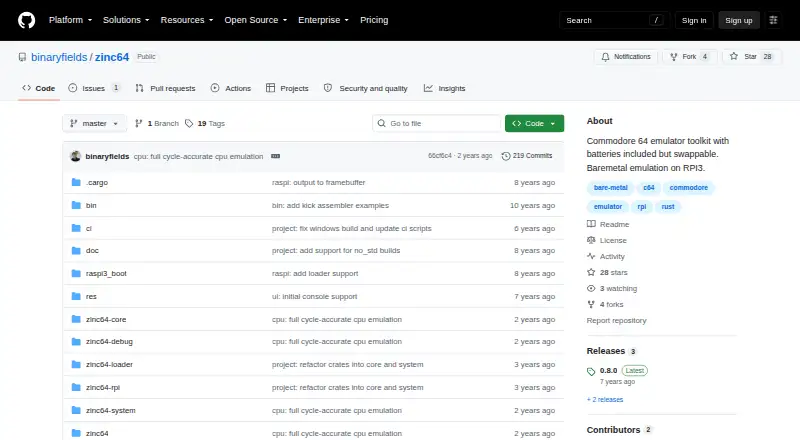
What Zinc64 is
Zinc64 is a free Commodore 64 emulator toolkit for Linux, Windows, and self-hosted use. It can operate as a standalone emulator or provide a library for building other emulators. The toolkit models the MOS 6510 CPU, MOS 6526 CIA, MOS 6581 SID, and MOS 6567/6569 VIC chipset, together with C64 devices and peripherals. PAL and NTSC C64 systems are supported. Cartridge, datassette, keyboard, and joystick support are marked done, as are BIN, CRT, P00, PRG, and TAP file formats. D64 and T64 formats, plus floppy and mouse support, are marked not started. An OpenGL client and a bare-metal Raspberry Pi 3 port are in progress. Components can be exchanged through a custom ChipFactory, with chip interactions modeled without coupling the chips together. The remote debugger is available over telnet and uses commands modeled after VICE; RAP server support allows radare2 connections. The zinc64-system crate can run without Rust's standard library in bare-metal environments. Building involves Rust, repository retrieval, Cargo compilation, and running the resulting emulator. Zinc64 is licensed under GPLv3.
Who it suits
Zinc64 suits developers building or extending Commodore 64 emulators, especially those wanting replaceable components or bare-metal Rust support. It also fits users seeking a standalone PAL or NTSC C64 emulator on Linux or Windows with debugger and radare2 connectivity.
What it does well
- Free plan with Linux and Windows support
- Standalone emulator and reusable library
- Models major C64 chips and peripherals
- Replaceable components through custom ChipFactory
- Telnet debugger and radare2 RAP support
- Supports BIN, CRT, P00, PRG, and TAP
What to know first
- D64 and T64 formats are not started
- Floppy and mouse support are not started
- OpenGL client and Raspberry Pi 3 port are in progress
- Windows setup requires Visual C++ Build Tools 2017
Limits
The listed status leaves D64 and T64 formats, floppy and mouse support, and the OpenGL client unfinished. The Raspberry Pi 3 bare-metal port is also still in progress.
Getting started
- Install Rust
- On Windows, install Microsoft Visual C++ Build Tools 2017 with the Visual C++ build tools workload
- Clone or download the Zinc64 repository
- Build the project with Cargo
- Run the resulting emulator
Verdict
Pick Zinc64 if you want a free, extensible Commodore 64 emulator toolkit with debugger access and Rust-based components. Look elsewhere if you need D64 or T64 support, floppy or mouse emulation, or a finished OpenGL client and Raspberry Pi 3 port.
Questions
What platforms does Zinc64 support?
The listed platforms are Linux, Windows, and self-hosted use.
Is Zinc64 free?
Yes. It has a free plan and no free trial is listed.
Which C64 formats are supported?
BIN, CRT, P00, PRG, and TAP are marked done. D64 and T64 are marked not started.
Does Zinc64 include a debugger?
Yes. It provides a remote debugger over telnet, with commands modeled after VICE, and supports radare2 through its RAP server.
What license does Zinc64 use?
The repository license is the GNU General Public License version 3.
Facts from Zinc64's own pages
- Bare-metal support
- The zinc64-system crate can run without the Rust standard library in bare-metal environments. · github.com, 5 Oct 2026
- Build and run
- The README instructs users to install Rust, clone the repository, build with Cargo, and run the resulting emulator executable. · github.com, 5 Oct 2026
- Debugger
- The emulator includes a remote debugger accessible over telnet, with commands modeled after the VICE emulator. · github.com, 5 Oct 2026
- Device support
- The status table lists cartridge, datassette, keyboard, and joystick as done, while floppy and mouse are not started. · github.com, 5 Oct 2026
- Emulated hardware
- It implements the MOS 6510 CPU, MOS 6526 CIA, MOS 6581 SID, and MOS 6567/6569 VIC chipset, along with C64 devices and peripherals. · github.com, 5 Oct 2026
- Extensible design
- Its components can be swapped for alternate implementations, and chip interactions are modeled without coupling the chips together. · github.com, 5 Oct 2026
- File formats
- The status table lists BIN, CRT, P00, PRG, and TAP formats as done, while D64 and T64 are marked not started. · github.com, 5 Oct 2026
- Formats
- The status table marks BIN, CRT, P00, PRG, and TAP formats done; D64 and T64 are listed as not started. · github.com, 5 Oct 2026
- Getting started
- The project instructs users to install Rust, clone or download the repository, build it with Cargo, and run the resulting emulator. · github.com, 5 Oct 2026
- License
- The repository's LICENSE file contains the GNU General Public License version 3. · github.com, 5 Oct 2026
- Maintainer
- The GitHub account for binaryfields identifies the profile as Sebastian Jastrzebski and lists Boston, MA. · github.com, 5 Oct 2026
- Other unfinished components
- The status table marks floppy and mouse support as not started and the OpenGL client as in progress. · github.com, 5 Oct 2026
- Product
- Zinc64 is a Commodore 64 emulator toolkit designed to work as a standalone emulator or as a library for building emulators. · github.com, 5 Oct 2026
- Project origin
- The author says Zinc64 began as an exercise to learn Rust and explore Commodore 64 hardware. · github.com, 5 Oct 2026
- Purpose
- Zinc64 is a Commodore 64 emulator toolkit designed to run as a standalone emulator or as a library for building emulators. · github.com, 5 Oct 2026
- Radare2 integration
- The README documents connecting radare2 to the emulator through its RAP server support. · github.com, 5 Oct 2026
- Raspberry Pi
- The project describes a bare-metal Raspberry Pi 3 port, listed as in progress in its component status table. · github.com, 5 Oct 2026
- Swappable components
- Its design allows emulator components to be replaced with other implementations through a custom ChipFactory. · github.com, 5 Oct 2026
- Windows requirements
- The README's Windows instructions call for Microsoft Visual C++ Build Tools 2017 with the Visual C++ build tools workload. · github.com, 5 Oct 2026
- Windows setup
- The README's Windows considerations say to install Microsoft Visual C++ Build Tools 2017 and select the Visual C++ build tools workload. · github.com, 5 Oct 2026
Where Zinc64 stands on Freedom251
- Commodore 64 Emulators#22 of 31