Zephyr
What Zephyr is
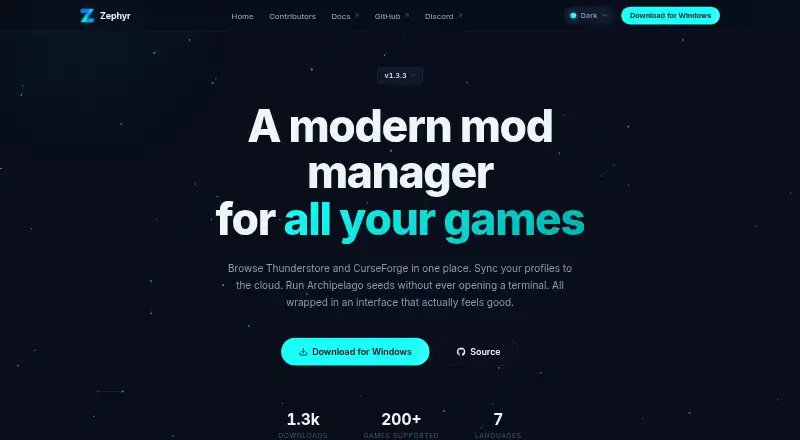
Zephyr is a desktop mod manager for finding and installing game mods, organizing them into profiles, and switching between those profiles. It supports about 200 games out of the box and brings Thunderstore and CurseForge browsing into one search. Mods are deployed by copying them, and players can share a profile code or link so a friend can reproduce a setup. The app also includes an Archipelago multiworld randomizer, with Python bundled for generating seeds, and an editor for BepInEx plugin configuration files. Gamepad navigation is available throughout the interface. For customization, users can choose among seven built-in themes, adjust fonts and colors, and use one of seven language options. Zephyr runs on Windows, macOS, and Linux and is open source under the GPL-3.0 license. Cloud sync is optional: users sign in with Discord and enable the feature in the app. The maker says that without sign-in, personal data stays on the device and mod metadata requests are anonymous. With cloud sync enabled, profile archives and metadata are stored with the maker's hosting provider in France. The installation guide says the Windows build is not code-signed and the macOS build is not notarized.
Who it suits
Zephyr suits players who want to browse mods for supported games, manage separate profiles, and share a setup with friends. It also fits users who value gamepad navigation, customization, or an open-source desktop app.
What it does well
- Supports about 200 games out of the box.
- Combines Thunderstore and CurseForge browsing in one search.
- Profile codes and links let users share setups.
- Includes an Archipelago randomizer and BepInEx config editor.
- Offers seven themes and seven language options.
- Released under the GPL-3.0 license.
What to know first
- Available only for Windows, macOS, and Linux.
- Windows build is not code-signed; macOS build is not notarized.
- Cloud sync requires Discord sign-in and must be enabled.
Limits
The free plan is the desktop app. The maker's installation guide says the Windows build is not code-signed and the macOS build is not notarized.
Plans
| Plan | Billed and limits | Price |
|---|---|---|
| Free | Free, open source desktop app | Free |
As zephyr.prismo-studios.dev lists them, read 9 Oct 2026. The maker's own page has the final word.
Getting started
- Open the Zephyr website.
- Choose the desktop build for Windows, macOS, or Linux.
- Install the app; the Windows build is not code-signed and the macOS build is not notarized.
- Browse supported games and mods from Thunderstore and CurseForge.
- Create and switch between profiles, then share a profile code or link if needed.
- Sign in with Discord and enable cloud sync in the app if you want to use it.
Verdict
Choose Zephyr if you want a free, open-source desktop manager with profile switching, combined mod browsing, and sharing. Look elsewhere if you need a platform beyond Windows, macOS, or Linux, or prefer signed or notarized installation builds.
Questions
How much does Zephyr cost?
The Free plan costs nothing. Zephyr is described as a free, open-source desktop app.
Which platforms does Zephyr support?
The desktop application is available for Windows, macOS, and Linux.
Is Zephyr open source?
Yes. It is distributed under the GPL-3.0 license.
Does Zephyr include cloud sync?
Yes, as an opt-in feature. Users need to sign in with Discord and enable cloud sync in the app.
Where is cloud-synced profile data stored?
With cloud sync enabled, profile archives and metadata are stored with the maker's hosting provider in France.
How can users get support?
The documentation directs documentation issues to Discord and app bug reports to GitHub Issues.
Facts from Zephyr's own pages
- Automatic updates
- Yes · zephyr.prismo-studios.dev, 20 Sept 2026
- Cloud data
- For cloud sync, profile archives are stored with the maker's hosting provider in France, and profile metadata is stored in a MySQL database there. · zephyr.prismo-studios.dev, 9 Oct 2026
- Cloud sync
- Users can opt in to cloud sync by signing in with Discord and enabling the feature in the app. · zephyr.prismo-studios.dev, 9 Oct 2026
- Config editor
- Zephyr includes an editor for BepInEx plugin configuration files. · github.com, 9 Oct 2026
- Customization
- Zephyr offers built-in themes, custom fonts and colors, and seven language options. · zephyr.prismo-studios.dev, 9 Oct 2026
- Deployment method
- copy · zephyr.prismo-studios.dev, 20 Sept 2026
- Free plan
- Yes · zephyr.prismo-studios.dev, 20 Sept 2026
- Gamepad
- The app supports gamepad navigation throughout its interface. · zephyr.prismo-studios.dev, 9 Oct 2026
- Game support
- Zephyr supports about 200 games out of the box. · docs.zephyr.prismo-studios.dev, 9 Oct 2026
- Installation limitation
- The maker’s installation guide says the Windows build is not code-signed and the macOS build is not notarized. · docs.zephyr.prismo-studios.dev, 9 Oct 2026
- License
- Zephyr is open source and distributed under the GPL-3.0 license. · zephyr.prismo-studios.dev, 9 Oct 2026
- Mod profiles
- Yes · zephyr.prismo-studios.dev, 20 Sept 2026
- Mod source access
- built-in · zephyr.prismo-studios.dev, 20 Sept 2026
- Mod sources
- Zephyr combines mods from Thunderstore and CurseForge in one browse list for supported games. · docs.zephyr.prismo-studios.dev, 9 Oct 2026
- Notable limit
- The maker states the desktop application is available for Windows, macOS, and Linux. · zephyr.prismo-studios.dev, 9 Oct 2026
- Open source
- The desktop application is released under the GPL-3.0 license. · zephyr.prismo-studios.dev, 9 Oct 2026
- Optional cloud sync
- Cloud sync is opt-in and requires signing in with Discord and enabling the setting in the app. · zephyr.prismo-studios.dev, 9 Oct 2026
- Privacy
- The maker says that without sign-in, no personal data leaves the device and mod metadata requests are anonymous. · zephyr.prismo-studios.dev, 9 Oct 2026
- Product
- Zephyr is a desktop mod manager for browsing and installing mods and switching between mod profiles. · docs.zephyr.prismo-studios.dev, 9 Oct 2026
- Profiles
- Users can switch between mod profiles and share a setup with a friend using a code. · zephyr.prismo-studios.dev, 9 Oct 2026
- Profile sharing
- Users can share a profile code or link so friends can reproduce their mod setup. · zephyr.prismo-studios.dev, 9 Oct 2026
- Publisher registry
- Mod authors can submit releases to the Zephyr Mods registry, where SHA-256 checks are verified through CI. · github.com, 9 Oct 2026
- Purpose
- Zephyr is a desktop mod manager for browsing, installing, and switching game mod profiles. · docs.zephyr.prismo-studios.dev, 9 Oct 2026
- Randomizer
- Zephyr includes an Archipelago multiworld randomizer with a bundled Python runtime. · github.com, 9 Oct 2026
Where Zephyr stands on Freedom251
- Mod managers#12 of 78
- Game Mod Managers#13 of 79