Freedom251 › Screen Recording Software
ZapisEkrana
What ZapisEkrana is
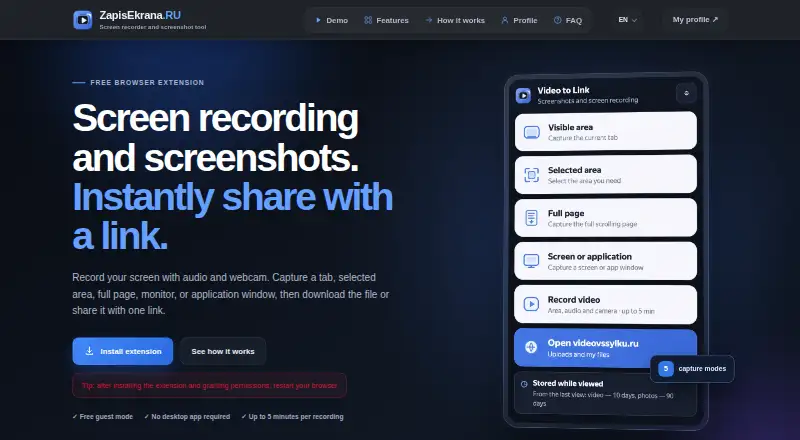
ZapisEkrana is a browser extension for recording screens and taking screenshots on Windows, macOS, Linux, and ChromeOS through a compatible Chromium browser. It captures a visible tab, selected area, full web page, monitor, or application window. Recordings can include webcam video, system audio, and microphone input; videos with audio and webcam are limited to five minutes per recording. Its screenshot editor provides drawing, arrows, shapes, text, blur, crop, and undo. Screenshots and recordings can be downloaded locally without cloud upload. For sharing, the extension uses videovssylku.ru for uploads, links, and profiles. Guest uploads require no registration; guest videos remain for 10 days and photos for 90 days after their last view. A personal profile requires an account and one API-key addition. Ordinary links are available to anyone with the link, while registered users can create private, link-only, or password-protected albums. Free account storage allows files up to 500 MB. Premium access costs $800 a month and includes 100 GB storage, 1 GB files, API access, and upload history.
Who it suits
It suits people creating bug reports, tutorials, design reviews, support material, training, or remote-work recordings. The extension also fits users who want local downloads or link-based sharing.
What it does well
- Captures tabs, areas, pages, monitors, and windows
- Records webcam, system audio, and microphone
- Includes screenshot annotation and editing tools
- Supports local downloads without cloud upload
- Offers private, link-only, and password albums
What to know first
- Audio-and-webcam recordings are limited to five minutes
- Free files are limited to 500 MB
- Guest videos expire after 10 days
- Premium access costs $800 a month
Plans
| Plan | Billed and limits | Price |
|---|---|---|
| Free account | 500 MB maximum file size · Videos stored for 10 days after last view · Images stored for 90 days after last view | Free |
| Premium access | Оплата раз в месяц · 100 GB storage · Up to 1 GB per file · Video stored while subscription is active and space is available · API access · Upload history | $800 a month |
| Free guest uploads | 500 MB maximum file size · Guest videos stored 10 days and images 90 days from last view | Free |
As zapisekrana.ru lists them, read 22 Sept 2026. The maker's own page has the final word.
Verdict
ZapisEkrana combines flexible screen capture, screenshot markup, local downloads, and hosted sharing. Check the five-minute recording limit, retention periods, and plan terms before relying on it for longer or archival recordings.
Facts from ZapisEkrana's own pages
- Audience
- The maker describes use for bug reports, tutorials, design reviews, support, training, and remote work. · zapisekrana.ru, 11 Oct 2026
- Capture modes
- It captures the visible tab, a selected area, a full web page, a monitor, or an application window. · zapisekrana.ru, 11 Oct 2026
- Cloud integration
- The extension uses videovssylku.ru for uploads, shareable links, and personal profiles. · zapisekrana.ru, 11 Oct 2026
- Free plan
- Yes · zapisekrana.ru, 22 Sept 2026
- Guest mode
- Guest uploads do not require registration and are not tied to an account. · zapisekrana.ru, 11 Oct 2026
- Local downloads
- Screenshots and recordings can be downloaded to the computer without uploading them to the cloud. · zapisekrana.ru, 11 Oct 2026
- Max recording length
- 5 · zapisekrana.ru, 22 Sept 2026
- Microphone recording
- Yes · zapisekrana.ru, 22 Sept 2026
- Supported platforms
- windows,macos,linux,chrome_extension · zapisekrana.ru, 22 Sept 2026
- Privacy
- Ordinary uploads are available to people with the direct link, while registered users can create albums with private, link-only, or password access. · videovssylku.ru, 11 Oct 2026
- Product
- ZapisEkrana is a free browser extension for screen recording and screenshots, with an option to download files or share them by link. · zapisekrana.ru, 11 Oct 2026
- Profile setup
- To manage uploads in a personal profile, users create an account and add an API key once; the key is stored in the browser. · zapisekrana.ru, 11 Oct 2026
- Retention
- Guest videos remain for 10 days and photos for 90 days after their last view. · zapisekrana.ru, 11 Oct 2026
- Screenshot editor
- The built-in screenshot editor includes drawing, arrows, shapes, text, blur, crop, and undo. · zapisekrana.ru, 11 Oct 2026
- Support
- For a lost deletion link, the upload service says to contact support for help. · videovssylku.ru, 11 Oct 2026
- Supported environment
- The extension works in a compatible Chromium browser on Windows, macOS, Linux, and ChromeOS; available screen sources depend on the browser and operating system. · zapisekrana.ru, 11 Oct 2026
- System audio
- Yes · zapisekrana.ru, 22 Sept 2026
- Video limit
- Video recordings with audio and webcam are limited to five minutes per recording. · zapisekrana.ru, 11 Oct 2026
- Webcam recording
- Yes · zapisekrana.ru, 22 Sept 2026
Where ZapisEkrana stands on Freedom251
- Screen Recording Software#59 of 131