Freedom251 › Video Repair Software
Yodot Video Repair
What Yodot Video Repair is
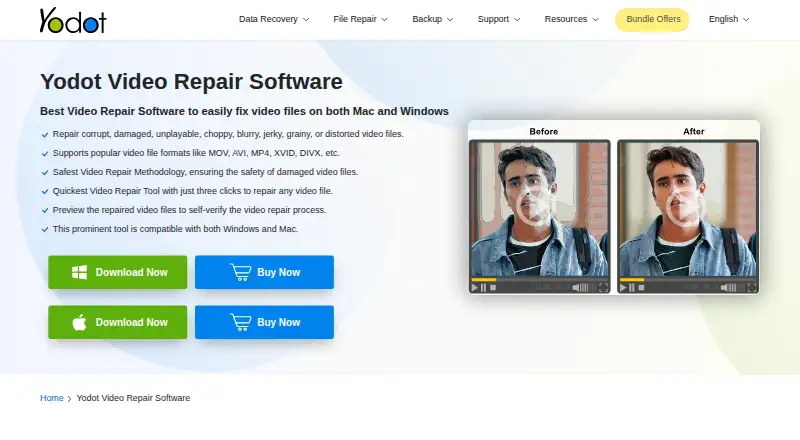
Yodot Video Repair is desktop software for repairing damaged or unplayable video files on Windows and macOS. It is described as addressing header corruption, audio-video sync problems, choppiness, jerkiness, blurriness, graininess, and distortion. Supported formats include MOV, MP4, M4V, AVI, XVID, and DIVX, and the product page lists AVC (H.264) and HEVC (H.265) codec support. The automatic workflow is to select a damaged video, run Repair, preview the result, and save it to a chosen location. Yodot works on a copy of the damaged file, leaving the original unmodified during repair, and a reference file is required. The product page says it can repair video from Canon, Nikon, and Sony cameras, GoPro and DJI devices, iPhones, and Android phones. A free trial can preview a repaired AVI file, but saving the result is disabled until purchase. Yodot advertises free technical support and a 30-day money-back policy for purchases. The listed one-time activation license key activates on two computers, two times each.
Who it suits
Yodot Video Repair suits Windows and macOS users trying to repair damaged or unplayable video files. It may be useful when the file has sync or playback problems and a reference file is available.
What it does well
- Works on a copy, leaving the original unmodified.
- Supports MOV, MP4, M4V, AVI, XVID, and DIVX.
- Users can preview repairs before saving.
- A free trial is available for evaluation.
- Yodot advertises free technical support.
What to know first
- The trial cannot save the repaired AVI file.
- A reference file is required.
- AVI Repair processes only one file at a time.
- The product is paid, with no free plan.
Limits
The trial can preview a repaired AVI file but cannot save it until purchase. Yodot AVI Repair handles only one AVI file at a time, without concurrent processing.
Plans
| Plan | Billed and limits | Price |
|---|---|---|
| Yodot Video Repair | One-time activation; license key activates on two computers, two times each | On request |
As yodot.com lists them, read 9 Oct 2026. The maker's own page has the final word.
Getting started
- Open the Yodot Video Repair website
- Download the demo or purchase the one-time activation plan
- Install it on a supported Windows or macOS system
- Select the damaged video and provide a reference file
- Run Repair, preview the result, and save it to a chosen location
Verdict
Yodot Video Repair offers an automatic repair workflow and lets users preview results before saving. The trial does not save the repaired AVI file, and the repair process requires a reference file.
Questions
Which systems support Yodot Video Repair?
It supports Windows and macOS. Windows requirements list at least 1 GB RAM and 50 MB installation space; Mac also requires a 64-bit system with the same memory and space minimums.
Is there a free version?
There is a free demo for evaluation, but saving a repaired AVI file is disabled until purchase.
What formats and codecs are supported?
Listed formats include MOV, MP4, M4V, AVI, XVID, and DIVX. The product page lists AVC (H.264) and HEVC (H.265) support.
How does the repair process work?
Select a damaged video, run the automatic repair, preview the result, then save it. A reference file is required, and the original remains unmodified because repair uses a copy.
What does the license include?
The one-time activation license key activates on two computers, two times each.
Is there a refund policy?
Yodot states a 30-day money-back policy for purchases.
Facts from Yodot Video Repair's own pages
- Codecs
- The product page says it supports AVC (H.264) and HEVC (H.265). · yodot.com, 9 Oct 2026
- Common issues
- The software is described as addressing header corruption and audio-video sync issues as well as unplayable, choppy, jerky, and blurry video. · yodot.com, 8 Oct 2026
- Device compatibility
- Yodot says it can repair videos from Canon, Nikon, Sony, GoPro, DJI drones, iPhones, and Android phones. · yodot.com, 9 Oct 2026
- Devices
- Yodot says it can repair videos shot on Canon, Nikon, and Sony cameras, GoPro, DJI drones, iPhones, and Android phones. · yodot.com, 8 Oct 2026
- Formats
- Supports video formats including MOV, AVI, MP4, XVID, and DIVX. · yodot.com, 9 Oct 2026
- Free evaluation
- Yodot describes the software as available in a free demo version for evaluating its performance before purchase. · yodot.com, 9 Oct 2026
- Guarantee
- The product page advertises a 100% money-back guarantee. · yodot.com, 8 Oct 2026
- Mac requirements
- The product page lists macOS 10.13 High Sierra through macOS 15 Sequoia, at least 1 GB RAM, and 50 MB installation space; Mac requires a 64-bit system. · yodot.com, 9 Oct 2026
- Media players
- The product page says it can repair videos that do not play in VLC Media Player, Windows Media Player, Adobe Flash Player, QuickTime, or iTunes. · yodot.com, 9 Oct 2026
- Platforms
- Yodot lists Windows and Mac versions; its system requirements include Windows 11 through XP and macOS 10.13 and later, plus earlier versions. · yodot.com, 8 Oct 2026
- Preview
- Users can preview a repaired video before saving it. · yodot.com, 9 Oct 2026
- Purpose
- Repairs corrupted, damaged, unplayable, choppy, blurry, jerky, grainy, or distorted video files. · yodot.com, 9 Oct 2026
- Read-only method
- The software works on a copy of the corrupt video file, leaving the original file unmodified during repair. · yodot.com, 8 Oct 2026
- Refund
- Yodot’s FAQ states a 30-day money-back policy for purchases. · yodot.com, 9 Oct 2026
- Repair limit
- The product FAQ says Yodot AVI Repair processes only one AVI file at a time and cannot repair multiple files concurrently. · yodot.com, 8 Oct 2026
- Repair method
- The tool uses a read-only method and works on a copy of the damaged video to create a playable file. · yodot.com, 9 Oct 2026
- Repair workflow
- The listed workflow is to select a damaged video, click Repair, then preview and save the result. · yodot.com, 8 Oct 2026
- Support
- The product page advertises free technical support; Yodot’s FAQ says it provides assistance by email and live chat and does not currently provide phone support. · yodot.com, 9 Oct 2026
- Trial limitation
- The product FAQ says the trial can preview a repaired AVI file, but saving the repaired file is disabled until purchase. · yodot.com, 8 Oct 2026
- Use cases
- It addresses header corruption and audio-video sync issues as well as unplayable, choppy, jerky, and blurry videos. · yodot.com, 9 Oct 2026
- Windows requirements
- The product page lists Windows 11, 10, 8.1, 8, 7, Vista, XP, and Windows Server, with at least 1 GB RAM and 50 MB installation space. · yodot.com, 9 Oct 2026
- Workflow
- The listed workflow is to select a damaged video, run repair, then preview and save the result. · yodot.com, 9 Oct 2026
Where Yodot Video Repair stands on Freedom251
- Video Repair Software#23 of 25