Freedom251 › Sega CD Emulators
YDrive
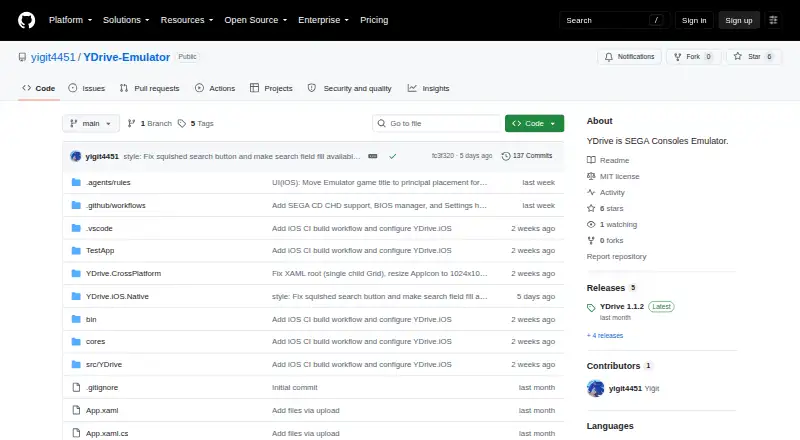
What YDrive is
YDrive is a free Windows SEGA console emulator and game library manager for organizing and browsing a retro game collection. It integrates the Genesis Plus GX emulation core, while an automatic scraper uses TheGamesDB API to retrieve cover art, metadata, and game information. Listed settings include audio resolution, six-button pad support, and aspect ratio choices. The interface has a dark theme and adjusts to English or Turkish based on the system language. A BIOS is required, and save states are supported. The stated prerequisites are 64-bit Windows 10 or 11; self-contained builds do not require the .NET 8 runtime. The project directs users to a Windows x64 ZIP in its Releases section. YDrive was developed independently by Yigit4451 as a non-commercial fan-made project, and the repository lists an MIT license. An in-game save/load state interface and shader or CRT scanline filters are roadmap items, rather than listed current features.
Who it suits
YDrive suits Windows users organizing and playing a retro SEGA game collection who can provide a BIOS. The stated system requirements are 64-bit Windows 10 or 11.
What it does well
- Integrates the Genesis Plus GX core.
- Automatic scraper retrieves cover art and game metadata.
- Supports save states.
- Interface adjusts to English or Turkish system language.
What to know first
- A BIOS is required.
- The in-game save/load interface is planned, not listed as available.
- Shader and CRT scanline filters are planned additions.
Limits
A BIOS is required. The dedicated in-game save/load state interface and shader or CRT scanline filters are listed as planned additions; save states are supported.
Getting started
- Use a 64-bit Windows 10 or 11 system.
- Open the project's Releases section on GitHub.
- Download the Windows x64 ZIP.
- Provide a BIOS to use the emulator.
Verdict
YDrive brings SEGA emulation and collection management together, with automatic metadata retrieval and save-state support. Note the BIOS requirement and that its in-game save/load interface and visual filters are roadmap items.
Questions
How much does YDrive cost?
YDrive is free, with a free plan.
Which platforms does YDrive support?
YDrive is listed for Windows. Its stated prerequisites are 64-bit Windows 10 or 11.
Does YDrive require a BIOS?
Yes, a BIOS is required.
Does YDrive support save states?
Yes. Save states are supported; a dedicated in-game save/load state interface is planned.
Where can I download YDrive?
The project directs users to download a Windows x64 ZIP from the Releases section of its GitHub repository.
What license does YDrive use?
The repository lists an MIT license.
Facts from YDrive's own pages
- Developer
- The README says YDrive was developed independently by Yigit4451. · github.com, 7 Oct 2026
- Distribution
- The README directs users to download a Windows x64 ZIP from the Releases section. · github.com, 7 Oct 2026
- Emulation core
- The emulator integrates the Genesis Plus GX core. · github.com, 7 Oct 2026
- Game metadata
- An automatic scraper uses TheGamesDB API to fetch cover art, metadata, and game information. · github.com, 7 Oct 2026
- Interface
- The project describes its interface as a modern dark theme for organizing and browsing a retro game collection. · github.com, 7 Oct 2026
- Languages
- The interface adjusts to English or Turkish system language. · github.com, 7 Oct 2026
- License
- The repository page lists an MIT license. · github.com, 7 Oct 2026
- Planned features
- In-game save/load state UI and shader or CRT scanline filters are listed on the development roadmap. · github.com, 7 Oct 2026
- Product
- YDrive is a SEGA console emulator and game library manager. · github.com, 7 Oct 2026
- Project status
- The README describes YDrive as a non-commercial fan-made project. · github.com, 7 Oct 2026
- Purpose
- YDrive is a SEGA console emulator and game library manager. · github.com, 7 Oct 2026
- Requirements
- The stated prerequisites are 64-bit Windows 10 or 11; .NET 8 runtime is not required for self-contained builds. · github.com, 7 Oct 2026
- Roadmap
- The development roadmap lists an in-game save/load state interface and shader or CRT scanline filters as planned items. · github.com, 7 Oct 2026
- Settings
- The project lists audio resolution, 6-button pad support, and aspect ratio choices among its settings. · github.com, 7 Oct 2026
- Technology
- The project is built with C# and .NET 8 using WPF and an MVVM architecture. · github.com, 7 Oct 2026
- Windows requirements
- The listed prerequisites are Windows 10 or 11 (64-bit); .NET 8 runtime is not required for self-contained builds. · github.com, 7 Oct 2026
Where YDrive stands on Freedom251
- Sega CD Emulators#18 of 19