Freedom251 › Build Automation Software

Xmake
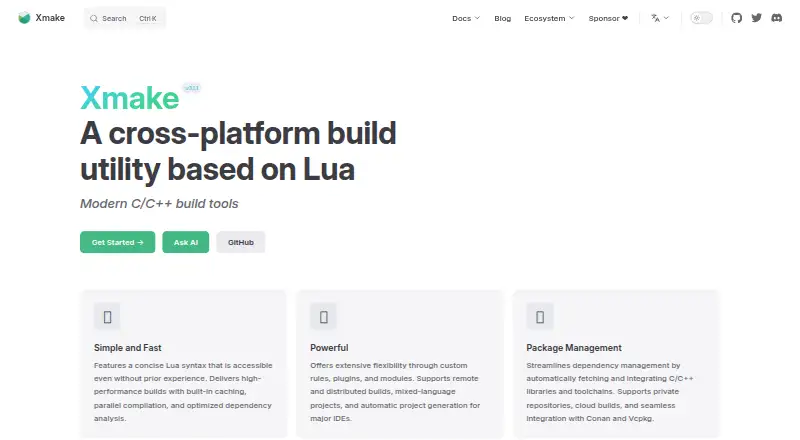
What Xmake is
Xmake is a free build utility based on Lua that can compile source code or generate project files. Lua project scripts are driven by a dependency-free core written in C. Listed build features include caching, parallel compilation, and optimized dependency analysis. The tool supports mixed-language projects, custom rules, plugins, and modules. For C and C++ dependencies, `xmake require` manages packages within a project, while `xrepo` provides global package commands. Repositories can be official, user-built, or third-party sources such as Conan, Conda, Vcpkg, Homebrew, and system package managers. Xmake documents distributed compilation, with token and password authentication and server-side trusted-host verification. It can generate files for major IDEs, and documented plugins include VS Code, IntelliJ IDEA, CLion, Zed, and Sublime. Installation guides cover Windows, macOS, Linux, FreeBSD, and Android’s Termux; the documentation also includes iOS and Android application examples. The project describes its configuration syntax as accessible to novices while retaining build-system flexibility. It is community-driven and primarily maintained in its creator’s spare time.
Who it suits
Xmake suits developers who want a Lua-configured tool for building code or generating project files across platforms. Its project describes the syntax as approachable for novices while retaining flexibility for build-system needs.
What it does well
- Free to use, with no free-trial requirement.
- Includes caching and parallel compilation.
- Supports package management for C and C++ dependencies.
- Documents remote compilation with authentication options.
- Can generate project files for major IDEs.
What to know first
- The project is primarily maintained in its creator’s spare time.
- Installation guidance is listed for Windows, Linux, and macOS.
Getting started
- Open the Xmake website and review its documentation.
- Follow the installation instructions for Windows, Linux or macOS, or the documented FreeBSD and Termux options.
- Create a Lua project script for the build.
- Use Xmake to compile source code or generate project files for an IDE.
- Add C/C++ dependencies with `xmake require` or manage global packages with `xrepo`.
- For remote compilation, configure token or password authentication and trusted-host verification.
Verdict
Xmake combines project builds, project-file generation, dependency management, and distributed compilation in a free tool. Its community-driven maintenance model and root-installation caution are worth considering.
Questions
How much does Xmake cost?
Xmake is free, with a free plan.
Which operating systems does it support?
The installation guide covers Windows, macOS, Linux, FreeBSD and Android's Termux. Documentation also includes examples for iOS and Android applications.
Can Xmake manage C and C++ dependencies?
Yes. `xmake require` manages packages for a project, while `xrepo` provides global package commands. Xmake supports its own and user-built repositories along with sources such as Conan, Conda, Vcpkg, Homebrew and system package managers.
Does Xmake support remote builds?
Yes. Its distributed compilation documentation covers GCC, Clang, Windows and MSVC, and remote compilation supports token and password authentication with server-side trusted-host verification.
Which IDEs does it support?
Xmake can automatically generate project files for major IDEs. Documented plugins include VS Code, IntelliJ IDEA, CLion, Zed and Sublime.
Where can users get help?
Xmake links to a community and to its GitHub and Gitee project pages for documentation and help.
Facts from Xmake's own pages
- Authentication
- The distributed compilation guide recommends token authentication for connecting clients to build servers. · xmake.io, 3 Oct 2026
- Build and project generation
- Xmake can build source code directly or generate project files, and it includes package management for C/C++ dependencies. · xmake.io, 3 Oct 2026
- Build performance
- The homepage says Xmake uses built-in caching, parallel compilation, and optimized dependency analysis. · xmake.io, 3 Oct 2026
- Build speed
- The homepage lists built-in caching, parallel compilation, and optimized dependency analysis among its build features. · xmake.io, 3 Oct 2026
- Community and support
- Xmake describes itself as a community-driven open-source project maintained primarily in the creator’s spare time and invites users to its community and sponsorship channels. · xmake.io, 3 Oct 2026
- Core
- Its Lua project scripts are driven by a dependency-free core program written in C. · xmake.io, 3 Oct 2026
- Distributed builds
- Xmake documents built-in distributed compilation and support for GCC, Clang, Windows, and MSVC. · xmake.io, 3 Oct 2026
- Extensibility
- Xmake supports custom rules, plugins, and modules, as well as mixed-language projects. · xmake.io, 3 Oct 2026
- IDE integrations
- Officially documented IDE plugins include VS Code and IntelliJ IDEA/CLion; the docs also list Zed and Sublime plugins. · xmake.io, 3 Oct 2026
- IDE support
- The homepage says Xmake can automatically generate project files for major IDEs. · xmake.io, 3 Oct 2026
- Installation caution
- Xmake advises against root installation, describing it as insecure and warning of possible operating-system file errors when run as root. · xmake.io, 3 Oct 2026
- Install platforms
- The installation page gives instructions for Windows, Linux, and macOS. · xmake.io, 3 Oct 2026
- Intended users
- The project introduction says Xmake’s concise configuration syntax is friendly to novices while retaining build-system flexibility. · xmake.io, 3 Oct 2026
- Mobile targets
- Build configuration examples cover Android and iPhoneOS targets. · xmake.io, 3 Oct 2026
- Package commands
- The xmake require command manages packages for the current project, while xrepo provides global package management commands. · xmake.io, 3 Oct 2026
- Package management
- Xmake includes package management for integrating C/C++ dependencies, and its homepage names Conan and Vcpkg integrations. · xmake.io, 3 Oct 2026
- Package repositories
- Xmake supports its official package repository, user-built repositories, and third-party sources including Conan, Conda, Vcpkg, Homebrew, and system package managers. · xmake.io, 3 Oct 2026
- Platform support
- The installation guide documents Windows, macOS, Linux, FreeBSD, and Termux on Android. · xmake.io, 3 Oct 2026
- Purpose
- Xmake is a lightweight, cross-platform build utility based on Lua that can build source code or generate project files. · xmake.io, 3 Oct 2026
- Remote build security
- Remote compilation supports token and password authentication, plus server-side trusted-host verification. · xmake.io, 3 Oct 2026
- Support
- The site links to a community and GitHub and Gitee project pages for documentation and help. · xmake.io, 3 Oct 2026
- What it does
- Xmake is a lightweight, cross-platform build utility based on Lua, with a dependency-free core written in C. · xmake.io, 3 Oct 2026
Where Xmake stands on Freedom251
- Build Automation Software#32 of 42