Freedom251 › Build Automation Software

Waf
What Waf is
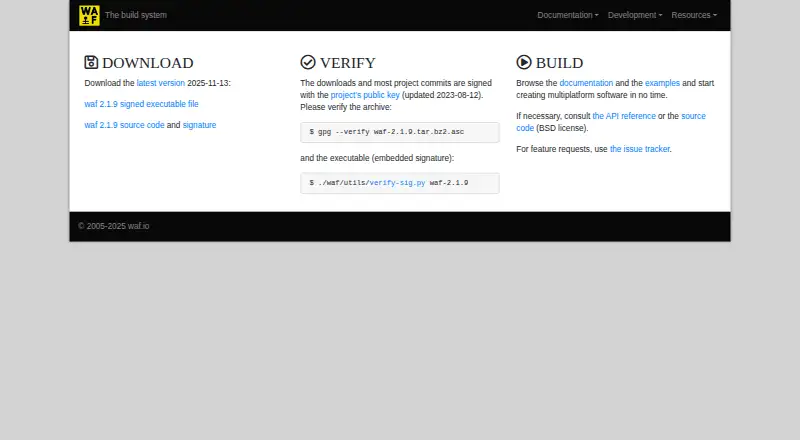
Waf is a free build system for automating source processing and custom commands in software projects. It runs compilers and scripts, checks configuration and tests, tracks changes to avoid unnecessary work, and parallelizes processes. Projects define settings and commands in Python files named wscript. Waf requires Python but no additional software or libraries, and its executable can run without installation when its folder is writable. Built-in phases include configure, build, install, uninstall, distribution, cleaning, listing, and stepping through tasks. Reusable Python modules can extend the system, and extensions can be bundled into a built executable. Waf supports Linux, macOS, and Windows; its documentation covers compiler detection for GCC, Clang, and MSVC. The project uses a BSD license permitting redistribution and modification under its conditions. The site lists Waf 2.1.9, dated 2025-11-13, with signed downloads and verification instructions. Windows users receive a waf.bat file that detects Python. Feature requests go to the project issue tracker.
Who it suits
Waf suits developers who want Python-configured, cross-platform build automation with incremental and parallel processing. It is also useful for projects needing extensible build scripts and standard distribution commands.
What it does well
- Tracks changes for incremental builds
- Supports parallel processes
- No installation required for executable
- Uses Python wscript project files
- Runs on Linux, macOS, and Windows
What to know first
- Requires Python
- Writable executable folder is required
- Interpreter compatibility varies by version
- BSD license has stated conditions
Verdict
Waf provides a free, Python-based build workflow with incremental processing, parallel execution, and extensible scripts. Its no-install executable and multi-platform support are practical, provided Python and a writable folder are available.
Facts from Waf's own pages
- Build scripts
- Waf project scripts are Python files named wscript. · waf.io, 8 Oct 2026
- Build tasks
- Waf can run compilers and scripts, track changes to avoid unnecessary work, parallelize processes, and assist with tests and configuration checks. · waf.io, 8 Oct 2026
- Build workflow
- Waf provides configure, build, install, uninstall, dist, and clean project phases. · waf.io, 8 Oct 2026
- Commands
- Built-in commands include build, clean, configure, dist, distcheck, distclean, install, list, step, and uninstall. · waf.io, 8 Oct 2026
- Compiler support
- Waf documentation describes tools for detecting C and C++ compilers including GCC, Clang, and MSVC. · waf.io, 8 Oct 2026
- Current download
- The homepage lists Waf 2.1.9 as the latest version, dated 2025-11-13. · waf.io, 8 Oct 2026
- Download
- The site lists Waf 2.1.9 as its latest release, dated 2025-11-13, with signed executable and source downloads. · waf.io, 8 Oct 2026
- Download security
- The site says downloads and most project commits are signed with the project's public key and provides instructions for verifying the archive and executable. · waf.io, 8 Oct 2026
- Extensibility
- Waf can be extended with reusable Python modules, and additional extensions can be included in a built Waf executable. · waf.io, 8 Oct 2026
- Help and requests
- The site directs users to its documentation and API reference and directs feature requests to the issue tracker. · waf.io, 8 Oct 2026
- Incremental builds
- Waf can run processes only when needed by tracking what has changed. · waf.io, 8 Oct 2026
- Installation
- The executable requires no installation, but its folder must be writable so it can decompress its library when run. · waf.io, 8 Oct 2026
- Integrity
- The site says downloads and most project commits are signed with the project's public key and provides verification instructions. · waf.io, 8 Oct 2026
- License
- The Waf files are published under a BSD license that permits redistribution and modification subject to its conditions. · waf.io, 8 Oct 2026
- Parallel builds
- Waf supports parallelizing processes for efficiency. · waf.io, 8 Oct 2026
- Project configuration
- Projects use Python modules named wscript to define project-specific details and commands. · waf.io, 8 Oct 2026
- Purpose
- Waf is a build system that automates source code processing and custom command execution in software projects. · waf.io, 8 Oct 2026
- Python interpreters
- The executable documentation lists cPython, PyPy, and Jython as supported interpreters, with compatibility depending on interpreter versions. · waf.io, 8 Oct 2026
- Requirements
- Waf requires Python and does not depend on additional software or libraries. · waf.io, 8 Oct 2026
- Runtime
- Waf requires only Python and does not depend on additional software or libraries. · waf.io, 8 Oct 2026
- Support
- The homepage directs feature requests to the project's issue tracker. · waf.io, 8 Oct 2026
- Use without installation
- The Waf executable can be run directly with Python, and the documentation says no installation is necessary. · waf.io, 8 Oct 2026
- Windows support
- The documentation says a waf.bat file is provided for Windows to detect Python. · waf.io, 8 Oct 2026
Where Waf stands on Freedom251
- Build Automation Software#34 of 42