Freedom251 › Minecraft Launchers

X Minecraft Launcher
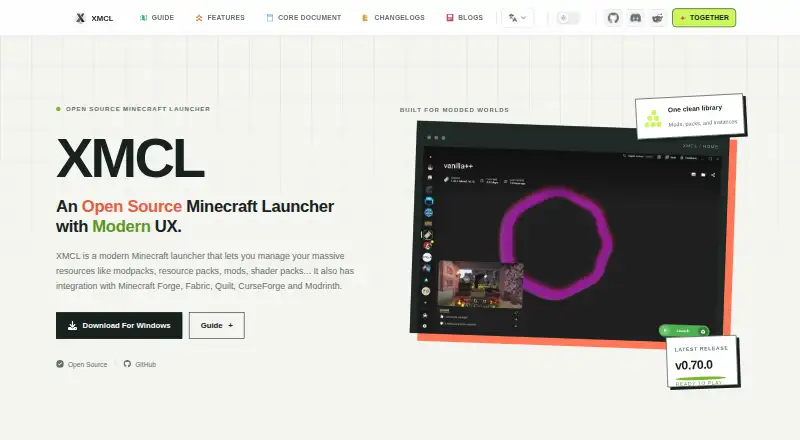
What X Minecraft Launcher is
X Minecraft Launcher is a free, open-source launcher for managing Minecraft game resources and separate instances. It supports modpacks, resource packs, mods, shader packs, and other resources, with instances spanning Forge, Fabric, Quilt, NeoForge, OptiFine, and LabyMod; Bedrock support is experimental. Its marketplace gathers modpacks and projects from Modrinth, CurseForge, and FTB, and users can also import modpacks. The launcher includes Java runtime management and automatic updates. Mod tools include dependency inspection and custom groups. It supports Microsoft, offline, and third-party authentication services, including Ely.by and LittleSkin. World tools can preview saves, select, copy, or delete chunks, and show structures in 3D. Users can export modpacks and local server files. Installation packages are listed for Windows, macOS, and Linux. Telemetry is off by default and only processed when explicitly enabled in settings. XMCL says it does not process or store Microsoft account passwords, credentials, or session tokens. The project is independent and says it is not an official Minecraft product or associated with Mojang or Microsoft.
Who it suits
It suits Minecraft players on Windows, macOS, or Linux who want to organize separate instances and manage modpacks, mods, and Java runtimes. Players seeking Bedrock support should note that it is experimental.
What it does well
- Free and open source.
- Manages separate instances across multiple mod loaders.
- Imports modpacks and includes a marketplace.
- Java runtime management and automatic updates are included.
- Telemetry is disabled by default.
What to know first
- Bedrock support is experimental.
- Available packages are for desktop platforms only.
- Not an official Minecraft product or affiliated with Mojang or Microsoft.
Limits
Bedrock support is experimental.
Plans
| Plan | Billed and limits | Price |
|---|---|---|
| XMCL | Free, open-source Minecraft launcher | Free |
As xmcl.app lists them, read 8 Oct 2026. The maker's own page has the final word.
Getting started
- Visit xmcl.app.
- Choose the installation package for Windows, macOS, or Linux.
- Install the launcher and create or manage a Minecraft instance.
- Choose an authentication option supported by the launcher.
Overview
X Minecraft Launcher (XMCL) is a free, open-source desktop launcher for Minecraft worlds and game resources. It suits players who maintain several modded setups or want more control over mods and saves. Its broad toolkit is useful for Java play, but Bedrock support is experimental and the project is independent of Mojang and Microsoft.
Key features
XMCL keeps game instances separate across Forge, Fabric, Quilt, NeoForge, OptiFine, and LabyMod. That makes it a practical option for players who switch between different modded configurations and want to keep their setups organized; experimental Bedrock support is not a firm basis for a Bedrock-focused choice. Modpacks can be imported and browsed through a built-in marketplace connecting projects from Modrinth, CurseForge, and FTB.
The launcher also manages resource packs, shader packs, Java runtimes, and installed mods. Dependency inspection and custom mod groups help users understand and organize a setup rather than merely install files. Automatic updates reduce launcher maintenance, while export tools can package modpacks and local server files for sharing.
World management is a meaningful differentiator: users can preview saves, select, copy, or delete chunks, and inspect structures in 3D. Authentication options include Microsoft, offline, and third-party services such as Ely.by and LittleSkin. XMCL says telemetry is disabled by default and only processed if enabled in settings; it also says it does not process or store Microsoft passwords, credentials, or session tokens.
Pricing
XMCL costs nothing. The free, open-source plan includes the launcher, with no paid tier described. That makes it suitable for players who want instance and resource management without a launcher subscription. The project directs issue reports to GitHub and community support to Discord.
Platforms
XMCL provides desktop packages for Windows, macOS, and Linux. It is not a mobile launcher.
Who it's for
Choose XMCL if you regularly move among modded Minecraft instances, want a combined catalog and mod-management workflow, or need tools for inspecting and editing worlds. It is less suitable if you require established Bedrock support or specifically want an official Mojang or Microsoft product: XMCL is an independent project operated by CI010 and the Voxelum contributor community, and is not approved by or associated with either company.
Pros and cons
- Pros: Separate instances cover six named mod-loader and client options, making it easier to keep configurations apart.
- Pros: The marketplace aggregates modpacks and projects from Modrinth, CurseForge, and FTB, while import and export support sharing setups.
- Pros: Save previews, chunk operations, and 3D structure previews extend the launcher beyond installation and mod upkeep.
- Pros: Telemetry is off unless enabled, and XMCL says it does not handle Microsoft account credentials or tokens.
- Cons: Bedrock support is experimental, so Bedrock players should not rely on it as a core capability.
- Cons: It is an independent, unofficial project, which may not suit players seeking a Mojang- or Microsoft-affiliated launcher.
Alternatives
Browse Minecraft Launchers for more options. Prism Launcher is another free, open-source option for Windows, macOS, and Linux; choose between them based on whether XMCL's world tools and its Modrinth, CurseForge, and FTB marketplace suit your needs. Refract is also free and supports the same desktop platforms, making it another option to compare.
LabyMod offers a free Minecraft Java Edition launcher for Windows, macOS, and Linux, with support for more than 20 versions, as well as a paid Laby+ plan; consider it if that version coverage is your priority. Spectra Launcher is a free desktop program for Windows, macOS, and Linux. GDLauncher is free on those platforms, with no premium tier or overlay. ATLauncher is a free, open-source desktop option, but requires a paid Minecraft account to use the launcher and play modpacks. Thendrask Launcher has a free MIT-licensed plan with no subscription requirement, plus an End Crystal plan at $3 a month for project support. Cactus MC Launcher is free forever, open-source, ad-free, and available for Windows, macOS, and Linux.
Verdict
XMCL is a strong choice for desktop players who want separate modded instances, a multi-source modpack catalog, and unusually capable world tools in a free launcher. Look elsewhere if experimental Bedrock support is not enough or you require an official Minecraft product.
Verdict
XMCL offers instance, modpack, Java, and world-management tools in one launcher for supported desktop systems. Its project status and experimental Bedrock support are worth noting.
Questions
How much does XMCL cost?
The XMCL plan is free. XMCL is described as a free, open-source launcher.
Which platforms does it support?
The installation guide provides packages for Windows, macOS, and Linux.
Can I import modpacks?
Yes. Modpacks can be imported, and XMCL also has a built-in marketplace catalog.
Which mod loaders does it support?
Its game instances support Forge, Fabric, Quilt, NeoForge, OptiFine, and LabyMod. Bedrock support is experimental.
Is XMCL an official Minecraft product?
No. XMCL says it is not official and is not approved by or associated with Mojang or Microsoft.
Where can I get support?
The project directs issue reports to GitHub and community support to Discord.
Facts from X Minecraft Launcher's own pages
- Accounts
- The launcher supports Microsoft, offline, and third-party authentication services, including Ely.by and LittleSkin. · xmcl.app, 8 Oct 2026
- Affiliation
- The site says XMCL is not an official Minecraft product and is not approved by or associated with Mojang or Microsoft. · xmcl.app, 8 Oct 2026
- Automatic updates
- Yes · xmcl.app, 19 Sept 2026
- Built-in modpack catalog
- Yes · xmcl.app, 19 Sept 2026
- Community content
- Its marketplace brings together modpacks and projects from Modrinth, CurseForge, and FTB. · xmcl.app, 8 Oct 2026
- Credential handling
- XMCL says it does not process or store Microsoft account passwords, credentials, or session tokens. · xmcl.app, 8 Oct 2026
- Desktop platforms
- The installation guide provides packages for Windows, macOS, and Linux. · xmcl.app, 8 Oct 2026
- Free plan
- Yes · xmcl.app, 19 Sept 2026
- Game instances
- It creates and manages separate Minecraft instances across Forge, Fabric, Quilt, NeoForge, OptiFine, and LabyMod, with experimental Bedrock support. · xmcl.app, 8 Oct 2026
- Java runtime management
- Yes · xmcl.app, 19 Sept 2026
- Mod loader support
- multiple · xmcl.app, 19 Sept 2026
- Mod management
- Users can inspect mod dependencies, organize custom groups, and manage installed mods. · xmcl.app, 8 Oct 2026
- Modpack import
- both · xmcl.app, 19 Sept 2026
- Privacy
- Launcher telemetry is disabled by default and is processed only when the user explicitly enables it in settings. · xmcl.app, 8 Oct 2026
- Project status
- XMCL is an independent open-source project operated by CI010 and the Voxelum contributor community. · xmcl.app, 8 Oct 2026
- Separate instances
- Yes · xmcl.app, 19 Sept 2026
- Sharing
- Users can export modpacks and local server files from the launcher. · xmcl.app, 8 Oct 2026
- Support
- The project directs users to GitHub for issue reports and Discord for community support. · xmcl.app, 8 Oct 2026
- What it does
- XMCL is an open-source Minecraft launcher for managing modpacks, resource packs, mods, shader packs, and other game resources. · xmcl.app, 8 Oct 2026
- World tools
- XMCL can preview saves, select, copy, or delete chunks, and preview structures in 3D. · xmcl.app, 8 Oct 2026
Where X Minecraft Launcher stands on Freedom251
- Minecraft Launchers#7 of 76