Freedom251 › AI Text Humanizers

WriteHuman
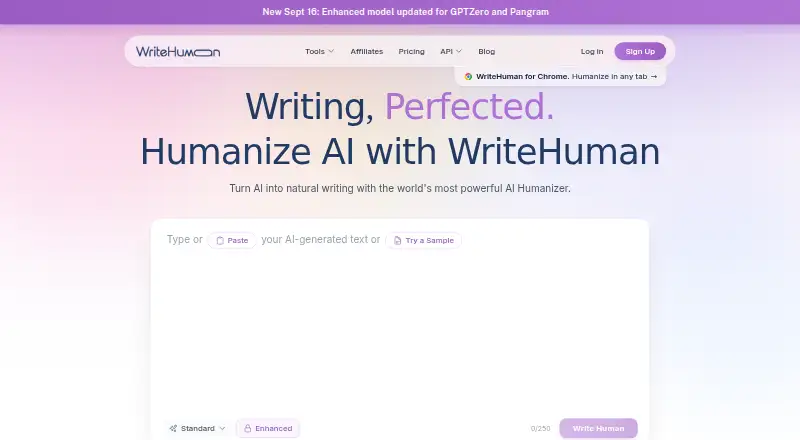
What WriteHuman is
WriteHuman rewrites AI-generated text to read more naturally, with the aim of retaining its meaning and voice. The site says it accepts writing from ChatGPT, Claude, Gemini, Grok, DeepSeek, and other AI tools, and supports more than 40 languages. Listed uses include articles, blog posts, marketing copy, emails, landing pages, newsletters, and reports. Its detector assigns an AI probability to each sentence. The mobile app includes humanization, writing detection, and image detection, with five free uses of each in a rolling 30-day period. The Chrome extension adds grammar and spelling checks, inline corrections, a personal dictionary, site controls, and a side panel for humanization. Developers can use a REST API; MCP access is listed on paid plans subject to limits. A free plan is available, and paid plans start at $12/mo. The company says submissions are encrypted in transit and at rest and are not sold or shared with advertisers. Its terms warn that output and detection may be inaccurate or change meaning.
Who it suits
It may suit marketers, freelancers, professionals, content creators, and agencies who want to revise AI-generated writing. Developers can also use its REST API.
What it does well
- Supports more than 40 languages.
- Sentence-level AI probability detection is included.
- Chrome extension has inline fixes and a personal dictionary.
- REST API and paid-plan MCP access are listed.
What to know first
- Free plan allows three humanizer requests monthly.
- Mobile tools allow five free uses each per rolling 30 days.
- Terms warn results may be inaccurate or alter meaning.
- Pricing page lists differing monthly prices across its sections.
Limits
The free plan permits 3 humanizer requests per month, up to 250 words per request and one output variation, plus 10 detection checks and 10 image scans monthly. Paid plans set different request, word, variation, detection, and image-scan limits; Ultra lists unlimited requests and up to 3,000 words per request, while its annual plan lists 1,000 MCP uses monthly.
Plans
| Plan | Billed and limits | Price |
|---|---|---|
| Free | 3 humanizer requests/month · 250 words/request · 1 output variation · 10 detection checks/month · 10 image scans/month | Free |
| Premium 800K API | 800K words/month · 6,000 words/call · 3 outputs/request · 160 requests/min | $129 a month |
| Basic | $144 billed yearly · 80 requests/month · 2 output variations · enhanced model · AI detection checks · 600 words/request · MCP access · priority support | $144 a year |
| Basic (annual) | billed annually ($144 billed yearly shown on plan card) · 80 requests/month · 600 words/request · 2 output variations · enhanced model · AI detection checks | $144 a year |
| Basic | Monthly billing · 80 requests/month · 600 words/request | $20 a month |
| Pro (annual) | billed annually ($228 billed yearly shown on plan card) · 200 requests/month · 1,200 words/request · 3 output variations · enhanced model · MCP access | $228 a year |
| Pro | $228 billed yearly · 200 requests/month · 3 output variations · enhanced model · AI detection checks · 1,200 words/request · MCP access · priority support | $228 a year |
| API Standard | Monthly billing · 125,000 words/month · 2,000 words/request · 1 output/request · 40 requests/minute · up to 5 API keys | $29 a month |
The first 8 of 15 plans, as writehuman.ai lists them, read 2 Oct 2026. The maker's own page has the final word. Every plan
Getting started
- Open https://writehuman.ai/.
- Choose the free plan or a paid plan that fits your request and word limits.
- Use the web service, or access it through the Android or iOS app or Chrome extension.
- For developer use, choose an API plan; MCP access is listed on paid plans subject to limits.
WriteHuman is an AI-text rewriting service for people who want to refine generated drafts and check text or images for AI signals. It is best suited to creators and professionals who can use its browser, mobile, or developer tools alongside the humanizer. Choose it for that breadth, not for guaranteed rewrites or detector outcomes.
Overview
WriteHuman aims to make AI-generated writing read more naturally while retaining its meaning and voice. It accepts text from ChatGPT, Claude, Gemini, Grok, DeepSeek, and other AI writing tools, and supports more than 40 languages. Its listed uses span articles, blog posts, marketing copy, emails, landing pages, newsletters, and reports, making it relevant to varied content workflows.
The central trade-off is reliability: the company warns that a rewrite can change meaning and detection results can be inaccurate. It does not guarantee a particular detector score or outcome. That makes WriteHuman a poor fit when preserving every nuance or meeting a specific detection threshold is essential.
Key features
Humanizing and detection
The detector assigns an AI probability to each sentence, which gives writers a more granular view than a single passage-level result. Paid humanizer plans provide multiple output variations, useful when a first rewrite misses the desired voice. Neither tool should be treated as definitive: review revised text for meaning and do not rely on a particular detection result.
Mobile and browser tools
The mobile app combines an AI humanizer with AI writing and image detectors. Each tool includes five free uses on a rolling 30-day allowance, a small but useful way to try all three before committing. The Chrome extension adds grammar and spelling checks, inline fixes, a personal dictionary, site-by-site controls, and a humanizer in a side panel. It is the more practical fit for writers who want assistance in the browser rather than moving drafts between separate tools.
API, MCP, and privacy
Developers can use a REST API, with paid plans also offering MCP access subject to plan limits. API tiers set monthly word quotas, per-call word limits, output counts, and request rates, so the right option depends on expected throughput. WriteHuman says submissions are encrypted in transit with TLS and at rest with AES-256, and are not sold or shared with advertisers. Its terms also say services use its own AI models and may use third-party models and services.
Pricing
WriteHuman is freemium, but its subscription prices conflict across the pricing page: plan cards show annual-billing rates while a comparison table gives monthly rates. The annual plan cards show Basic at $12/mo ($144 billed yearly), Pro at $19/mo ($228 billed yearly), and Ultra at $39/mo ($468 billed yearly); the comparison table shows monthly Basic at $20/mo, Pro at $29/mo, and Ultra at $59/mo. Confirm the billing term and amount before subscribing.
| Plan | Price | Limits and inclusions |
|---|---|---|
| Free | free | 3 humanizer requests/month, 250 words/request, 1 variation, 10 detection checks/month, and 10 image scans/month. |
| Basic (annual) | $12/mo, billed annually ($144 billed yearly) | 80 requests/month, 600 words/request, 2 variations, enhanced model, and AI detection checks. |
| Pro (annual) | $19/mo, billed annually ($228 billed yearly) | 200 requests/month, 1,200 words/request, 3 variations, enhanced model, and MCP access. |
| Ultra (annual) | $39/mo, billed annually ($468 billed yearly) | Unlimited requests, 3,000 words/request, 5 variations, and MCP access (1,000/month). |
| Basic | $20 a month | 80 requests/month, 600 words/request, 2 variations, 160 detection checks/month, and 80 image scans/month. |
| Pro | $29 a month | 200 requests/month, 1,200 words/request, 3 variations, 400 detection checks/month, and 200 image scans/month. |
| Ultra | $59 a month | Unlimited requests, 3,000 words/request, 5 variations, and unlimited detection checks and image scans. |
| Standard API | $29 a month | 125K words/month, 2,000 words/call, 1 output/request, and 40 requests/min. |
| Premium 400K API | $69 a month | 400K words/month, 4,000 words/call, 3 outputs/request, and 120 requests/min. |
| Premium 800K API | $129 a month | 800K words/month, 6,000 words/call, 3 outputs/request, and 160 requests/min. |
Free is best for occasional, short rewrites and light checking; three 250-word requests and ten checks of each listed type make it a trial-sized allowance, not a regular publishing workflow. Basic raises the humanizer quota to 80 monthly requests but retains a 600-word cap per request. Pro doubles that request allowance and raises the cap to 1,200 words, while adding more variations; it suits heavier individual use. Ultra removes the monthly request ceiling and allows 3,000 words per request, though its annual card still caps MCP access at 1,000 per month. The monthly comparison tiers include explicit detection and image-scan quotas, while the annual card summaries do not state those counts. Paid subscription plan cards list priority support; Enterprise API offers dedicated support, with custom pricing.
The API tiers are aimed at different integration volumes: Standard allows 125K words monthly and one output per call, while the two Premium tiers increase both quota and request rate, and allow three outputs. These are less suitable when usage is unpredictable or exceeds the monthly word allocation. No seat counts are given, so team suitability should not be inferred from the individual plan quotas.
Platforms
WriteHuman is available on web, Android, iOS, through a Chrome extension, and via API. That range supports both direct writing workflows and integrations, but each channel has different usage limits and capabilities.
Who it's for
Marketers, freelancers, professionals, content creators, and agencies can use WriteHuman to revise AI drafts across common content formats. The extension is useful for browser-based editing, while the API and MCP options suit developers integrating rewriting into other workflows. It is less appropriate for anyone who needs guaranteed meaning preservation, a dependable detector verdict, or a clearly unambiguous subscription price before purchase.
Pros and cons
- Pros: Supports 40-plus languages and multiple content types, giving users flexibility across languages and channels.
- Pros: Sentence-level detection, mobile text and image tools, and a capable Chrome extension extend the service beyond rewriting.
- Pros: API plans spell out word, call, output, and rate limits, which helps developers match capacity to expected use.
- Cons: Rewrite meaning and detector accuracy are not guaranteed, limiting its usefulness for high-stakes or score-dependent work.
- Cons: The pricing page presents different annual and monthly prices, complicating plan comparison.
- Cons: Free use is tightly capped at three short humanizer requests each month, so it cannot support sustained drafting.
Alternatives
For a broader comparison, browse AI Text Humanizers.
- StealthWriter is another freemium option, with a free allowance of 10 humanizations and 10 AI scans per day, a 1,000-word input limit, and Android, iOS, and web access.
- Humanize AI may suit users who want a web and API option with 1,500 free words per month and a 300-word check limit.
- HumanizeAI.io is worth considering for its free overall word allowance, though free requests without signup return tomorrow and each request has a limited word count.
- Ryne AI offers a free Amethyst plan with 100 coins and a 250-word humanization limit per go.
- Rephrasy may appeal to users seeking a paid option with a $8.25 per month Growth plan billed at $99 yearly, 100 monthly humanizations, and a Chrome extension.
- Humbot is another freemium choice, with a $7.99 per year Basic plan and a 500-word input limit.
- AIHumanize offers a $12 a month Basic plan with up to 500 words per request and monthly humanizer and detector word quotas.
- HumanizerAI may suit users who want API access on a $10 a month Starter plan, alongside a 10,000-word monthly quota and an AI detector.
Verdict
WriteHuman is a sensible choice for creators who want rewriting, sentence-level detection, and browser or mobile tools in one service, with API plans for integration work. Its strongest case is the breadth of those tools across platforms and content types. Look elsewhere if faithful preservation or dependable detection results are central, and verify the subscription price and billing term before choosing a paid plan.
Verdict
WriteHuman combines rewriting with sentence-level detection and browser and mobile tools. Check the plan limits and pricing details, and review outputs because meaning and detection results are not guaranteed.
Questions
Is there a free plan?
Yes. It includes 3 humanizer requests per month, 10 detection checks, and 10 image scans.
What do paid plans cost?
Plan cards list Basic at $12/mo, Pro at $19/mo, and Ultra at $39/mo with yearly billing; the cards show annual bills of $144, $228, and $468. The comparison table also lists Basic at $20/mo, Pro at $29/mo, and Ultra at $59/mo.
Which platforms does WriteHuman support?
It lists Android, iOS, web, an extension, and API access.
Does it include an AI detector?
Yes. It assigns each sentence its own AI probability. The mobile app also includes an AI writing detector and image detector.
Is there a plagiarism checker?
No. The supplied product details say there is no plagiarism checker.
How does WriteHuman handle submitted text?
The company says submissions are encrypted in transit with TLS and at rest with AES-256, and are not sold or shared with advertisers. Its terms caution that outputs or detection results may be inaccurate or may alter meaning.
Facts from WriteHuman's own pages
- AI detector
- The product includes a detector that reports AI probability for individual sentences. · writehuman.ai, 21 Oct 2026
- API and MCP
- The developer offering includes a REST API and the pricing page lists MCP access on paid plans, subject to plan limits. · writehuman.ai, 2 Oct 2026
- API authentication
- API requests use revocable Bearer API keys, with up to five keys available per account. · writehuman.ai, 21 Oct 2026
- API data handling
- The privacy policy says API and MCP text is not saved to the database, used for training or sent to third-party AI detection services. · writehuman.ai, 21 Oct 2026
- API SDKs
- The API documentation provides cURL, Python and JavaScript examples but says no SDK installation is required. · writehuman.ai, 21 Oct 2026
- Apple system requirements
- The iOS listing requires iOS 15.1 or later and lists iPadOS 15.1, macOS 12 with Apple M1 or later, and visionOS compatibility. · apps.apple.com, 21 Oct 2026
- Browser extension
- The Chrome extension offers grammar and spelling checks, inline fixes, a personal dictionary, site-by-site controls, and humanization from a side panel. · chromewebstore.google.com, 2 Oct 2026
- Chrome extension
- The extension provides spelling and grammar suggestions in text boxes and can humanize drafts in place. · writehuman.ai, 21 Oct 2026
- Company founded
- LinkedIn lists WriteHuman as founded in 2023. · linkedin.com, 21 Oct 2026
- Company headquarters
- WriteHuman lists 1224 Shirlton Road, Midlothian, Virginia 23114, United States. · writehuman.ai, 21 Oct 2026
- Company legal name
- The service identifies its operator as WriteHuman, LLC. · writehuman.ai, 21 Oct 2026
- Company size
- LinkedIn lists the company as privately held with 2–10 employees. · linkedin.com, 21 Oct 2026
- Extension limitation
- The extension does not currently work in Google Docs because Docs renders text on a canvas. · writehuman.ai, 21 Oct 2026
- Extension limitations
- The first extension release lacks right-click actions, keyboard shortcuts, tone controls, a built-in detector, non-English checking, Safari support and Firefox support. · writehuman.ai, 21 Oct 2026
- Funding disclosure
- GetLatka reports no published revenue, funding or headcount figures from available sources. · getlatka.com, 21 Oct 2026
- Google Play requirements
- The Android listing describes a productivity app with 100K-plus downloads and support for 40-plus languages. · play.google.com, 21 Oct 2026
- Headquarters
- Arlington, Virginia, United States · writehuman.ai, 28 Sept 2026
- Humanizer workflow
- Users paste text from tools such as ChatGPT, Claude, Gemini, Grok or DeepSeek and receive a rewritten version. · writehuman.ai, 21 Oct 2026
- Image detector
- WriteHuman also offers an AI image detector as part of its services. · writehuman.ai, 21 Oct 2026
- Input sources
- The site says it works with writing from ChatGPT, Claude, Gemini, Grok, DeepSeek, or other AI writing tools. · writehuman.ai, 2 Oct 2026
- Integrations
- The Chrome extension is intended for Gmail, Outlook, LinkedIn, Notion, Slack, X, WordPress and other web text fields. · writehuman.ai, 21 Oct 2026
- Intended users
- The site presents the product for marketers, freelancers, professionals, content creators, and agencies. · writehuman.ai, 2 Oct 2026
- Languages
- The website says the humanizer supports 40-plus languages. · writehuman.ai, 2 Oct 2026
- Licence
- The terms grant a limited, non-exclusive, non-transferable and revocable licence for personal or internal business use, indicating proprietary software rather than open source. · writehuman.ai, 21 Oct 2026
Where WriteHuman stands on Freedom251
- AI Text Humanizers#19 of 25