Freedom251 › Minecraft World Map Viewers
Worldlens
What Worldlens is
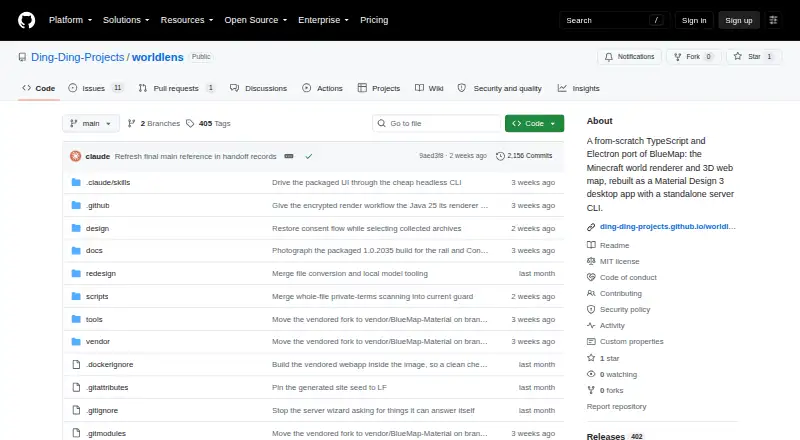
Worldlens is a tool for turning Minecraft worlds into 3D maps that can be explored locally or through BlueMap servers. It is published under Ding-Ding-Projects and is MIT licensed. Its Windows desktop app can render local worlds offline with BlueMap’s Java renderer, which requires Java, or connect to remote BlueMap servers and browse their maps through a token-gated proxy. The project also offers a command-line interface that renders and serves the map in a browser, with a watch mode for updates. Container options cover the CLI map app and a browser-served version of the desktop interface. Rendering can run on another machine over SSH, in Docker, or through GitHub Actions; documented integrations also include GitHub Pages and Home Assistant boolean entities for scheduled settings. The stated target range is Minecraft 1.12.2 through 26.x. The maps support dimensions, markers, waypoints, and live updates. Documentation covers features, configuration, failure modes, security considerations, and verification. The project says marker and popup HTML is sanitized, and its documentation assets are served locally without analytics or tracking. The public 1.0 compatibility contract is Windows-only; Windows releases are unsigned and may prompt a SmartScreen warning. An add-on system, static export, and multi-server dashboard remain future work.
Who it suits
Worldlens suits Minecraft world owners who want to render a local world offline or browse maps from a BlueMap server. Its CLI and container options also fit people who want to serve maps in a browser or run rendering through SSH, Docker, or GitHub Actions.
What it does well
- Free to use and MIT licensed.
- Renders local worlds offline with BlueMap’s Java renderer.
- Supports remote BlueMap servers through a token-gated proxy.
- CLI watch mode can keep maps updated.
- Supports dimensions, markers, waypoints, and live map updates.
- Can run rendering through SSH, Docker, or GitHub Actions.
What to know first
- The public 1.0 compatibility contract is Windows-only.
- Local desktop rendering requires Java.
- Unsigned Windows releases may show a SmartScreen warning.
- Add-ons, static export, and a multi-server dashboard are future work.
Limits
The project’s public 1.0 compatibility contract is Windows-only. Local desktop rendering requires Java; an add-on system, static export, and multi-server dashboard are listed as future work.
Getting started
- Visit the Worldlens project website.
- Choose the Windows desktop app, CLI, or one of the container options.
- For local desktop rendering, use the BlueMap Java renderer, which requires Java.
- For browser maps, use the CLI to render and serve the map web app.
- For remote rendering, use SSH, Docker, or GitHub Actions.
Verdict
Choose Worldlens if you want a free way to render Minecraft worlds into 3D maps or browse maps from BlueMap servers. Its offline desktop rendering, browser serving, and remote rendering routes cover several workflows. Check the Windows-only 1.0 compatibility contract and Java requirement if you plan to render locally.
Questions
How much does Worldlens cost?
Worldlens is free, with a free plan.
Which platforms does it support?
The listed platforms are API, Linux, self-hosted, web, and Windows. Its public 1.0 compatibility contract is Windows-only.
Can it render maps offline?
Yes. The desktop app renders local worlds offline using BlueMap’s Java renderer, which requires Java.
Can I browse maps from a BlueMap server?
Yes. The desktop app can connect to remote BlueMap servers through a token-gated proxy.
Is Worldlens open source?
Yes. The repository states that it is MIT licensed.
What tools and services does it integrate with?
Documented integrations include remote BlueMap servers, Docker, SSH, GitHub Actions, GitHub Pages, and Home Assistant boolean entities for scheduled settings.
Facts from Worldlens's own pages
- CLI
- The standalone CLI renders and serves the map web app, with a watch mode for map updates. · github.com, 30 Sept 2026
- Compatibility limit
- The project’s public 1.0 compatibility contract is Windows-only. · github.com, 30 Sept 2026
- Containers
- The project describes one container image for the CLI map web app and another that serves the desktop application interface in a browser. · github.com, 30 Sept 2026
- Integrations
- Documented integrations include remote BlueMap servers, Docker, SSH, GitHub Actions, GitHub Pages, and Home Assistant boolean entities for scheduled settings. · github.com, 30 Sept 2026
- Intended users
- The project describes workflows for Minecraft world owners who want to render local worlds or browse maps served by BlueMap servers. · github.com, 30 Sept 2026
- License
- The repository states that Worldlens is MIT licensed. · github.com, 30 Sept 2026
- Local rendering
- The desktop app renders local worlds offline using upstream BlueMap’s Java renderer, which requires Java. · ding-ding-projects.github.io, 30 Sept 2026
- Maker
- The repository is published under the Ding-Ding-Projects GitHub organization; the opened pages do not state a headquarters or founding date. · github.com, 30 Sept 2026
- Minecraft versions
- The stated target world versions are Minecraft 1.12.2 through 26.x. · github.com, 30 Sept 2026
- Notable limits
- The project lists a multi-server dashboard, partial marker authoring, an add-on system, and static export among future work. · github.com, 30 Sept 2026
- Not yet available
- The project lists an add-on system, static export, and multi-server dashboard among future work. · github.com, 30 Sept 2026
- Privacy
- The documentation site says its executable dependencies and assets are served locally and that it has no analytics, advertising, tracking pixel, or runtime network fallback. · ding-ding-projects.github.io, 30 Sept 2026
- Purpose
- Worldlens is a TypeScript port of BlueMap for rendering Minecraft worlds into 3D maps and browsing them. · github.com, 30 Sept 2026
- Release caveat
- The project states that Windows releases are intentionally unsigned and may trigger a SmartScreen unknown-publisher warning. · github.com, 30 Sept 2026
- Release signing
- Windows releases are intentionally unsigned, and the project says SmartScreen may show an unknown-publisher warning. · github.com, 30 Sept 2026
- Remote maps
- The desktop app can connect to remote BlueMap servers and browse maps through a token-gated proxy. · github.com, 30 Sept 2026
- Remote rendering
- Renders can be run on another machine over SSH, in Docker, or through GitHub Actions. · github.com, 30 Sept 2026
- Security
- The project says marker and popup HTML is sanitized with DOMPurify and event listeners are used to support a strict Content Security Policy. · github.com, 30 Sept 2026
- Site privacy
- The documentation site says its dependencies and media are served locally and that it has no CDN, analytics, advertising, tracking pixel, or runtime network fallback. · ding-ding-projects.github.io, 30 Sept 2026
- Support and documentation
- The documentation site says it provides an article for every feature, covering behavior, configuration, failure modes, security considerations, and verification. · ding-ding-projects.github.io, 30 Sept 2026
- Ways to run
- The project describes a Windows desktop app, two container images, and a separate Wharf desktop app for deploying a container locally or over SSH. · github.com, 30 Sept 2026
- Web maps
- The standalone CLI can render and serve the map web app to browsers, and the project also describes a hosted container image for its application interface. · github.com, 30 Sept 2026
Where Worldlens stands on Freedom251
- Minecraft World Map Viewers#20 of 22