Freedom251 › Minecraft World Map Viewers
Mapee
What Mapee is
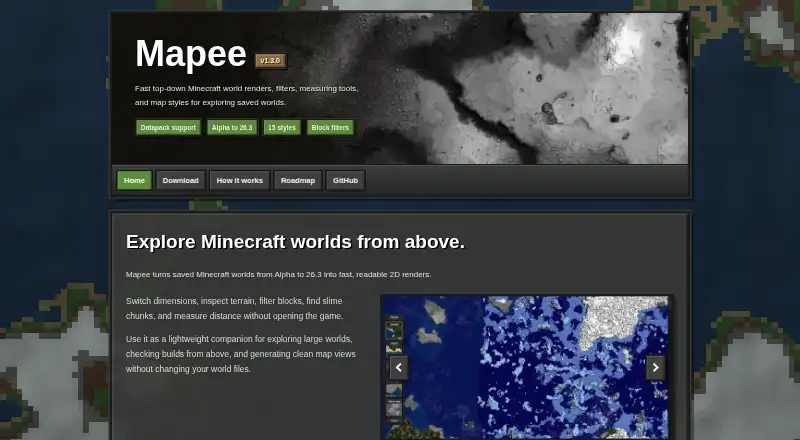
Mapee creates 2D map views of saved Minecraft worlds, giving players an overhead way to explore large areas and check builds. It can load worlds from Alpha through the newest release described in its compatibility details, and the map views do not alter the world files. Users can switch dimensions, inspect terrain, filter maps to selected blocks, locate slime chunks, and measure distances. Listed views include cave, heightmap, night mode, Nether, The End, and Urban style; the project also identifies heightmap and Alpha support among its features. Mapee is a Minecraft mapper and filter with a public GitHub repository and an MIT license. The free, open-source application is a Windows-only GUI app. Its download page lists an installer for 64-bit Windows 10 or later and requires at least 4 GB of RAM. The listed release is version 1.0.0, dated May 1, 2023. Mapee is not an official Minecraft product and is not approved by or associated with Mojang.
Who it suits
Mapee suits Minecraft players who want overhead views to explore large worlds, inspect terrain, or check builds. It is for Windows users with a 64-bit Windows 10 or later system and at least 4 GB of RAM.
What it does well
- Creates maps without changing world files
- Switches dimensions and filters selected blocks
- Finds slime chunks and measures distance
- Free and open source under the MIT license
What to know first
- Windows only
- Requires 64-bit Windows 10 or later
- Requires at least 4 GB of RAM
Getting started
- Visit the Mapee website or its public GitHub repository.
- Download the installer for Windows 10/11 x64.
- Use a 64-bit Windows 10 or later system with at least 4 GB of RAM.
- Open a saved Minecraft world in Mapee and choose a dimension or map view.
Verdict
Mapee combines overhead world views with terrain inspection, block filters, slime-chunk finding, and distance measurement. Its stated system requirements limit it to qualifying Windows computers.
Questions
Does Mapee cost anything?
Mapee is free and open source under the MIT license.
Which platforms does it support?
The download page lists an installer for Windows 10/11 x64; the application is described as Windows-only.
What are the system requirements?
It requires 64-bit Windows 10 or higher and at least 4 GB of RAM.
What can Mapee do with a Minecraft world?
It creates 2D map views without changing world files. Users can switch dimensions, filter blocks, find slime chunks, and measure distance.
Which world versions does it support?
Its compatibility details say it can load worlds from Alpha to the newest release and list blocks in version 26.2.
Is Mapee an official Minecraft product?
No. The download page says it is not official and is not approved by or associated with Mojang.
Facts from Mapee's own pages
- Additional features
- The project's GitHub page lists heightmap and Alpha support among its features. · github.com, 4 Oct 2026
- Block filtering
- The project's GitHub page includes examples of renders filtered to selected blocks, including stone and gravel. · github.com, 4 Oct 2026
- Block filters
- Mapee can filter blocks in map views. · mapee.net, 9 Oct 2026
- Dimensions
- Mapee lets users switch dimensions. · mapee.net, 9 Oct 2026
- Distance measurement
- Mapee includes a tool to measure distance. · mapee.net, 9 Oct 2026
- Distribution
- The project's GitHub repository is public and describes Mapee as a Minecraft mapper and filter. · github.com, 4 Oct 2026
- Installer
- The download page lists an installer for Windows 10/11 x64. · mapee.net, 4 Oct 2026
- Intended use
- The site presents Mapee as a companion for exploring large worlds and checking builds from above. · mapee.net, 4 Oct 2026
- Map views
- The GitHub README shows examples including cave view, heightmap, night mode, Nether, The End, and Urban style. · github.com, 9 Oct 2026
- Minecraft disclaimer
- The download page says Mapee is not an official Minecraft product and is not approved by or associated with Mojang. · mapee.net, 9 Oct 2026
- Minecraft notice
- The download page says Mapee is not an official Minecraft product and is not approved by or associated with Mojang. · mapee.net, 4 Oct 2026
- Open-source license
- The GitHub repository lists an MIT license. · github.com, 9 Oct 2026
- Operating system
- The download page lists an installer for Windows 10/11 x64; the What's New page describes the current application as a Windows-only GUI app. · mapee.net, 9 Oct 2026
- Purpose
- Mapee renders saved Minecraft worlds as 2D maps for viewing terrain and builds from above. · mapee.net, 9 Oct 2026
- Release
- The download page lists version 1.0.0, released May 1, 2023. · mapee.net, 4 Oct 2026
- Requirements
- The download page requires 64-bit Windows 10 or higher and at least 4 GB of RAM. · mapee.net, 4 Oct 2026
- Slime chunks
- Mapee can find slime chunks. · mapee.net, 9 Oct 2026
- Styles
- The project's GitHub page shows examples including night mode, Urban style, cave view, and heightmap. · github.com, 4 Oct 2026
- System requirements
- The download page requires 64-bit Windows 10 or higher and 4 GB of RAM or more. · mapee.net, 9 Oct 2026
- Terrain tools
- Mapee lets users switch dimensions, inspect terrain, filter blocks, find slime chunks, and measure distance. · mapee.net, 4 Oct 2026
- World compatibility
- The GitHub README says Mapee can load worlds from Alpha to the newest release and lists version 1.2.0 as adding Alpha support and blocks in 26.2. · github.com, 9 Oct 2026
- World files
- The site says Mapee generates map views without changing world files. · mapee.net, 9 Oct 2026
Where Mapee stands on Freedom251
- Minecraft World Map Viewers#22 of 22