Freedom251 › Minecraft World Editors
World Repair Studio
What World Repair Studio is
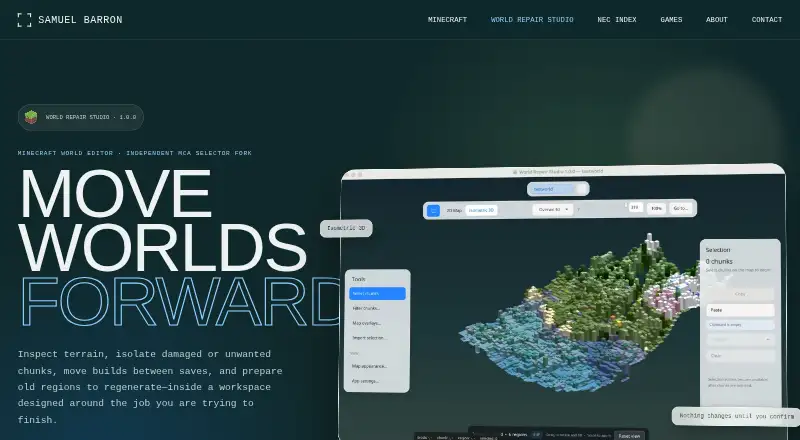
World Repair Studio is a free desktop editor for Minecraft Java Edition world saves and region files. It helps you inspect terrain, select chunks, move builds between compatible saves, and prepare areas for Minecraft to generate again. An isometric view combines surface colors and terrain heights for reviewing terrain before selection. Its 2D region map supports filters and overlays for age, status, biome, entities, structures, coordinates, and other stored data. World tabs and selection context let you copy and paste selected areas between open Java Edition saves. You can export selected chunks or images before destructive work. Removing selected chunks allows Minecraft to regenerate them, but the software does not automatically diagnose every corrupt save. Inspection, selection, copying, and 3D viewing are non-destructive; deleting, importing, or changing chunk data requires confirmation. Release 1.0.0 is based on MCA Selector 2.8, uses Java 21 with JavaFX, and is distributed under the MIT License.
Who it suits
It suits Minecraft Java Edition players carrying out world repair, terrain inspection, chunk transfers, or region regeneration. It runs on Windows, macOS, and Linux.
What it does well
- Free plan available
- Isometric terrain inspection
- Chunk filters and data overlays
- Copy areas between compatible saves
- Export before destructive operations
What to know first
- Does not diagnose every corrupt save
- Deleting chunks can alter worlds
- Downloads are not commercially code-signed
- Backups are advised before editing
Verdict
World Repair Studio provides focused tools for inspecting, transferring, exporting, and regenerating Minecraft Java chunks. Its confirmation steps and broad desktop support help, but repairs still require careful backups and manual diagnosis.
Facts from World Repair Studio's own pages
- Backup guidance
- The maker advises backing up a world before editing it. · github.com, 7 Oct 2026
- Backups
- The maker advises backing up a world before editing because the software can modify or delete Minecraft chunks. · github.com, 7 Oct 2026
- Build requirements
- Building locally requires JDK 21 with JavaFX. · github.com, 7 Oct 2026
- Chunk selection
- The 2D region map supports chunk selection, with filters and overlays for age, status, biome, entities, structures, coordinates, and other stored data. · barrondesign.org, 7 Oct 2026
- Downloads
- Release 1.0.0 offers Windows x64, Apple silicon and Intel Mac, Debian/Ubuntu, Fedora/RHEL, and universal JAR downloads. · barrondesign.org, 7 Oct 2026
- Download signing
- The community builds are not notarized or commercially code-signed, and the operating system may ask users to confirm trust in the download. · barrondesign.org, 7 Oct 2026
- Edit safety
- Selection, inspection, copying, and 3D viewing are non-destructive, while deleting, importing, or changing chunk data requires explicit confirmation. · barrondesign.org, 7 Oct 2026
- Export
- Users can export selected chunks or images before a destructive operation. · barrondesign.org, 7 Oct 2026
- Foundation
- It is an independent fork of MCA Selector 2.8 and is distributed under the MIT License. · barrondesign.org, 7 Oct 2026
- Headquarters
- Atlanta, Georgia, United States · barrondesign.org, 28 Sept 2026
- Integrations
- The maker’s pages describe world-to-world transfers between open saves but do not list third-party integrations. · barrondesign.org, 7 Oct 2026
- Intended users
- The maker describes the workspace as designed for people carrying out Minecraft world repair tasks. · barrondesign.org, 7 Oct 2026
- Isometric view
- Its isometric view uses surface colors and terrain heights to help users inspect terrain before selecting chunks. · barrondesign.org, 7 Oct 2026
- License
- World Repair Studio is distributed under the MIT License. · barrondesign.org, 7 Oct 2026
- Limits
- The software does not automatically diagnose every corrupt save; it provides tools to inspect, isolate, transfer, export, or remove chunks. · barrondesign.org, 7 Oct 2026
- Product
- World Repair Studio is a desktop Minecraft world editor for inspecting terrain, isolating chunks, moving builds between saves, and preparing regions to regenerate. · barrondesign.org, 7 Oct 2026
- Purpose
- World Repair Studio is a Minecraft world editor for inspecting terrain, isolating chunks, moving builds between saves, and preparing regions to regenerate. · barrondesign.org, 7 Oct 2026
- Repair actions
- Users can remove selected chunks so Minecraft can generate them again, or copy selected areas into another compatible Java Edition save. · barrondesign.org, 7 Oct 2026
- Repair workflow
- Users can remove selected chunks so Minecraft can generate them again; the product says it does not automatically diagnose every corrupt save. · barrondesign.org, 7 Oct 2026
- Safety
- Inspection, selection, copying, and 3D viewing are non-destructive; deleting, importing, or changing chunk data requires explicit confirmation. · barrondesign.org, 7 Oct 2026
- Support
- The maker’s page links to a Ko-fi support option. · barrondesign.org, 7 Oct 2026
- Supported systems
- Release 1.0.0 offers installers for Windows x64, Apple silicon and Intel Macs, Debian/Ubuntu, and Fedora/RHEL, plus a universal JAR for systems with JavaFX. · barrondesign.org, 7 Oct 2026
- Technology and lineage
- Version 1.0.0 is based on MCA Selector 2.8 and uses Java 21 with JavaFX. · barrondesign.org, 7 Oct 2026
- World transfers
- World tabs and selection context support copying and pasting selected areas between compatible Java Edition saves. · barrondesign.org, 7 Oct 2026
Where World Repair Studio stands on Freedom251
- Minecraft World Editors#31 of 35