Freedom251 › User Activity Monitoring Software
Worktivity
What Worktivity is
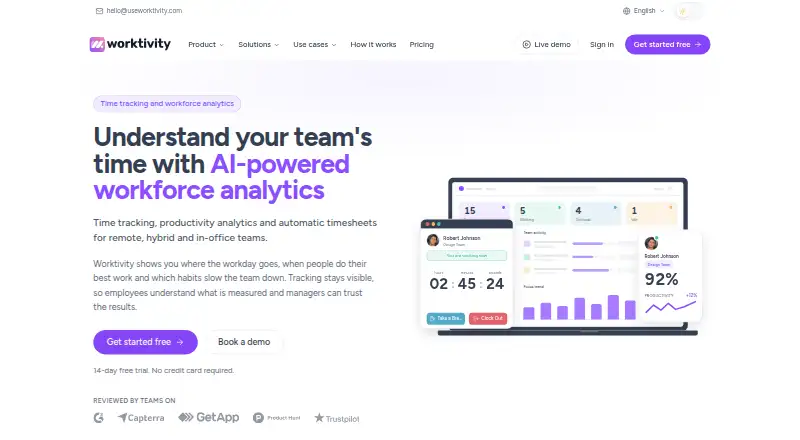
Worktivity combines time tracking, activity monitoring, task management, billing, and AI analysis in one platform. Its desktop app records working, break, and idle time, plus app and website use; it can track offline and sync after reconnecting. Periodic screenshots are optional and configurable, and users can blur them or turn capture off. Timesheets compile clock-in and clock-out details with work, break, and idle time; XLSX export is available on Growth and Pro. Its Productivity Coach analyzes tracked work minutes and reports productivity trends, productive periods, wellness signals, and possible burnout risk. Plans start at $3.32 per user per month, billed once a year, and a 14-day trial is listed; there is no free plan. Starter, Growth, and Pro differ in team limits, screenshot intervals, and screenshot retention. Tracking data retention is 12 months on paid plans. Integrations include an Open API, Asana, Trello, and Zapier; ClickUp, Monday, Jira, and Notion are marked as coming soon. Worktivity offers on-premise deployment for organizations with security, data-residency, or compliance requirements.
Who it suits
Worktivity may suit small businesses, agencies, startups, remote or hybrid teams, and BPO/KPO teams that need time tracking and activity monitoring. Its on-premise option may fit organizations with strict security or data-residency requirements.
What it does well
- Can record time while offline and sync later.
- Screenshots can be blurred or switched off.
- Growth and Pro include XLSX export.
- Pro includes API access and chat support.
- On-premise deployment is available.
What to know first
- No free plan is available.
- No mobile apps are listed.
- Paid plans retain tracking data for 12 months.
Plans
| Plan | Billed and limits | Price |
|---|---|---|
| Apex AI credits | One-time purchase · 12,500 AI credits | $149.99, paid once |
| Extended data retention | Per user, per month; billed with subscription · Keeps activity data, timesheets and payroll records for 6 years instead of 12 months | $1.99 a month |
| Focus AI credits | One-time purchase · 250 AI credits | $19.99, paid once |
| Extended screenshot retention | Per user, per month; billed with subscription · Keeps screenshots and timelapse videos for 12 months instead of the plan window | $2.99 a month |
| Starter | Billed once a year; per user / month · 2 teams · screenshots every 5 minutes · 2-month screenshot retention · 12-month data retention · 100 AI credits · email support | $3.32 |
| Optimize AI credits | One-time purchase · 1,250 AI credits | $39.99, paid once |
| Growth | Billed once a year; per user / month · 5 teams · screenshots every 3 minutes · 4-month screenshot retention · 12-month data retention · task tracking · integrations · XLSX export · 100 AI credits · email support | $4.99 |
| Pro | Billed once a year; per user / month · Unlimited teams · screenshots every minute · 6-month screenshot retention · 12-month data retention · API access · payout, cost and leave management · 100 AI credits · email and chat support | $7.49 |
The first 8 of 10 plans, as useworktivity.com lists them, read 9 Oct 2026. The maker's own page has the final word. Every plan
Verdict
Worktivity brings monitoring, timesheets, task management, and AI analysis together, with controls over optional screenshots.
Facts from Worktivity's own pages
- AI coach
- Its Productivity Coach analyzes tracked work minutes and provides reports on productivity trends, productive periods, wellness signals and possible burnout risk. · useworktivity.com, 9 Oct 2026
- Company
- Worktivity OÜ says it is registered in Estonia, headquartered in Tallinn, and launched in 2023. · useworktivity.com, 9 Oct 2026
- Headquarters
- Viru square 2, Kesklinna district, Tallinn, Harju county, 10111, Estonia · useworktivity.com, 28 Sept 2026
- Integrations
- The integrations page lists an Open API, Asana, Trello and Zapier; ClickUp, Monday, Jira and Notion are marked as coming soon. · useworktivity.com, 9 Oct 2026
- Intended teams
- The company describes use cases for small businesses, agencies, remote and hybrid teams, startups, and BPO/KPO teams. · useworktivity.com, 9 Oct 2026
- Platforms
- The download page offers Windows, macOS, Linux and a Chrome extension; it notes that the extension does not collect screenshots, application tracking or website addresses. · useworktivity.com, 9 Oct 2026
- Privacy
- The privacy policy says the desktop app records keystroke and mouse-movement counts but not click locations or typed content, and says it is not a keystroke-logging application. · useworktivity.com, 9 Oct 2026
- Product
- Worktivity combines time tracking, activity monitoring, task management, billing and AI analysis in one platform. · useworktivity.com, 9 Oct 2026
- Retention limits
- Paid plans retain tracking data for 12 months and screenshots for 2 months on Starter, 4 months on Growth and 6 months on Pro. · useworktivity.com, 9 Oct 2026
- Screenshots
- Periodic screenshots are configurable and optional, and the company says users can blur them or switch the feature off. · useworktivity.com, 9 Oct 2026
- Security deployment
- The company offers an on-premise deployment for organizations with strict security, data-residency or compliance requirements. · useworktivity.com, 9 Oct 2026
- Support
- All paid plans include email support, Pro includes chat support, and the pricing comparison lists no phone support on any plan. · useworktivity.com, 9 Oct 2026
- Timesheets
- Tracked minutes are compiled into timesheets with clock-in and clock-out, work, break and idle time, and XLSX export is available on Growth and Pro. · useworktivity.com, 9 Oct 2026
- Time tracking
- The desktop app records working, break and idle time, app and website use, and can continue recording offline before syncing when reconnected. · useworktivity.com, 9 Oct 2026
Where Worktivity stands on Freedom251
- User Activity Monitoring Software#8 of 17
- Employee Time Tracking Software#43 of 52