Freedom251 › Database Design Tools

WorksCove ERD
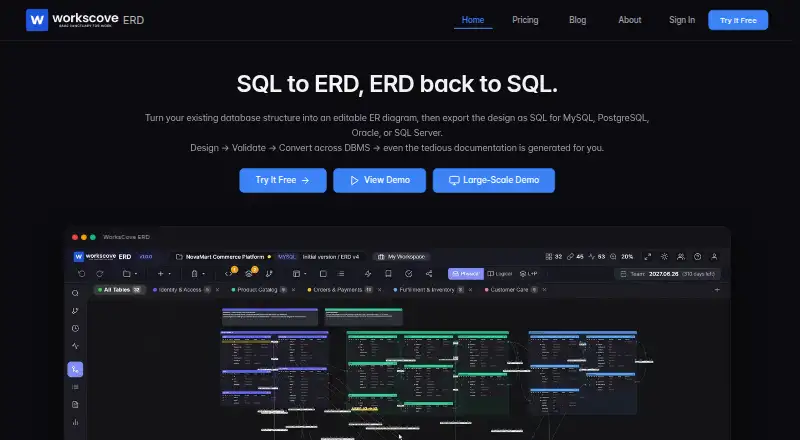
What WorksCove ERD is
WorksCove ERD is a web-based database design tool that turns database structures into editable entity-relationship diagrams and exports designs as SQL. It can reverse-engineer schemas from MySQL, MariaDB, PostgreSQL, Oracle, and SQL Server. Designs can be exported as SQL for MySQL, PostgreSQL, Oracle, or SQL Server, with data types and constraints mapped to the target dialect.
The product checks schemas against more than 20 validation rules, including naming issues, circular references, and missing indexes. It can compare schema versions and generate migration scripts for differences. For documentation and sharing, it produces table specifications in XLSX, Markdown, and HTML, and ERD exports in PNG and SVG. An AI assistant provides design advice and optimization recommendations. When the assistant is used, schema data and prompts are sent to OpenAI; the privacy policy says identifiable information and project content are not used for separate AI model training.
The Free plan allows three projects and up to 40 tables per project, with PNG exports carrying a watermark. Professional costs $10 a month, and Team costs $20 a month. The paid plans offer a 30-day trial without a credit card. Team adds real-time editing, invitations, seat management, and project-level permissions. WorksCove says the service runs on AWS and encrypts traffic in transit.
Who it suits
WorksCove ERD suits database designers who need to reverse-engineer supported schemas, edit ER diagrams, validate designs, or generate SQL and migration scripts. Teams that need real-time editing, invitations, and project permissions can consider the Team plan; individuals can start with the Free plan’s project and table allowances.
What it does well
- Reverse-engineers schemas from five listed database systems.
- Exports SQL for four target database dialects.
- Checks designs with more than 20 validation rules.
- Generates migration scripts by comparing schema versions.
- Exports documentation in XLSX, Markdown, and HTML.
- Offers a free plan and 30-day trials for paid plans.
What to know first
- Free plan limits users to three projects and 40 tables per project.
- Free-plan PNG exports include a watermark.
- AI use sends schema data and prompts to OpenAI.
Limits
The Free plan is limited to three projects and 40 tables per project, and its PNG exports have a watermark. Professional costs $10 a month; Team costs $20 a month and includes one seat, with additional seats priced at $ 20.00 /user/month.
Plans
| Plan | Billed and limits | Price |
|---|---|---|
| Professional | Unlimited projects and tables · SQL and PNG export · version control and history · table documentation · own AI API key · AI assistant (500K tokens/month) | $10 a month |
| Team | Unlimited projects and tables · SQL and PNG export · version control and history · table documentation · team collaboration · own AI API key · AI assistant (500K tokens/month per seat) · $ 20.00 /user/month · 1 seats included | $20 a month |
| Free | 3 projects · 40 tables per project · SQL export · PNG export with watermark · version control and history · table documentation · AI assistant (50K tokens/month) | On request |
As erd.workscove.com lists them, read 4 Oct 2026. The maker's own page has the final word.
Getting started
- Open the WorksCove ERD website in a web browser.
- Choose the Free plan or review Professional and Team. The Professional and Team plans offer a 30-day trial without a credit card.
- Import a schema from a supported database or create a design.
- Edit the ER diagram, review validation results, and export SQL or documentation.
- For team editing, invitations, seat management, and project permissions, choose Team.
Verdict
Choose WorksCove ERD if you need a web tool for turning supported database schemas into editable diagrams, validating designs, or generating SQL and migration scripts. The Free plan provides a way to start, while Professional and Team remove project and table limits. Consider the Team plan when real-time collaboration and project permissions are needed.
Questions
Is WorksCove ERD free?
Yes. Its Free plan allows three projects and 40 tables per project, with SQL export, watermarked PNG export, version history, table documentation, and an AI assistant quota of 50K tokens per month.
How much do the paid plans cost?
Professional costs $10 a month. Team costs $20 a month and includes one seat; the listed per-user price is $ 20.00 /user/month.
Is there a free trial?
Professional and Team offer a 30-day free trial without a credit card.
Which databases does it support?
It reverse-engineers MySQL, MariaDB, PostgreSQL, Oracle, and SQL Server. SQL export is listed for MySQL, PostgreSQL, Oracle, and SQL Server.
Does WorksCove ERD support collaboration?
The Team plan includes real-time editing, team member invitations, seat management, and project-level permissions.
What happens when I use the AI assistant?
Schema data and prompts are sent to OpenAI when the assistant is used. WorksCove’s privacy policy says identifiable information and project content are not used for separate AI model training.
Facts from WorksCove ERD's own pages
- AI assistant
- The product offers AI-powered design advice and optimization recommendations. · erd.workscove.com, 4 Oct 2026
- Collaboration
- The Team plan includes real-time editing, team member invitations, seat management, and project-level permissions. · erd.workscove.com, 4 Oct 2026
- Documentation and exports
- It generates table specifications in XLSX, Markdown, and HTML, and supports ERD exports including PNG and SVG. · erd.workscove.com, 4 Oct 2026
- Founded
- 2025 · erd.workscove.com, 28 Sept 2026
- Free plan limits
- The Free plan allows 3 projects and 40 tables per project, and its PNG exports include a watermark. · erd.workscove.com, 4 Oct 2026
- Headquarters
- Seoul, South Korea · erd.workscove.com, 28 Sept 2026
- Hosting and transport security
- WorksCove says it runs on AWS infrastructure and encrypts traffic in transit. · erd.workscove.com, 4 Oct 2026
- Migration scripts
- It compares schema versions and generates migration scripts for the differences. · erd.workscove.com, 4 Oct 2026
- Privacy and AI processing
- The privacy policy says ERD schema data and prompts are sent to OpenAI when the AI assistant is used, and identifiable information and project content are not used for separate AI model training. · erd.workscove.com, 4 Oct 2026
- Purpose
- WorksCove ERD turns database structures into editable ER diagrams and exports designs as SQL. · erd.workscove.com, 4 Oct 2026
- Schema validation
- The product advertises over 20 validation rules, including checks for naming violations, circular references, and missing indexes. · erd.workscove.com, 4 Oct 2026
- Sharing
- Projects can be shared with password protection, expiry dates, and access-count limits. · erd.workscove.com, 4 Oct 2026
- SQL conversion
- It can export designs for MySQL, PostgreSQL, Oracle, or SQL Server, mapping data types and constraints to the target dialect. · erd.workscove.com, 4 Oct 2026
- Support
- The contact page says it usually responds to email inquiries within one to two business days, and technical or billing support is available through a signed-in support ticket. · erd.workscove.com, 4 Oct 2026
- Supported databases
- The product supports MySQL, MariaDB, PostgreSQL, Oracle, and SQL Server for reverse engineering. · erd.workscove.com, 4 Oct 2026
- Trial
- The Professional and Team plans offer a 30-day free trial without a credit card. · erd.workscove.com, 4 Oct 2026
Where WorksCove ERD stands on Freedom251
- Database Design Tools#22 of 35