Freedom251 › Software Update Tools
WinUpdateChecker
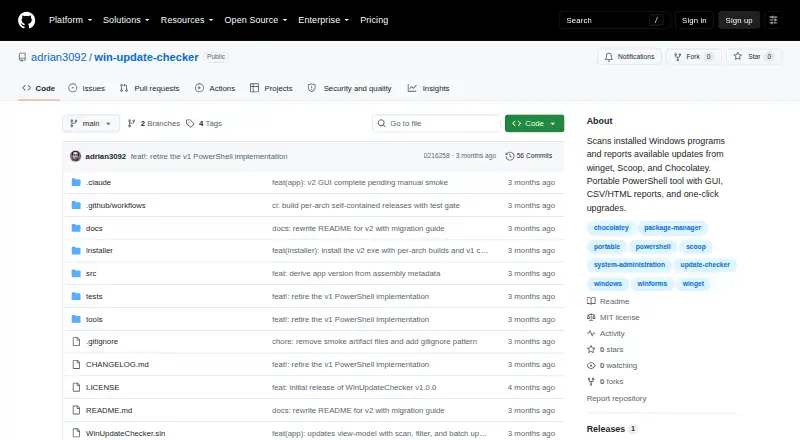
What WinUpdateChecker is
WinUpdateChecker is the original name of a Windows update utility whose second version is the native Patch Pal application. Patch Pal reads Windows uninstall registry keys and checks winget, Scoop, and Chocolatey in parallel for available updates. The graphical interface can update individual programs or run bulk updates, while saving update history and failure logs. A headless command-line interface lists updates, supports scheduled scans, and exports CSV or standalone HTML reports; upgrades themselves run through the GUI. The free, MIT-licensed project offers installer and portable ZIP downloads, x64 and ARM64 builds, and a self-contained executable that does not require a .NET runtime. It requires Windows 10 version 1809 or later, or Windows 11, plus at least one supported package manager. Light, dark, and system themes are available. The project states it has no telemetry and only runs updates after the user clicks Update. Programs missing from package-manager catalogs are not covered, and store-managed apps remain with their own clients.
Who it suits
Patch Pal suits Windows users who want package-manager-based update checks, individual or bulk updates, history, and reports. It is also useful for scheduled scans where supported package managers are installed.
What it does well
- Free and open source under the MIT license
- Supports winget, Scoop, and Chocolatey
- Offers individual and bulk updates
- Includes portable ZIP downloads
- Provides scheduled scans and report exports
What to know first
- Windows-only
- Requires at least one package manager
- Catalog-missing programs are not tracked
- Store-managed apps need their own clients
Verdict
Patch Pal modernizes WinUpdateChecker with parallel package-manager checks, GUI updates, command-line reporting, and portable builds. Coverage depends on programs appearing in winget, Scoop, or Chocolatey catalogs.
Facts from WinUpdateChecker's own pages
- Architecture
- The app has light, dark, and system themes and is available in x64 and ARM64 builds. · github.com, 9 Oct 2026
- Code signing
- The repository says releases published before joining the SignPath Foundation program, including v2.0.0, are unsigned; later signed releases are built by GitHub Actions and manually approved before signing. · github.com, 9 Oct 2026
- Coverage limit
- Programs absent from the package manager catalogs are not tracked, and updates for Steam and other store-managed apps remain with their own clients. · github.com, 9 Oct 2026
- Coverage limitation
- Programs absent from the package manager catalogs cannot be tracked or updated by Patch Pal. · github.com, 9 Oct 2026
- History and reports
- The app saves update history and failure logs, and its CLI can export CSV or standalone HTML reports. · github.com, 9 Oct 2026
- Installation
- The project offers installer and portable ZIP downloads, and the self-contained executable does not require a .NET runtime installation. · github.com, 9 Oct 2026
- License
- The repository identifies the software as MIT licensed. · github.com, 9 Oct 2026
- Maker
- The GitHub profile identifies the maker as Adrian Zielinski and lists Houston, Texas. · github.com, 9 Oct 2026
- Package managers
- It checks winget, Scoop, and Chocolatey, querying installed package managers in parallel. · github.com, 9 Oct 2026
- Privacy
- The project states it has no telemetry and does not transfer information unless specifically requested by the user or operator. · github.com, 9 Oct 2026
- Product rename
- Version 2 is a native application named Patch Pal; version 1 shipped as WinUpdateChecker, a PowerShell and WinForms script. · github.com, 9 Oct 2026
- Purpose
- Patch Pal finds outdated installed programs and offers updates through winget, Scoop, and Chocolatey. · github.com, 9 Oct 2026
- Release verification
- GitHub releases include SHA-256 sums for checking downloaded artifacts; the README says releases published before joining the SignPath Foundation program are unsigned. · github.com, 9 Oct 2026
- Reports and CLI
- The headless CLI can list available updates and export CSV or standalone HTML reports; upgrades are performed through the GUI. · github.com, 9 Oct 2026
- Requirements
- It requires Windows 10 version 1809 or later, or Windows 11, plus at least one of winget, Scoop, or Chocolatey for update detection. · github.com, 9 Oct 2026
- Scanning
- The app reads Windows uninstall registry keys and checks installed package managers in parallel for updates. · github.com, 9 Oct 2026
- Scheduling
- Headless CLI options support scheduled scans and report exports; upgrades are performed from the GUI. · github.com, 9 Oct 2026
- Supported systems
- The app requires Windows 10 version 1809 or later, or Windows 11, on x64 or ARM64. · github.com, 9 Oct 2026
- Themes
- The interface supports light, dark, and system themes. · github.com, 9 Oct 2026
- Updates
- Users can update individual programs or perform bulk updates from the GUI. · github.com, 9 Oct 2026
- Updates and history
- Users can apply per app or bulk updates in the GUI, and the app saves update history with failure logs. · github.com, 9 Oct 2026
- User control
- The program says it only reads the registry and queries package managers, and runs updates only after the user clicks an Update button in the GUI. · github.com, 9 Oct 2026
Where WinUpdateChecker stands on Freedom251
- Software Update Tools#29 of 29