Freedom251 › Screenshot Software
WinSnap
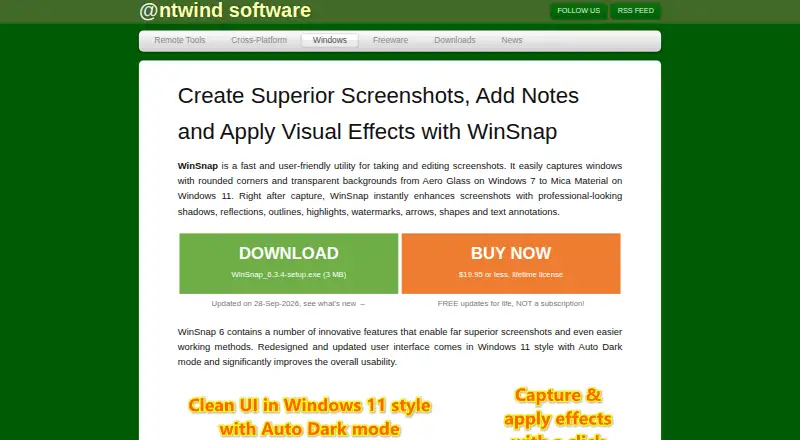
What WinSnap is
WinSnap is paid Windows software for capturing and editing screenshots, aimed at technical communicators, web designers, and everyday users. It captures individual windows, the whole screen, or selected regions, including fixed-size areas and multiple objects or regions at once. Window captures can retain rounded corners and transparent backgrounds, including Aero Glass on Windows 7 and Mica Material on Windows 11. Editing tools include arrows, lines, shapes, text comments, a pen, pixelation, highlights, colorization, and blur. Users can add shadows, reflections, outlines, highlights, and watermarks, with adjustable shadow color, size, direction, and opacity. WinSnap exports PNG, JPEG, GIF, TIFF, and BMP, and supports transparent PNG images. With Microsoft Office installed, transparent captures can be pasted into Word, PowerPoint, Outlook, or OneNote. It supports Windows 7 through Windows 11 and includes a native 64-bit setup. The 30-day trial includes all features but adds a watermark. A single-PC license costs $19.95, paid once.
Who it suits
WinSnap suits Windows users who need screenshot capture, annotation, and visual effects. Its stated audience includes technical communicators, web designers, and ordinary users.
What it does well
- Captures windows, screens, regions, or multiple objects
- Includes extensive markup and blur tools
- Exports five listed image formats
- Supports transparent PNG and Office pasting
- 30-day trial includes all features
What to know first
- No free plan
- Trial screenshots include a watermark
- Windows-only software
- Single-PC license costs $19.95, paid once
Plans
| Plan | Billed and limits | Price |
|---|---|---|
| Business License | One-time purchase; all updates free · Up to 10 users · 10 PCs in one company | $139, paid once |
| Enterprise License | One-time purchase; all updates free · Unlimited users and PCs in one company | $1,800, paid once |
| Single PC License | One-time purchase; all updates free · 1 user · 1 PC | $19.95, paid once |
| Single User License | One-time purchase; all updates free · 1 user · up to 3 computers | $34.95, paid once |
| Family License | One-time purchase; all updates free · Up to 3 users · 6 PCs in one household | $69, paid once |
As ntwind.com lists them, read 11 Oct 2026. The maker's own page has the final word.
Verdict
WinSnap offers broad Windows capture modes, annotation tools, effects, and transparent-image workflows. The trial is useful for evaluation, but unregistered screenshots carry a watermark and paid licensing is required for unrestricted use.
Facts from WinSnap's own pages
- Annotations
- Markup tools include arrows, lines, shapes, text comments, a pen tool, pixelation, highlights, colorize, and blur effects. · ntwind.com, 11 Oct 2026
- Export formats
- PNG,JPEG,GIF,TIFF,BMP · ntwind.com, 20 Sept 2026
- Capture modes
- It supports window, whole-screen, and region capture, including fixed-size regions and simultaneous capture of multiple objects or regions. · ntwind.com, 11 Oct 2026
- Current release
- The maker lists WinSnap 6.3.4, updated September 28, 2026, as a maintenance release with fixes and minor improvements. · ntwind.com, 11 Oct 2026
- Free plan
- No · ntwind.com, 20 Sept 2026
- License and updates
- The maker says purchases are perpetual and updates are free, and registered users receive free upgrades. · ntwind.com, 11 Oct 2026
- Office integration
- With Microsoft Office installed, users can paste transparent captures directly into Word, PowerPoint, Outlook, and OneNote. · ntwind.com, 11 Oct 2026
- Payment security
- The maker says payments are securely processed by PayPro Global using industry-standard encryption and data protection. · ntwind.com, 11 Oct 2026
- Supported platforms
- windows · ntwind.com, 20 Sept 2026
- Purpose
- WinSnap is a utility for capturing and editing screenshots, aimed at technical communicators, web designers, and ordinary users. · ntwind.com, 11 Oct 2026
- Refunds
- Purchases come with a 30-day money-back guarantee, with a full refund or a license change offered if the buyer is dissatisfied. · ntwind.com, 11 Oct 2026
- Support
- The FAQ directs users to a support forum and provides an email contact; the maker says it can resend lost licensing information at no charge. · ntwind.com, 11 Oct 2026
- Supported Windows
- The product page says WinSnap supports Windows 7 through Windows 11 and includes a native 64-bit version in the setup package. · ntwind.com, 11 Oct 2026
- Transparency and Office
- It saves screenshots with PNG transparency and can copy transparent images to the clipboard for pasting into Word, PowerPoint, Outlook, or OneNote when Microsoft Office is installed. · ntwind.com, 11 Oct 2026
- Trial limitation
- The 30-day trial allows evaluation of all features, but adds a watermark to screenshots in the unregistered version. · ntwind.com, 11 Oct 2026
- Visual effects
- Screenshots can be enhanced with shadows, reflections, outlines, highlights, and watermarks, with customizable shadow color, size, direction, and opacity. · ntwind.com, 11 Oct 2026
- Window capture
- It captures windows with rounded corners and transparent backgrounds, including Aero Glass effects on Windows 7 and Mica Material on Windows 11. · ntwind.com, 11 Oct 2026
Where WinSnap stands on Freedom251
- Screenshot Software#37 of 39
- Screen Capture Software#59 of 61
- Screenshot tools#39 of 40