Freedom251 › Monitor Control Software
winddcutil
What winddcutil is
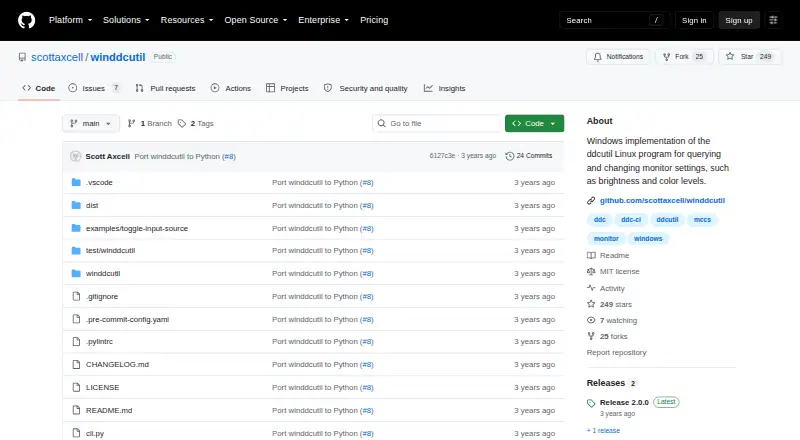
winddcutil is a Windows command-line tool for reading and changing monitor settings, including brightness and color levels. It communicates with monitors using VESA’s Monitor Control Command Set over DDC-CI. Its commands can detect monitors, inspect their reported capabilities, and retrieve or change VCP feature values. The project offers a standalone `winddcutil.exe` that runs without a Python interpreter installed. It also describes a Python port built on the API from the `monitorcontrol` package. The 2.0.0 executable was built and tested on Windows 10, and the releases page lists that version as released on September 15, 2023. The software is free, with a listed plan of $0, and is licensed under MIT. The project directs bug reports and feature requests to its GitHub issue tracker, and welcomes bug fixes and enhancements submitted as pull requests.
Who it suits
It suits Windows users who want command-line access to monitor controls through DDC-CI. The standalone executable may suit users who do not have a Python interpreter installed.
What it does well
- Detects monitors and queries their capabilities.
- Gets or sets VCP feature values.
- Standalone executable runs without Python installed.
- Free and licensed under MIT.
What to know first
- Windows is the only supported platform listed.
- The executable was tested on Windows 10.
- Latest listed release is from September 15, 2023.
Plans
| Plan | Billed and limits | Price |
|---|---|---|
| winddcutil | Windows monitor control via DDC-CI | Free |
As github.com lists them, read 9 Oct 2026. The maker's own page has the final word.
Getting started
- Open the project repository at https://github.com/scottaxcell/winddcutil.
- Use the standalone winddcutil.exe from the repository's dist folder without installing a Python interpreter.
- Run the CLI commands to detect monitors, query capabilities, or get and set VCP values.
- For bug reports or feature requests, use the GitHub issue tracker.
Verdict
winddcutil offers monitor detection and VCP setting controls through a Windows CLI. Its standalone executable and MIT license are useful considerations for Windows users.
Questions
How much does winddcutil cost?
The listed plan is free.
Which operating system does it support?
Windows is the supported platform. The 2.0.0 executable was built and tested on Windows 10.
Can I use it without Python installed?
Yes. The project describes a standalone winddcutil.exe that runs without installing a Python interpreter.
What monitor controls does it offer?
Its CLI can detect monitors, query their capabilities, and read or write VCP feature values using VESA MCCS over DDC-CI.
Is winddcutil open source?
The project identifies its license as MIT.
Facts from winddcutil's own pages
- Commands
- Its CLI supports detecting monitors, querying capabilities, and getting or setting VCP feature values. · github.com, 9 Oct 2026
- Contributions
- The README welcomes bug fix and enhancement contributions through pull requests. · github.com, 9 Oct 2026
- Latest release
- The releases page lists version 2.0.0, released on September 15, 2023. · github.com, 9 Oct 2026
- License
- The repository identifies its license as MIT. · github.com, 9 Oct 2026
- Monitor protocol
- It uses VESA MCCS over the DDC-CI standard. · github.com, 9 Oct 2026
- Protocol
- It uses the VESA Monitor Control Command Set over the Display Data Channel Command Interface Standard (DDC-CI). · github.com, 9 Oct 2026
- Purpose
- winddcutil is a Windows implementation of ddcutil for querying and changing monitor settings such as brightness and color levels. · github.com, 9 Oct 2026
- Python package
- The project says its Python port uses the API provided by the monitorcontrol package. · github.com, 9 Oct 2026
- Release platform
- The 2.0.0 winddcutil.exe asset was built and tested on Windows 10. · github.com, 9 Oct 2026
- Standalone download
- The repository says dist\winddcutil.exe is a standalone executable that runs without installing a Python interpreter. · github.com, 9 Oct 2026
- Support
- The README directs bug reports and feature requests to the GitHub issue tracker. · github.com, 9 Oct 2026
- Tested platform
- The 2.0.0 release says winddcutil.exe was built and tested on Windows 10. · github.com, 9 Oct 2026
Where winddcutil stands on Freedom251
- Monitor Control Software#20 of 24