Freedom251 › Certificate Management Software
win-acme
What win-acme is
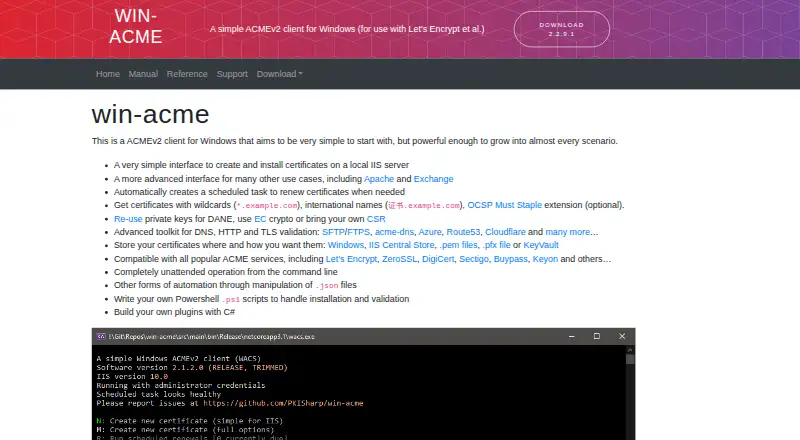
win-acme is a free, open-source ACMEv2 client for Windows that obtains certificates from Let’s Encrypt and other ACME services. Its simple interface creates and installs certificates on a local IIS server, while an advanced interface supports other setups, including Apache and Exchange. After configuration, win-acme creates a scheduled task that checks daily whether certificates need renewal. It can obtain wildcard and international-name certificates and supports the optional OCSP Must Staple extension. Validation options cover DNS, HTTP and TLS, with examples including acme-dns, Azure, Route53 and Cloudflare. Certificates can be stored in Windows, the IIS Central Store, PEM or PFX files, or KeyVault. Listed compatible providers include Let’s Encrypt, ZeroSSL, DigiCert, Sectigo, Buypass and Keyon. For automation, it supports unattended command-line operation, JSON-file configuration, PowerShell scripts and custom plugins written in C#. Sensitive configuration data is encrypted with Microsoft Data Protection API by default, and cached private keys are encrypted and protected by filesystem access control lists. The current program depends on .NET 7 and officially supports Windows Server 2016 or higher. Community support is available through GitHub issues; guaranteed future professional support is offered in connection with sponsoring a core developer.
Who it suits
win-acme suits Windows users who need certificates for a local IIS server, with additional options for Apache and Exchange. Its validation choices, storage destinations and automation support also suit more advanced certificate setups.
What it does well
- Creates and installs certificates on a local IIS server.
- Schedules daily checks for certificate renewal.
- Supports wildcard and international-name certificates.
- Offers DNS, HTTP and TLS validation options.
- Supports command-line, JSON, PowerShell and C# automation.
What to know first
- The current program depends on .NET 7.
- Official support is limited to Windows Server 2016 or higher.
- Professional support is tied to sponsoring a core developer.
Limits
The current program depends on .NET 7 and officially supports Windows Server 2016 or higher. Older releases may work on older Windows versions, but those versions are unsupported.
Plans
| Plan | Billed and limits | Price |
|---|---|---|
| win-acme | ACMEv2 client for Windows · community support; professional support available through sponsorship | Free |
As win-acme.com lists them, read 10 Oct 2026. The maker's own page has the final word.
Getting started
- Visit the win-acme website.
- Use a Windows system; the current program depends on .NET 7 and officially supports Windows Server 2016 or higher.
- Use the simple interface for local IIS, or the advanced interface for other use cases such as Apache or Exchange.
- Choose an available ACME provider and validation option.
- Select a certificate storage destination and configure renewal checks.
Verdict
Choose win-acme for a free Windows ACME client with scheduled renewal checks and several certificate validation and storage options. Its simple interface targets local IIS, while advanced setups can use its broader configuration and automation features. Community support is through GitHub issues; guaranteed future professional support is connected to sponsorship.
Questions
How much does win-acme cost?
The listed plan is free. It is open source.
Which Windows versions are supported?
The current program depends on .NET 7 and officially supports Windows Server 2016 or higher. Older releases may work on older Windows versions, but are unsupported.
Which certificate authorities can it use?
Listed compatible providers are Let’s Encrypt, ZeroSSL, DigiCert, Sectigo, Buypass and Keyon.
Can win-acme renew certificates automatically?
Yes. It creates a scheduled task that checks daily whether certificates need renewal.
Where can certificates be stored?
Destinations include Windows, the IIS Central Store, PEM files, PFX files and KeyVault.
What support is available?
Community support is provided through GitHub issues. Guaranteed future professional support is offered in connection with sponsoring a core developer.
Facts from win-acme's own pages
- ACME providers
- The site lists compatibility with Let’s Encrypt, ZeroSSL, DigiCert, Sectigo, Buypass and Keyon. · win-acme.com, 10 Oct 2026
- Automation
- The program supports unattended command-line operation, JSON-file configuration, PowerShell scripts and custom plugins written in C#. · win-acme.com, 10 Oct 2026
- Certificate setup
- Its simple interface creates and installs certificates on a local IIS server, with an advanced interface for other use cases including Apache and Exchange. · win-acme.com, 10 Oct 2026
- Certificate storage
- Certificates can be stored in Windows, the IIS Central Store, PEM files, PFX files or KeyVault. · win-acme.com, 10 Oct 2026
- Certificate types
- It can obtain wildcard and international-name certificates, and supports the optional OCSP Must Staple extension. · win-acme.com, 10 Oct 2026
- Headquarters
- Austria · win-acme.com, 28 Sept 2026
- Intended users
- The site describes the program as suitable for simple local IIS certificate setup and says it can grow to cover more advanced scenarios. · win-acme.com, 10 Oct 2026
- Private-key protection
- The site says cached private keys are encrypted and protected by filesystem access control lists by default. · win-acme.com, 10 Oct 2026
- Renewals
- The program creates a scheduled task that checks daily whether certificates need renewal. · win-acme.com, 10 Oct 2026
- Security
- Encryption of sensitive configuration information using Microsoft Data Protection API is enabled by default and can be turned off. · win-acme.com, 10 Oct 2026
- Support
- Community support is provided through GitHub issues, while guaranteed future professional support is offered in connection with sponsoring a core developer. · win-acme.com, 10 Oct 2026
- System requirements
- The site says the current program depends on .NET 7 and officially supported Windows Server 2016 or higher; older releases may work on older Windows versions but are unsupported. · win-acme.com, 10 Oct 2026
- Validation integrations
- Its validation toolkit includes DNS, HTTP and TLS options, with examples including acme-dns, Azure, Route53 and Cloudflare. · win-acme.com, 10 Oct 2026
- What it does
- win-acme is an ACMEv2 client for Windows for obtaining certificates from Let’s Encrypt and other ACME services. · win-acme.com, 10 Oct 2026
Where win-acme stands on Freedom251
- Certificate Management Software#13 of 31