Freedom251 › Windows Compatibility Layers
WIE
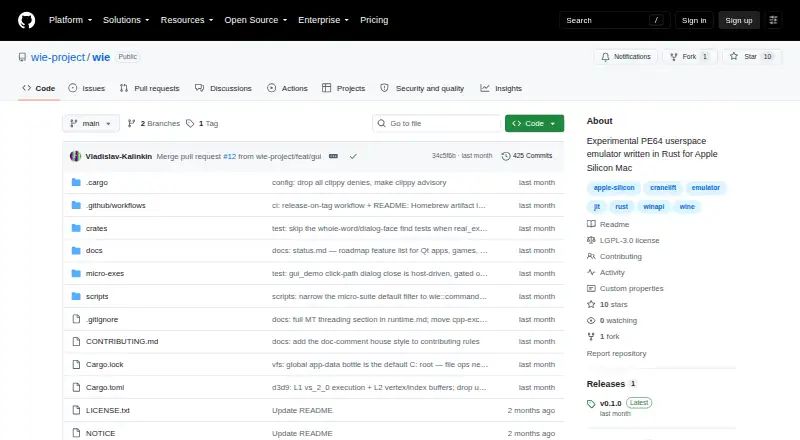
What WIE is
WIE runs Windows PE64 user-mode binaries on macOS Apple Silicon without requiring Windows, Wine or a virtual machine. Guest x86-64 code runs through a Cranelift block JIT, while Windows API calls are handled on the Mac host in Rust. Windows GUI apps can open real macOS windows, use controls, menus and native dialogs, and support printing. Guest files are accessible as files on the Mac. By default, the guest C: drive maps to a per-user app-data bottle; native Open and Save panels can access files elsewhere on the Mac.
WIE is an experimental project, and its Windows API coverage is intentionally incomplete. Reported working examples include Windows Notepad, 7-Zip console operations, console apps, and the 2048 and Snake terminal games. The D3D9 software renderer supports selected features such as VS 2.0 and PS 2.0, with 51 of 119 IDirect3DDevice9 methods implemented. Networking through WS2_32, OpenGL, child-process creation, audio output and D3D11 are among the listed missing or unsupported capabilities. The project says 32-bit binaries and full Windows compatibility are out of scope. It is free and licensed under GNU Lesser General Public License v3.0. The README documents building with Cargo or installing a prebuilt binary with Homebrew; release binaries are also published as GitHub release assets.
Who it suits
WIE suits people using Apple Silicon Macs who want to run selected Windows PE64 user-mode programs without a Windows installation or virtual machine. It may fit developers and researchers exploring emulation and cross operating system runtimes, provided the experimental status and incomplete Windows API support suit their needs.
What it does well
- Runs Windows PE64 user-mode binaries on Apple Silicon Macs.
- Windows GUI apps can use macOS windows and native dialogs.
- Guest files are accessible as Mac files.
- Supports prefix management.
- Free software under the GNU Lesser General Public License v3.0.
What to know first
- The project is experimental and Windows API support is incomplete.
- 32-bit binaries and full Windows compatibility are out of scope.
- Networking, audio output, OpenGL and D3D11 are listed as missing or unsupported.
- Graphics acceleration is none.
Limits
WIE's Windows API surface is intentionally incomplete, and the project does not target 32-bit binaries or full Windows compatibility. Networking handlers, OpenGL, child-process creation, audio output and D3D11 are listed as missing or unsupported.
Getting started
- Visit the WIE GitHub repository.
- Install a prebuilt binary with Homebrew, or build from source with Cargo.
- Alternatively, download a release binary from the GitHub releases page.
- Run a supported Windows PE64 user-mode binary on macOS Apple Silicon.
- Use the default per-user app-data bottle for guest C: files, or native Open and Save panels to reach other Mac files.
Verdict
Choose WIE if you have an Apple Silicon Mac and want to run the Windows PE64 programs that its current implementation supports. Its native macOS windows, dialogs and file access are useful for supported GUI apps. Look elsewhere if you need broad Windows compatibility, 32-bit program support, networking or audio output.
Questions
What does WIE run?
It runs Windows PE64 user-mode binaries on macOS Apple Silicon. The project lists Windows Notepad, 7-Zip console operations, console apps, and the 2048 and Snake terminal games as working examples.
Does WIE require Windows or a virtual machine?
No. WIE runs the binaries on macOS without Windows, Wine or a virtual machine.
How much does WIE cost?
WIE is free and its repository identifies the license as GNU Lesser General Public License v3.0.
How can I install it?
The README documents building from source with Cargo or installing a prebuilt binary with Homebrew. Release binaries are published as GitHub release assets.
Which Mac platform does it support?
WIE supports macOS on Apple Silicon.
Can it run 32-bit Windows programs?
No. The project says 32-bit binaries and full Windows compatibility are out of scope.
Facts from WIE's own pages
- Compatibility
- The project describes itself as experimental and says 32-bit binaries and full Windows compatibility are out of scope. · github.com, 7 Oct 2026
- Compatibility gaps
- The status page lists networking handlers, OpenGL, child process creation, audio output, and several other Windows APIs as missing or incomplete. · github.com, 7 Oct 2026
- Execution
- Guest x86-64 code executes through a Cranelift block JIT, while Windows API calls are handled on the host in Rust. · github.com, 7 Oct 2026
- File access
- Guest C: maps by default to a per-user app-data bottle, while native Open and Save panels can access files elsewhere on the Mac. · github.com, 7 Oct 2026
- Graphics
- Its D3D9 software renderer supports selected features including VS 2.0 and PS 2.0, with 51 of 119 IDirect3DDevice9 methods implemented according to the status page. · github.com, 7 Oct 2026
- GUI
- GUI apps open real macOS windows and use native dialogs, and guest files are accessible as files on the Mac. · github.com, 7 Oct 2026
- GUI support
- Windows GUI apps can open real macOS windows, and WIE supports controls, menus, native dialogs, and printing. · github.com, 7 Oct 2026
- Install
- The README documents building from source with Cargo or installing a prebuilt binary with Homebrew; release binaries are published as GitHub release assets. · github.com, 7 Oct 2026
- Installation
- The README gives source build instructions and a Homebrew installation command, and says release binaries are published as GitHub release assets. · github.com, 7 Oct 2026
- License
- The repository identifies the project license as GNU Lesser General Public License v3.0. · github.com, 7 Oct 2026
- Limits
- The WinAPI surface is intentionally incomplete, and the project says 32-bit binaries and full Windows compatibility are out of scope. · github.com, 7 Oct 2026
- Maker
- The GitHub organization describes itself as an open source research and engineering organization focused on emulation, systems programming, and cross OS runtime environments. · github.com, 7 Oct 2026
- Notable gaps
- The status page lists networking through WS2_32, OpenGL, child-process creation, audio output, and D3D11 as missing or unsupported capabilities. · github.com, 7 Oct 2026
- Purpose
- WIE runs Windows PE64 user-mode binaries on macOS Apple Silicon without Windows, Wine, or a virtual machine. · github.com, 7 Oct 2026
- Release
- The GitHub releases page lists v0.1.0 as the latest release. · github.com, 7 Oct 2026
- Support
- The repository links contributors to CONTRIBUTING.md and names ./scripts/check.sh as the pre-PR gate. · github.com, 7 Oct 2026
- Team
- The project profile names Vladislav-Kalinkin as founder and DevYatsu as WIE co-developer. · github.com, 7 Oct 2026
- Windows APIs
- The WinAPI surface is intentionally incomplete, and many handlers are stubs intended to support the micro-suite and engine bring-up. · github.com, 7 Oct 2026
- Working apps
- The status page lists Windows Notepad, the 7-Zip console, console apps, and terminal games including 2048 and Snake as working examples. · github.com, 7 Oct 2026
- Working examples
- The project reports support for Windows Notepad, 7-Zip console operations, console apps, and the 2048 and Snake terminal games. · github.com, 7 Oct 2026
Where WIE stands on Freedom251
- Windows Compatibility Layers#21 of 26