Freedom251 › Screen Capture Software
Webshot
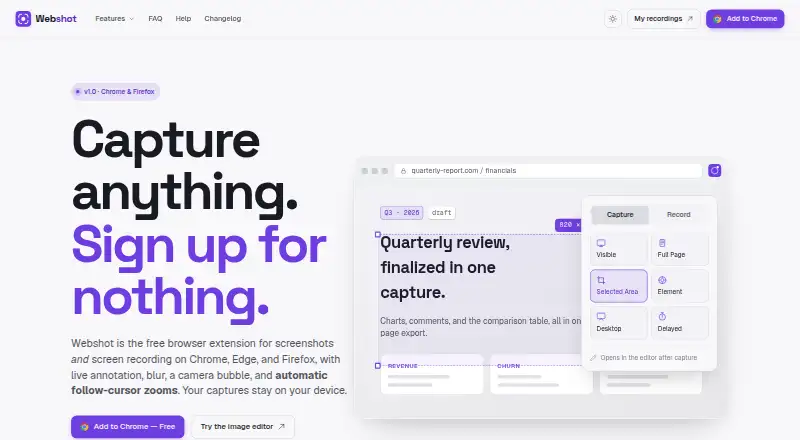
What Webshot is
Webshot is a free browser extension for screenshots, screen recording, editing, and text extraction. It can capture the visible area, a full page, a selected region, or an individual element, including delayed captures. Recording can target a browser tab, window, or desktop, with microphone input and a camera bubble. During recording, users can annotate, blur page elements, and apply highlight, ripple, or spotlight cursor effects. The screenshot editor includes a pen, arrows, shapes, text callouts, highlighter, blur, crop, and export tools. Its video editor adds automatic click-based zooms that can be adjusted, removed, or added manually. Text extraction works from images, paused video frames, and scanned PDFs. Webshot says captures are saved and rendered on-device, works offline, and has no account, telemetry, or usage tracking. Recordings have no time limit, and exports are full resolution without a watermark. Named formats include MP4, GIF, and WebM.
Who it suits
Webshot suits people who need browser-based screenshots, recordings, annotations, or OCR without creating an account. It also fits users who prefer offline, on-device processing and unrestricted recording length.
What it does well
- Captures pages, regions, and elements
- Records tabs, windows, or desktops
- Includes annotation and blur tools
- Extracts text from images and PDFs
- No account or telemetry
What to know first
- Firefox lacks single-tab recording
- Firefox lacks custom-region recording
- Firefox lacks tab or system audio capture
- No third-party integrations are listed
Plans
| Plan | Billed and limits | Price |
|---|---|---|
| The one plan | No billing; free, with no trial, paid tier, card, or account. · All capture modes · unlimited recording · full-resolution exports · no watermark | Free |
As webshot.net lists them, read 9 Oct 2026. The maker's own page has the final word.
Verdict
Webshot combines capture, recording, editing, OCR, and privacy controls in a free extension. Its Firefox version omits several recording modes, so browser choice affects available features.
Facts from Webshot's own pages
- Annotation and privacy tools
- While recording, users can annotate and blur page elements, and choose cursor effects such as highlight, ripple, or spotlight. · webshot.net, 9 Oct 2026
- Data access
- The FAQ says Webshot accesses only the tab or screen selected at capture time, not other tabs, browsing history, or visited pages. · webshot.net, 9 Oct 2026
- Exports and limits
- The maker says recordings have no time limit and exports are full resolution without a watermark; its FAQ names MP4 and GIF exports. · webshot.net, 9 Oct 2026
- Firefox support
- The Firefox version supports screenshots, text extraction, editing, and recording, but lacks single-tab recording, custom-region recording, and tab or system audio capture. · webshot.net, 9 Oct 2026
- Integrations
- The maker describes copying captures to the clipboard, downloading them, or opening them in its built-in editor; it does not list third-party integrations on the pages reviewed. · webshot.net, 9 Oct 2026
- Local processing
- The maker says captures are saved and rendered on the device, Webshot works offline, and it has no account, telemetry, or usage tracking. · webshot.net, 9 Oct 2026
- Maker
- Webshot says it is made by Betterlogic; BetterLogic FZE describes itself as UAE-based and says it was founded in 2014. · betterlogic.io, 9 Oct 2026
- Product
- Webshot is a free browser extension for screenshots and screen recording. · webshot.net, 9 Oct 2026
- Recording
- It records a browser tab, window, or desktop and supports microphone input and a camera bubble. · webshot.net, 9 Oct 2026
- Screenshot capture
- It captures the visible area, full page, selected region, or individual element, and supports delayed captures. · webshot.net, 9 Oct 2026
- Screenshot editor
- The editor includes a pen, arrows, shapes, text callouts, highlighter, blur, crop, and export. · webshot.net, 9 Oct 2026
- Support
- The FAQ directs users to support for questions not covered there; the linked support page could not be opened during this research. · webshot.net, 9 Oct 2026
- Text extraction
- Users can select text in images, paused video frames, or scanned PDFs and copy the extracted text to the clipboard. · webshot.net, 9 Oct 2026
- Video editor
- The video editor adds automatic click-based zooms that users can adjust, remove, or add themselves. · webshot.net, 9 Oct 2026
Where Webshot stands on Freedom251
- Screen Capture Software#42 of 61