WebNES
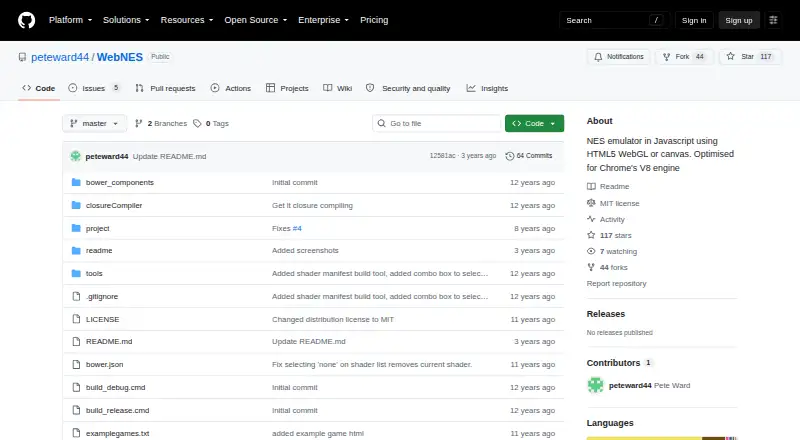
What WebNES is
WebNES is a free JavaScript emulator for Nintendo Entertainment System games that runs in a web browser. It uses HTML5 canvas and is optimized for Chrome’s V8 engine, with a playable release build hosted on GitHub Pages. The README says common NES mapper formats are supported and estimates that about 98% of games should work. Graphics use WebGL with a canvas fallback, plus selected shaders such as CRT monitor emulation; audio uses the HTML5 WebAudio API. Players can remap keyboard keys, use game pads, save or load states quickly, capture screenshots, switch between NTSC and PAL, load ZIP ROMs, vary game speed, and use a Game Genie code database. Trace logs for CPU instructions and PPU events support ROM and emulator developers. The project runs without building, is MIT licensed, and does not support Internet Explorer.
Who it suits
It suits browser players and developers interested in NES emulation, debugging, or emulator development. Chrome is the stated optimization target; Internet Explorer is explicitly unsupported.
What it does well
- Free browser-based emulator
- Playable GitHub Pages demo
- Quick save and load states
- Game pad and remappable keyboard support
- Trace logs for development
What to know first
- Internet Explorer is unsupported
- Approximately 98% compatibility is estimated
- Chrome is the optimization target
Limits
Internet Explorer is unsupported because of performance issues and its lack of real typed arrays. The README estimates compatibility at approximately 98% of games, so some titles may not work.
Getting started
- Open the WebNES website or GitHub repository
- Use the linked GitHub Pages release build
- Load a supported NES ROM, including ZIP files
- Configure keyboard keys or connect a game pad
- Use save states, screenshots, speed controls, or Game Genie codes
Verdict
WebNES offers a substantial set of NES playback, graphics, control, and development features in a browser. Its Internet Explorer exclusion and estimated, rather than complete, game compatibility should guide expectations.
Questions
What does WebNES cost?
WebNES is free and has a free plan.
Where does WebNES run?
It runs in web browsers and is optimized for Chrome’s V8 engine.
Can I use game pads and save states?
Yes. Keyboard keys can be remapped, game pads are supported, and quick save and quick load states are available.
Does WebNES support cheats?
Yes. A Game Genie code database can activate or deactivate known codes for a loaded game.
Is WebNES open source?
The repository identifies its license as MIT.
Can developers inspect emulator activity?
ROM authors and other emulator authors can generate trace logs for CPU instructions and PPU events.
Facts from WebNES's own pages
- Audio
- Audio support uses the HTML5 WebAudio API. · github.com, 4 Oct 2026
- Browser demo
- The maker links to a playable release build hosted on GitHub Pages. · github.com, 4 Oct 2026
- Browser limitation
- The README says Internet Explorer is entirely unsupported because of performance issues and its lack of real typed arrays. · github.com, 4 Oct 2026
- Build requirements
- The project can run without building; building requires npm and Bower, and the README provides Windows and Linux build instructions. · github.com, 4 Oct 2026
- Compatibility limit
- Internet Explorer is explicitly unsupported because of performance issues and its lack of real typed arrays. · github.com, 4 Oct 2026
- Controls
- Keyboard keys can be remapped, and game pads are supported. · github.com, 4 Oct 2026
- Controls and saves
- Features include remappable keyboard keys, game pad support, and quick save and quick load save states. · github.com, 4 Oct 2026
- Developer feature
- The emulator can generate trace logs for CPU instructions and PPU events for ROM authors or other emulator authors. · github.com, 4 Oct 2026
- Development tools
- Trace logs for CPU instructions and PPU events are available for ROM authors and other emulator authors. · github.com, 4 Oct 2026
- Game compatibility
- It supports common NES mapper formats, and the README estimates that approximately 98% of games should work. · github.com, 4 Oct 2026
- Game Genie
- A database of Game Genie codes lets players activate or deactivate known codes for a loaded game. · github.com, 4 Oct 2026
- Graphics
- It supports WebGL with a canvas fallback and includes selected shaders such as CRT monitor emulation. · github.com, 4 Oct 2026
- Graphics and audio
- It supports WebGL with canvas fallback, selected shaders including CRT monitor emulation, and audio through the HTML5 WebAudio API. · github.com, 4 Oct 2026
- License
- The repository identifies its license as MIT. · github.com, 4 Oct 2026
- Maker and audience
- Pete Ward describes himself as a game development software engineer and calls WebNES his browser NES emulator written in JavaScript. · github.com, 4 Oct 2026
- Maker background
- Pete Ward’s GitHub profile describes him as a game development software engineer with over 20 years of coding experience. · github.com, 4 Oct 2026
- Other player features
- It supports screenshots, NTSC and PAL, ZIP ROM loading, variable game speed, and a Game Genie code database. · github.com, 4 Oct 2026
- Product
- WebNES is a JavaScript NES emulator built with HTML5 canvas and optimized for Chrome's V8 engine. · github.com, 4 Oct 2026
- Project history
- Pete Ward’s profile says WebNES was started in 2013 and was originally ported from his C++ NES emulator. · github.com, 4 Oct 2026
- Save states
- Quick save and quick load are supported. · github.com, 4 Oct 2026
Where WebNES stands on Freedom251
- NES Emulators#22 of 26