Freedom251 › Coding Playgrounds
W3Schools Tryit Editor
What W3Schools Tryit Editor is
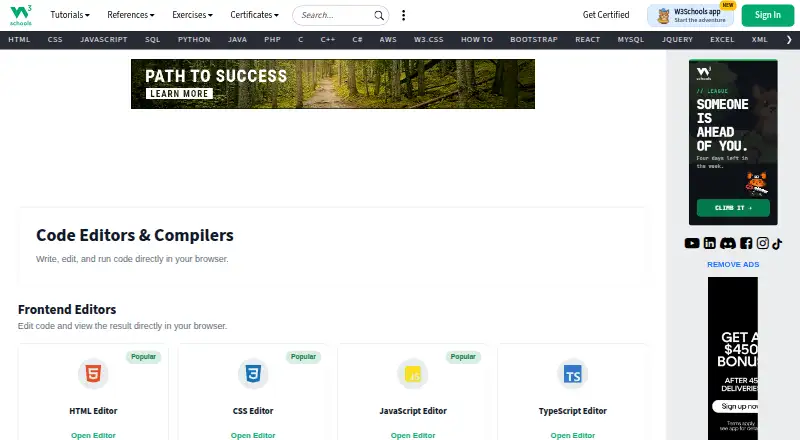
W3Schools Tryit Editor is a free, browser-based workspace for changing code and viewing the result immediately. It provides frontend editors for HTML, CSS, JavaScript, TypeScript, jQuery, Bootstrap, Angular.js, and Vue.js. Its backend compiler and editor list includes Python, SQL, Java, PHP, C, C++, C#, R, Node.js, Rust, Kotlin, Go, Bash, Swift, Fortran, VB.NET, Ruby, Perl, Scala, Clojure, Julia, and Excel. The page offers controls to run and save code, switch orientation, change the theme, and open Spaces. W3Schools presents its learning resources for beginners and professionals, moving from basic lessons toward professional references. Tryit runs on the web; W3Schools separately lists iOS and Android apps. The developer resource is free, while free users may receive advertising. W3Schools notes that examples can be simplified and may not be fully correct.
Who it suits
Tryit suits learners and developers who want to edit examples and run code in a browser. It covers many frontend and backend languages, from beginner-oriented practice through professional references.
What it does well
- Free browser-based code execution
- Many frontend editors
- Broad backend language coverage
- Run and save controls
- Theme and orientation options
What to know first
- Free users may receive targeted advertising
- Examples may be simplified
- W3Schools does not warrant complete correctness
- Tryit itself is browser-based
Verdict
W3Schools Tryit Editor offers broad language coverage and immediate browser-based results at no cost. Users should account for advertising and the stated limitations of simplified examples.
Facts from W3Schools Tryit Editor's own pages
- Audience
- W3Schools describes its learning experiences as intended to make web development accessible and easy to understand. · w3schools.com, 11 Oct 2026
- Backend compilers
- The site lists compilers for languages including Python, Java, PHP, C, C++, C#, Node.js, Rust, Kotlin, Go, Bash, and Swift, plus a SQL editor. · w3schools.com, 11 Oct 2026
- Backend languages
- The directory lists compilers or editors for Python, SQL, Java, PHP, C, C++, C#, R, Node.js, Rust, Kotlin, Go, Bash, Swift, Fortran, VB.NET, Ruby, Perl, Scala, Clojure, Julia, and Excel. · w3schools.com, 11 Oct 2026
- Browser-based
- The editor runs in the browser, where users can edit code and view the result. · w3schools.com, 11 Oct 2026
- Browser use
- The Tryit directory describes its editors as tools to write, edit, and run code directly in a browser. · w3schools.com, 11 Oct 2026
- Content limitation
- W3Schools says its examples may be simplified and it cannot warrant the full correctness of all content. · w3schools.com, 11 Oct 2026
- Editor controls
- The Tryit editor page shows controls to run and save code, change orientation and theme, and go to Spaces. · w3schools.com, 11 Oct 2026
- Free access
- W3Schools states that it is a completely free developers resource. · w3schools.com, 11 Oct 2026
- Free plan
- Yes · w3schools.com, 20 Sept 2026
- Free-user ads
- The privacy policy says free users may receive targeted advertising and can withdraw consent to personalized advertising. · w3schools.com, 11 Oct 2026
- Free-user advertising
- W3Schools says it funds the website with ads for free users and may use partners for personalized advertising, subject to consent choices. · w3schools.com, 11 Oct 2026
- Frontend editors
- The site lists editors for HTML, CSS, JavaScript, TypeScript, jQuery, Bootstrap, Angular.js, and Vue.js. · w3schools.com, 11 Oct 2026
- Frontend languages
- The directory lists frontend editors for HTML, CSS, JavaScript, TypeScript, jQuery, Bootstrap, Angular.js, and Vue.js. · w3schools.com, 11 Oct 2026
- Learning audience
- W3Schools describes its resources as serving beginners and professionals and says its tutorials progress from basic material to professional references. · w3schools.com, 11 Oct 2026
- Live result
- The editor page presents a Run button alongside an editable HTML example. · w3schools.com, 11 Oct 2026
- Mobile apps
- W3Schools lists an iOS and Android app, while Tryit itself is presented as an online browser editor. · w3schools.com, 11 Oct 2026
- Not affiliated with W3C
- W3Schools states it is not affiliated with the World Wide Web Consortium (W3C). · w3schools.com, 11 Oct 2026
- Pricing context
- W3Schools says its developer resource is free; its separate Plus plans are paid subscriptions. · w3schools.com, 11 Oct 2026
- Privacy and security
- The privacy policy says W3Schools uses administrative, technical, and physical safeguards and requires its subprocessors to follow industry-standard security measures. · w3schools.com, 11 Oct 2026
- Publishing option
- W3Schools directs users who want to create and publish websites or web applications to W3Schools Spaces. · w3schools.com, 11 Oct 2026
- Purpose
- Tryit lets users edit code examples and run them experimentally to see the results before implementation. · w3schools.com, 11 Oct 2026
- Related service
- W3Schools directs users who want to create and share websites to Spaces, which it describes as requiring no setup. · w3schools.com, 11 Oct 2026
- Run controls
- The editor page provides a Run control and keyboard shortcuts for running code, saving code, changing orientation, and changing theme. · w3schools.com, 11 Oct 2026
- Support
- W3Schools lists [email protected] for reporting errors or suggestions and [email protected] for institutional, team, or enterprise inquiries. · w3schools.com, 11 Oct 2026
Where W3Schools Tryit Editor stands on Freedom251
- Coding Playgrounds#100 of 138
- Code Playground Software#51 of 58
- Coding Learning Software#39 of 42