Freedom251 › Code Playground Software
MDN Playground
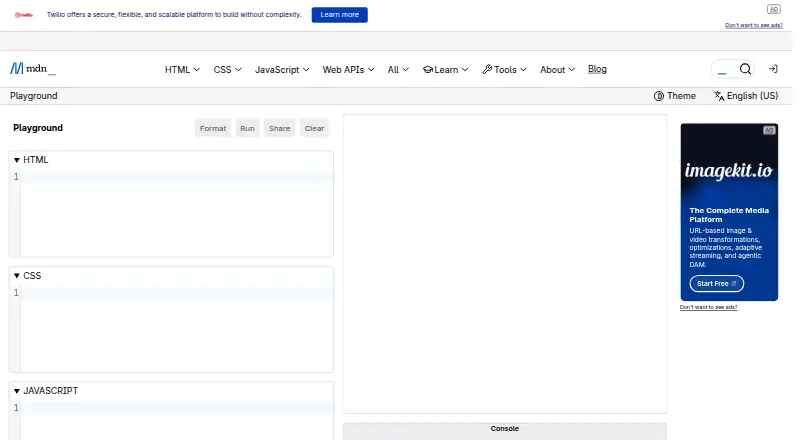
What MDN Playground is
MDN Playground is a free web tool for previewing HTML, CSS, and JavaScript. Edits appear in a live preview, so web developers can try code ideas and learn from examples. The editor includes basic autocomplete and formatting with Prettier. Users can open an existing MDN live sample with its Play button and modify it in Playground. To share work, anyone can copy Markdown for a playground; logged-in users can also create a permalink that lets others preview and interact with it. That Markdown can be added to an MDN article or a GitHub issue. Each playground runs in an iframe on a random UUID subdomain of mdnplay.dev to isolate instances, and users can flag shared content they consider malicious or inappropriate. The tool is available in modern web browsers and costs nothing. MDN presents it for experimenting with code and learning from MDN examples. It is not a full-stack runtime and has no deployment options.
Who it suits
MDN Playground suits web developers who want to experiment with HTML, CSS, and JavaScript or adapt MDN examples. It is for code previews rather than full-stack runtime or deployment.
What it does well
- Live preview updates as code changes.
- Includes basic autocomplete and Prettier formatting.
- Can open and modify MDN live samples.
- Logged-in users can create interactive permalinks.
- Available in modern web browsers.
What to know first
- No full-stack runtime.
- No deployment options.
- Permalink creation requires logging in.
Plans
| Plan | Billed and limits | Price |
|---|---|---|
| MDN Playground | HTML · CSS · JavaScript | Free |
As developer.mozilla.org lists them, read 11 Oct 2026. The maker's own page has the final word.
Verdict
MDN Playground offers a free way to try front-end code and adapt MDN examples. Its scope is previewing and sharing playgrounds, not running full-stack applications or deploying them.
Facts from MDN Playground's own pages
- Autocomplete and formatting
- It offers basic autocomplete and code formatting with Prettier. · developer.mozilla.org, 11 Oct 2026
- Availability
- The Playground is accessible on all modern web browsers and is completely free to use. · developer.mozilla.org, 11 Oct 2026
- Content reporting
- Users can flag a shared playground if its content is malicious or inappropriate. · developer.mozilla.org, 11 Oct 2026
- Deployment options
- none · developer.mozilla.org, 22 Sept 2026
- Execution isolation
- The runner uses an iframe on a random UUID subdomain of mdnplay.dev to isolate instances. · developer.mozilla.org, 11 Oct 2026
- Free plan
- Yes · developer.mozilla.org, 22 Sept 2026
- Full-stack runtime
- No · developer.mozilla.org, 22 Sept 2026
- GitHub workflow
- Copied Markdown can be included in an MDN article or a GitHub issue. · developer.mozilla.org, 11 Oct 2026
- Intended users
- MDN describes Playground as a tool for web developers to experiment with code and learn from MDN examples. · developer.mozilla.org, 11 Oct 2026
- Live preview
- Code changes appear in the preview area so users can test ideas interactively. · developer.mozilla.org, 11 Oct 2026
- MDN integration
- Users can open existing MDN live samples in Playground using the Play button and modify them. · developer.mozilla.org, 11 Oct 2026
- Purpose
- MDN Playground lets users preview HTML, CSS, and JavaScript code. · developer.mozilla.org, 11 Oct 2026
- Sharing controls
- link_access · developer.mozilla.org, 22 Sept 2026
- Sharing
- Users can copy Markdown for a playground or, when logged in, create a permalink that lets others preview and interact with it. · developer.mozilla.org, 11 Oct 2026
Where MDN Playground stands on Freedom251
- Code Playground Software#28 of 58
- Coding Playgrounds#98 of 138