Freedom251 › Version Control Software
VisualSVN Server
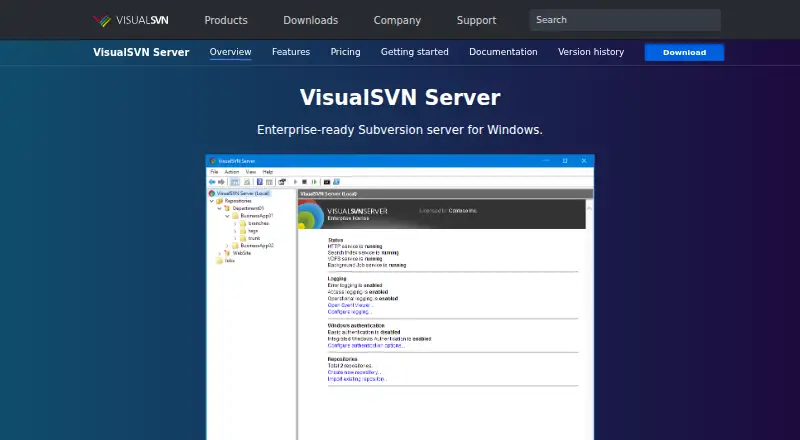
What VisualSVN Server is
VisualSVN Server is an Apache Subversion server for Windows, intended for enterprise use. It comes as a single installation package that sets up a full-featured Subversion server. It works with Apache Subversion clients and stores repositories in the standard format. The web interface searches repository contents and history across folders and revisions, and continuously indexes new revisions.
VDFS replicates repositories between geographically distributed sites, where the repositories remain writable. Backup and Restore supports hot backups and scheduled repository verification. In Active Directory environments, users can authenticate with Windows credentials through Kerberos V5 or NTLM; two-factor authentication and smart cards are supported as well. Administrators can manage the server through an MMC console or automate tasks with PowerShell cmdlets. The server can write HTTP requests and Subversion operations to the Windows Event Log and temporarily block IP addresses after repeated authentication failures. RESTful URLs in the web interface connect repository content with issue trackers and other third-party applications. Supported server systems include Windows Server 2012 R2–2025 and Windows 8.1 or later; Windows and Unix Subversion clients and web browsers are also supported. The Community plan is free, permits unlimited repositories, and supports up to 15 users. Paid perpetual licenses start at $55, with 12 months of free upgrades.
Who it suits
VisualSVN Server suits teams that host Subversion repositories on Windows and need repository search, backup, administration tools, or replication across sites. It also fits Active Directory environments that use Windows credentials, two-factor authentication, or smart cards.
What it does well
- Single package installs a full-featured Subversion server.
- Full-text search covers repository contents and revision history.
- VDFS supports writable replicated repositories across distributed sites.
- Hot backups and scheduled repository verification are available.
- MMC and PowerShell tools support administration and automation.
- Free Community plan permits unlimited repositories for up to 15 users.
What to know first
- The server requires Windows Server 2012 R2–2025 or Windows 8.1 or later.
- The Community plan is limited to 15 users.
- Essential licenses are limited by the selected license size for users and VDFS repositories.
- Distributed version control is not supported.
Limits
The free Community plan allows unlimited repositories and up to 15 users. Essential and Enterprise licenses have user and VDFS repository limits determined by license size; Enterprise Multinode covers all nodes in one VDFS cluster and allows unlimited VDFS repositories.
Plans
| Plan | Billed and limits | Price |
|---|---|---|
| Community | Free · Unlimited repositories · up to 15 users · free for commercial use | Free |
| Enterprise Multinode | Perpetual license; 12 months of free upgrades · For all nodes in one VDFS cluster · unlimited VDFS repositories · license size determines user limit | $350, paid once |
| Enterprise | Perpetual license; 12 months of free upgrades · For SMB or Enterprise · license size determines user and VDFS repository limits | $350, paid once |
| Essential | Perpetual license; 12 months of free upgrades · For home usage or small teams · license size determines user and VDFS repository limits | $55, paid once |
As visualsvn.com lists them, read 3 Oct 2026. The maker's own page has the final word.
Getting started
- Open the VisualSVN Server website and download the installation package.
- Install it on Windows Server 2012 R2–2025 or Windows 8.1 or later.
- Choose the free Community license or a paid perpetual license.
- Create repositories and administer the server with the MMC console or PowerShell cmdlets.
- Connect using an Apache Subversion client or web browser.
Verdict
Choose VisualSVN Server if you need to host standard-format Subversion repositories on Windows, especially when repository search, backup, or writable site replication matters. The free Community plan covers up to 15 users; larger teams or VDFS deployments should compare the perpetual license options, which have limits determined by license size.
Questions
Is VisualSVN Server free?
Yes. The Community plan is free, supports unlimited repositories, and allows up to 15 users, including for commercial use.
What do the paid licenses cost?
Essential costs $55 once. Enterprise Multinode and Enterprise each cost $350 once. Each paid license is perpetual and includes 12 months of free upgrades.
What operating systems are supported?
The download page lists Windows Server 2012 R2–2025 and Windows 8.1 or later. Windows and Unix Subversion clients and web browsers are also supported.
Does it work with Subversion clients?
Yes. VisualSVN Server is compatible with all Apache Subversion clients and stores repositories in the standard format.
Can repositories be replicated between sites?
Yes. VDFS provides replication between geographically distributed sites, and the distributed repositories are writable.
Who makes VisualSVN Server?
VisualSVN Software Ltd says it has provided version control tools and solutions since 2005 and lists its address in Limassol, Cyprus.
Facts from VisualSVN Server's own pages
- Administration
- VisualSVN Server includes an MMC management console and PowerShell cmdlets for administration and automation. · visualsvn.com, 3 Oct 2026
- Authentication
- In Active Directory environments, users can sign in with Windows credentials using Kerberos V5 or NTLM; two-factor authentication and smart cards are supported. · visualsvn.com, 3 Oct 2026
- Backup
- Its Backup and Restore feature supports hot backups and scheduled repository verification. · visualsvn.com, 3 Oct 2026
- Company
- VisualSVN Software Ltd says it has provided version control tools and solutions since 2005 and lists its address in Limassol, Cyprus. · visualsvn.com, 3 Oct 2026
- Compatibility
- The server is compatible with all Apache Subversion clients and stores repositories in the standard format. · visualsvn.com, 3 Oct 2026
- Founded
- 2005 · visualsvn.com, 28 Sept 2026
- Headquarters
- Limassol, Cyprus · visualsvn.com, 28 Sept 2026
- Installation
- It is distributed as a single installation package that sets up a full-featured Subversion server. · visualsvn.com, 3 Oct 2026
- Integrations
- The web interface uses RESTful URLs to link repository content with issue trackers and other third-party applications. · visualsvn.com, 3 Oct 2026
- Platform limits
- The download page lists Windows Server 2012 R2–2025 and Windows 8.1 or later as supported operating systems. · visualsvn.com, 3 Oct 2026
- Purpose
- VisualSVN Server is an enterprise-ready Apache Subversion server for Windows. · visualsvn.com, 3 Oct 2026
- Replication
- VDFS provides replication between geographically distributed sites, and distributed repositories are writable. · visualsvn.com, 3 Oct 2026
- Repository search
- Full-text search covers repository contents and history across folders and revisions, with continuous indexing of new revisions. · visualsvn.com, 3 Oct 2026
- Security
- The product can log HTTP requests and Subversion operations to the Windows Event Log, and temporarily block IP addresses after repeated authentication failures. · visualsvn.com, 3 Oct 2026
- Support
- The company says free technical support is available regardless of license type. · visualsvn.com, 3 Oct 2026
Where VisualSVN Server stands on Freedom251
- Version Control Software#43 of 62
- Source Code Management#22 of 30
- Game Version Control Software#23 of 28