Freedom251 › AI Face Swap Tools
Vidwud AI Face Swap
What Vidwud AI Face Swap is
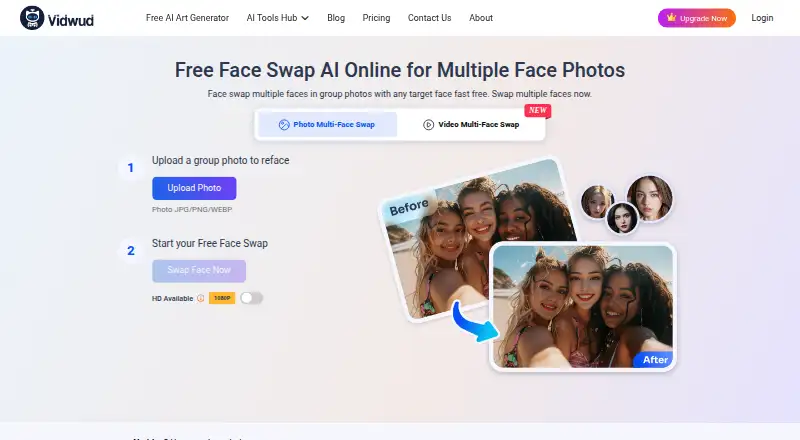
Vidwud AI Face Swap replaces faces in group photos, videos, and GIFs. Upload the original media and the faces to use; Vidwud says its AI detects faces and can follow multiple people as a video plays. The photo uploader accepts JPG, PNG, and WEBP files. For video, it accepts GIF and M4V, MP4, MOV, or WEBM files. The FAQ says there is no fixed face-count cap, though using too many replacements can lead to blur or other poor results. Vidwud recommends working with two to six faces and choosing clear, front-facing target photos with good lighting.
The product page claims downloads up to 4K for photos and 1080p for videos, without watermarks. Suggested projects include family pictures, movie-scene recreations, classical art, and personalized GIF memes. Vidwud offers a free plan and paid access from $9.99/mo. The free plan has limited multi-face swaps, zero credits, a 100 MB video limit, 500 MB of storage, and standard generation speed. The product is web-based. Vidwud says uploads are processed to provide the requested service and are typically deleted within seven days; it also says content is not used for AI training without disclosed consent and that it does not share biometric face data with third parties.
Who it suits
It suits people who want to replace several faces in photos, videos, or GIFs through a web tool, including for family pictures, scene recreations, art, or memes. People working with video should check the free plan’s 100 MB file limit and consider whether paid access fits their needs.
What it does well
- Handles multiple faces in photos, videos, and GIFs.
- Accepts JPG, PNG, and WEBP photos.
- Supports GIF, M4V, MP4, MOV, and WEBM video files.
- Claims photo output up to 4K and video up to 1080p.
- Claims downloads without watermarks.
- Offers a free plan.
What to know first
- Free plan includes zero credits and limited multi-face swaps.
- Free plan limits videos to 100 MB.
- Free plan includes 500 MB of storage and standard generation speed.
- Too many face replacements may cause blur or poor results.
Limits
The free plan has zero credits, limited multi-face swaps, a 100 MB video cap, 500 MB of storage, and standard generation speed. Vidwud says too many face replacements can result in blur or other poor output.
Plans
| Plan | Billed and limits | Price |
|---|---|---|
| Free | 0 credits · limited face-swap tools · 100 MB/video · 500 MB storage · standard speed | Free |
| Monthly | monthly · Full access to multi-face swap for images and video · max 500 MB/video · unlimited storage · faster generation · no watermark | Free |
| Yearly | annually · Full access to multi-face swap for images and video · max 500 MB/video · unlimited storage · faster generation · no watermark | Free |
| Half-Yearly | every six months · Full access to multi-face swap for images and video · max 500 MB/video · unlimited storage · faster generation · no watermark | Free |
| Starter | billed monthly · full tools · 500 MB/video · unlimited storage · faster processing · no watermark · 24/7 support | $24.99 a month |
| Pro | billed monthly · full tools · 500 MB/video · unlimited storage · faster processing · no watermark · 24/7 support | $46.99 a month |
| Basic | billed monthly · full tools · 500 MB/video · unlimited storage · faster processing · no watermark · 24/7 support | $9.99 a month |
As vidwud.com lists them, read 15 Oct 2026. The maker's own page has the final word.
Getting started
- Open the Vidwud AI Face Swap website.
- Upload a source photo, video, or GIF in a supported format.
- Upload the target faces for replacement.
- Use clear, front-facing target photos with good lighting; Vidwud recommends two to six faces.
- Choose a plan that fits your usage.
Verdict
Choose Vidwud AI Face Swap if you want a web tool for replacing multiple faces across photos, videos, or GIFs, with claimed high-resolution, watermark-free downloads. Look elsewhere if the free plan’s zero credits, limited swaps, or 100 MB video limit do not fit your project; paid access starts at $9.99/mo.
Questions
Is Vidwud AI Face Swap free?
Yes. It has a free plan, and paid access starts at $9.99/mo.
What does the free plan include?
It has zero credits and limited multi-face swaps, with a 100 MB video limit, 500 MB of storage, and standard generation speed.
Which file formats does it accept?
Photos can be JPG, PNG, or WEBP. Videos can be GIF, M4V, MP4, MOV, or WEBM.
Can it swap multiple faces in videos?
Yes. Vidwud says it can detect and track multiple faces through video playback. Its FAQ says there is no face-count limit, but too many replacements may reduce quality.
What does Vidwud say about uploaded content?
It says uploads are processed to provide the service and typically deleted within seven days. It says content is not used for AI training unless that use is disclosed and consented to.
What output quality does it claim?
The product page claims photo downloads up to 4K and video downloads up to 1080p, without watermarks.
Facts from Vidwud AI Face Swap's own pages
- Company background
- Vidwud says it was founded in 2017 and describes itself as an AI platform offering tools for presentation, video, and image creation. · vidwud.com, 3 Oct 2026
- Company size
- LinkedIn lists Vidwud AI as a self-owned technology and internet company with 11–50 employees. · linkedin.com, 15 Oct 2026
- Content handling
- The privacy policy says uploaded content is processed to provide the requested service, is not used for AI model training unless explicitly disclosed and consented to, and is typically deleted within seven days. · vidwud.com, 3 Oct 2026
- Credit expiry
- Credits remain valid while a subscription is active, and unused credits expire at the end of the subscription after cancellation. · vidwud.com, 15 Oct 2026
- Credit rollover
- Unused subscription credits are carried into the next billing cycle while the subscription continues. · vidwud.com, 15 Oct 2026
- Documentation and API
- The official site navigation exposes product pages, blog, contact, privacy, terms and refund links but no public API, SDK or developer-documentation link. · vidwud.com, 15 Oct 2026
- Face count
- The FAQ says there is no face-count limit, but too many replacements may cause blur or other poor results. · vidwud.com, 3 Oct 2026
- Face-count guidance
- The FAQ says there is no hard face-count limit, but recommends two to six faces because larger jobs may blur or misalign. · vidwud.com, 15 Oct 2026
- Face data
- Vidwud says it does not collect, store, sell, or share biometric face data, facial recognition data, or facial templates with third parties. · vidwud.com, 3 Oct 2026
- Face detection
- Vidwud says its AI automatically detects faces and adjusts color and lighting when swapping. · vidwud.com, 15 Oct 2026
- Founded
- Vidwud’s about page says the company was founded in 2017. · vidwud.com, 15 Oct 2026
- Funding claim
- Vidwud’s about page claims it has raised more than $30 million. · vidwud.com, 15 Oct 2026
- Hosting model
- An independent review describes Vidwud as cloud-only, with no offline processing or self-hosted mode. · vidmage.ai, 15 Oct 2026
- Intended use
- The product page describes use cases including family photos, recreating movie scenes, re-facing classical art, and personalized GIF memes. · vidwud.com, 3 Oct 2026
- Limit: angled faces
- Testing found three-quarter and side-profile inputs can stretch the jaw, misplace an eye and create mask-like distortion. · vidmage.ai, 15 Oct 2026
- Limit: free allowance
- Independent testing found the free tier provides one single-photo swap per day, while video and multi-face jobs require credits. · vidmage.ai, 15 Oct 2026
- Limit: GIF reliability
- AutoGPT reports that although Vidwud lists GIF uploads, an independent test found GIF output unavailable. · autogpt.net, 15 Oct 2026
- Limit: pricing clarity
- RenderPop says Vidwud marketing emphasizes free use while pricing pages impose credit charges and paid-plan limits. · renderpop.app, 15 Oct 2026
- Limit: queue variability
- A tester reported video processing ranging from about 45 seconds in the morning to seven-to-nine minutes during evening peaks. · vidmage.ai, 15 Oct 2026
- Limit: Trustpilot complaint
- A reviewer said a 12.99 purchase supplied 80 coins, lacked previewing and produced many unusable 15-second videos, making the per-video cost feel excessive. · trustpilot.com, 15 Oct 2026
- Output quality
- The product page claims downloads can be up to 4K for photos and 1080p for videos, without watermarks. · vidwud.com, 3 Oct 2026
- Output resolution
- The product page advertises downloads up to 1080p for video and 4K for photos. · vidwud.com, 15 Oct 2026
- Photo credit cost
- The pricing page charges one credit for a 1-to-6-face photo swap and two credits for a 7-to-10-face photo swap. · vidwud.com, 15 Oct 2026
- Photo formats
- The photo uploader accepts JPG, PNG, and WEBP files. · vidwud.com, 3 Oct 2026
Where Vidwud AI Face Swap stands on Freedom251
- AI Face Swap Tools#45 of 57