Freedom251 › Video Editing Software
VideoPad
by VideoPad
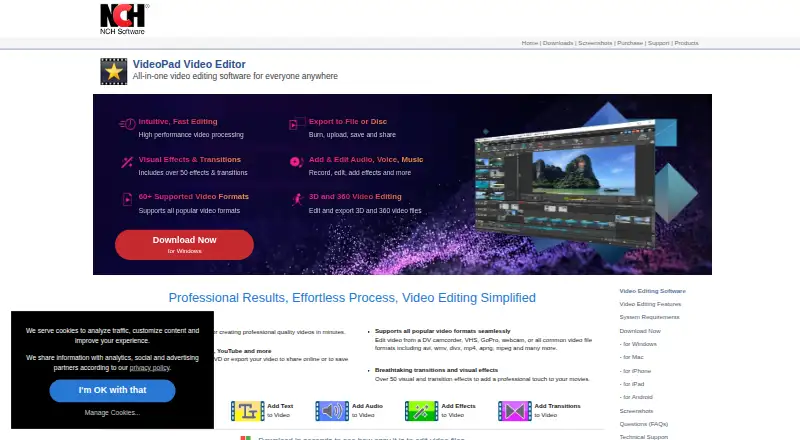
What VideoPad is
VideoPad is a video editor for assembling and finishing video projects on Android, iOS, macOS, and Windows. It is available as desktop and mobile apps, with no web app. Editing tools include drag-and-drop controls, multiple video and audio tracks, and speed adjustments. The product supports more than 60 video formats, with AVI, WMV, DivX, MP4, APNG, and MPEG among the examples, and its product page lists over 50 visual effects and transitions. VideoPad can edit and export 3D and 360 video, and supports 4K export. Projects can be exported to files or discs, burned to DVDs, or saved to portable devices. For capture, it can take video from a digital video camera, a video capture device, or a webcam. The help guide lists upload options for Dropbox, Vimeo, Flickr, Google Drive, Microsoft OneDrive, and YouTube. The free version is available without signup for non-commercial use. NCH provides tutorials, a help manual, technical support contact, and a user forum. NCH Software was established in 1993 and is headquartered in Canberra, Australia; it also has a satellite office in Denver, Colorado. A purchased license code does not expire for the software version in place when activated.
Who it suits
VideoPad suits people who want a desktop or mobile editor with support for multiple tracks, 4K output, and 3D or 360 video. Its free version is for non-commercial use, so commercial users should consider a purchased license.
What it does well
- Runs on Android, iOS, macOS, and Windows.
- Supports more than 60 video formats.
- Edits and exports 3D and 360 video.
- Offers 4K export.
- Can capture video from cameras, capture devices, and webcams.
- Lists uploads to Dropbox, Vimeo, Flickr, Drive, OneDrive, and YouTube.
What to know first
- The free version is limited to non-commercial use.
- There is no web app.
Limits
The free version is for non-commercial use only.
Plans
| Plan | Billed and limits | Price |
|---|---|---|
| Free version | Non-commercial use only · no signup required | Free |
As nchsoftware.com lists them, read 11 Oct 2026. The maker's own page has the final word.
Getting started
- Open the VideoPad website.
- Choose the version for Android, iOS, macOS, or Windows.
- Install the desktop or mobile app.
- Start with the free version without signing up, for non-commercial use.
Verdict
Choose VideoPad if you need a cross-platform editor with multi-track editing, 4K export, and support for 3D or 360 video. The free version suits non-commercial work; commercial use calls for a purchased license.
Questions
Is VideoPad free?
Yes. Its free version costs nothing and requires no signup. It is for non-commercial use only.
Which platforms does VideoPad support?
VideoPad is available on Android, iOS, macOS, and Windows. It has desktop and mobile apps, but no web app.
Can VideoPad export 4K video?
Yes, 4K export is supported.
Can it edit 3D or 360 video?
Yes. VideoPad can edit and export 3D and 360 video files.
Where can users upload finished videos?
The help guide lists Dropbox, Vimeo, Flickr, Google Drive, Microsoft OneDrive, and YouTube.
Facts from VideoPad's own pages
- 3D and 360 video
- VideoPad can edit and export 3D and 360 video files. · nchsoftware.com, 11 Oct 2026
- Capturing media
- VideoPad can capture video from a digital video camera, video capture device, or webcam. · help.nchsoftware.com, 11 Oct 2026
- Company history
- NCH Software says it was established in 1993 and is headquartered in Canberra, Australia, with a satellite office in Denver, Colorado. · nch.com.au, 11 Oct 2026
- Desktop app
- Yes · nchsoftware.com, 21 Sept 2026
- Editing
- The product supports drag-and-drop editing, multiple video and audio tracks, and speed adjustments. · help.nchsoftware.com, 11 Oct 2026
- Effects
- VideoPad offers over 50 visual effects and transitions on its product page. · nchsoftware.com, 11 Oct 2026
- Formats
- The product page says VideoPad supports more than 60 video formats and lists AVI, WMV, DivX, MP4, APNG, and MPEG as examples. · nchsoftware.com, 11 Oct 2026
- Founded
- 1993 · nchsoftware.com, 28 Sept 2026
- 4K export
- Yes · nchsoftware.com, 21 Sept 2026
- Free plan
- Yes · nchsoftware.com, 21 Sept 2026
- Free-use limit
- The free version is available for non-commercial use only. · nchsoftware.com, 11 Oct 2026
- Integrations
- The help guide lists uploads to Dropbox, Vimeo, Flickr, Google Drive, Microsoft OneDrive, and YouTube. · help.nchsoftware.com, 11 Oct 2026
- License
- NCH says a purchased license code does not expire for the software version released at the time of activation. · nch.com.au, 11 Oct 2026
- Mobile app
- Yes · nchsoftware.com, 21 Sept 2026
- Output
- Users can export videos to files or discs, burn DVDs, and save videos to portable devices. · nchsoftware.com, 11 Oct 2026
- Platforms
- The VideoPad page links downloads for Windows, Mac, iPhone, iPad, and Android. · nchsoftware.com, 11 Oct 2026
- Purpose
- VideoPad is a video editor for creating professional quality videos. · nchsoftware.com, 11 Oct 2026
- Security and privacy
- NCH's privacy statement says it may transfer information to NCH or third-party service providers across borders and describes its practices for cookies and tracking technologies. · nch.com.au, 11 Oct 2026
- Support
- NCH provides VideoPad tutorials, a help manual, technical support contact, and a user forum. · nchsoftware.com, 11 Oct 2026
- Web app
- No · nchsoftware.com, 21 Sept 2026
Where VideoPad stands on Freedom251
- Video Editing Software#10 of 155