Freedom251 › Minecraft Shader Packs
Vanilla Plus Shader
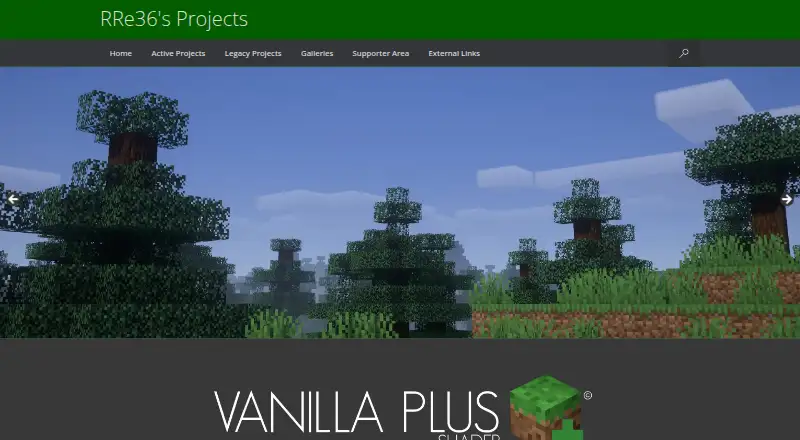
What Vanilla Plus Shader is
Vanilla Plus Shader is a free Minecraft shaderpack that adds visual effects while retaining a vanilla-style look. It includes dynamic soft shadows, lighting with dynamic colours, and volumetric clouds that use the resourcepack’s cloud texture. Optional effects include custom water, screen-space reflections, godrays, depth of field, lens flares, and vignette; temporal anti-aliasing is also included. It supports resourcepack materials based on the labPBR standard and provides color profiles inspired by Minecraft Alpha and older shaderpacks, including SEUS v08 and Chocapic v3. Version 3.3 added Minecraft 1.21 block mappings, improved wind handling, and settings for blocklight colour and brightness and minimum ambient light. Compatibility is listed for Minecraft Java Edition versions 1.16.x through 1.21.4 with Iris or OptiFine. Requirements include OptiFine for Minecraft 1.16 or newer, or Iris 1.5.0 or newer, and a graphics card supporting OpenGL 4.3 or newer. Listed operating systems are Windows and Linux. Downloads are available through CurseForge or Modrinth. Private modifications are allowed, but redistributing modified versions requires explicit permission.
Who it suits
Vanilla Plus Shader suits Minecraft Java Edition players who want added lighting and visual effects while keeping a vanilla-style aesthetic. It requires Iris or OptiFine and a graphics card supporting OpenGL 4.3 or newer.
What it does well
- Includes dynamic shadows and coloured lighting.
- Volumetric clouds use the resourcepack texture.
- Supports labPBR resourcepack materials.
- Private modifications are allowed.
What to know first
- Requires Iris or OptiFine.
- Requires a graphics card supporting OpenGL 4.3 or newer.
- Modified versions cannot be redistributed without permission.
Plans
| Plan | Billed and limits | Price |
|---|---|---|
| Vanilla Plus Shader | Downloads available through CurseForge or Modrinth | Free |
As rre36.com lists them, read 4 Oct 2026. The maker's own page has the final word.
Getting started
- Visit the Vanilla Plus Shader website.
- Download the shaderpack through CurseForge or Modrinth.
- Use OptiFine for Minecraft 1.16 or newer, or Iris 1.5.0 or newer.
- Run it on Windows or Linux with a graphics card supporting OpenGL 4.3 or newer.
- For support or development updates, use the creator’s Discord server.
Verdict
Vanilla Plus Shader offers optional visual effects and resourcepack material support across the listed Minecraft versions. Check the graphics and mod requirements before downloading.
Questions
Is Vanilla Plus Shader free?
Yes. Its pricing model is free, and the listed plan costs nothing.
Which Minecraft versions are listed as compatible?
The Modrinth page lists Minecraft Java Edition versions 1.16.x through 1.21.4 with Iris or OptiFine.
What does it require?
It requires OptiFine for Minecraft 1.16 or newer, or Iris 1.5.0 or newer, and a graphics card supporting OpenGL 4.3 or newer.
Which operating systems are listed?
Windows and Linux.
Can I redistribute a modified version?
Private modifications are allowed, but redistributing modified versions requires explicit permission.
Where can I get support?
The creator points users to the Discord server for support and development updates.
Facts from Vanilla Plus Shader's own pages
- Anti-aliasing
- The shaderpack includes temporal anti-aliasing. · modrinth.com, 4 Oct 2026
- Clouds
- Its volumetric vanilla-style clouds use the cloud texture from the resourcepack. · modrinth.com, 4 Oct 2026
- Color profiles
- It includes profiles that imitate Minecraft Alpha colors and the looks of older shaderpacks such as SEUS v08 and Chocapic v3. · rre36.com, 4 Oct 2026
- Compatibility
- The Modrinth page lists Minecraft Java Edition versions 1.16.x through 1.21.4 and Iris or OptiFine compatibility. · modrinth.com, 4 Oct 2026
- Download and support
- The creator encourages downloads through CurseForge or Modrinth and points users to the Discord server for support and development updates. · rre36.com, 4 Oct 2026
- License and reuse
- The creator's terms allow private modifications but prohibit redistributing modified versions without explicit permission. · rre36.com, 4 Oct 2026
- Materials
- It supports resourcepack materials based on the labPBR standard. · modrinth.com, 4 Oct 2026
- Operating systems
- The listed requirements specify Windows or Linux. · modrinth.com, 4 Oct 2026
- Optional effects
- Optional features include custom water, screenspace reflections, godrays, depth of field, lens flares and vignette. · modrinth.com, 4 Oct 2026
- Purpose
- Vanilla Plus is a Minecraft shaderpack designed to preserve the vanilla aesthetic while adding graphical enhancements. · rre36.com, 4 Oct 2026
- Recent update
- Version 3.3 added Minecraft 1.21 block mappings, improved wind handling, and settings for blocklight colour and brightness and minimum ambient light. · rre36.com, 4 Oct 2026
- Requirements
- The listed requirements are OptiFine for Minecraft 1.16 or newer or Iris 1.5.0 or newer, and a graphics card supporting OpenGL 4.3 or newer. · modrinth.com, 4 Oct 2026
- Shadows and lighting
- It adds dynamic soft shadows and improved lighting with dynamic colours. · modrinth.com, 4 Oct 2026
Where Vanilla Plus Shader stands on Freedom251
- Minecraft Shader Packs#14 of 38