Freedom251 › AI Companion Apps
Utsuwa
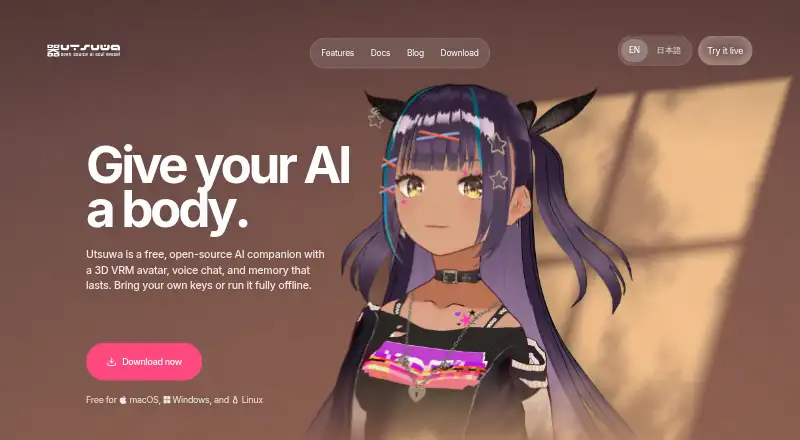
What Utsuwa is
Utsuwa is a free, open-source AI companion app built around a 3D VRM avatar, voice, conversation memory, and a relationship system. It supports models from OpenAI, Anthropic, Google, DeepSeek, and xAI, along with OpenAI-compatible endpoints, Ollama, and LM Studio. Users can load their own VRM avatars. Local embeddings enable semantic recall, and memories can be browsed, searched, added, or deleted. Voice services include local and hosted options; listed capabilities also include proactive messages, persistent memory, and image or video chat.
Utsuwa can run entirely on a user's machine with local models and voice services. The maker says there are no accounts, analytics, ads, or tracking cookies, and conversations, memories, and settings are stored on the device. In the hosted web app, cloud-provider requests may pass through Utsuwa servers; the maker says those servers do not store messages or API keys or log conversation content. Desktop messages go directly from the device to the selected provider. The desktop app is in beta, and its builds are not code-signed. The maker says the app is intended for adults aged 18 and over.
Who it suits
Utsuwa suits adults aged 18 and over who want an AI companion with an avatar, voice, and persistent memory. It also supports users who prefer local models and voice services.
What it does well
- Supports a range of hosted and local model options.
- Users can load their own VRM avatars.
- Memories can be browsed, searched, added, or deleted.
- Can run entirely on a user's machine.
What to know first
- Desktop app is in beta.
- Desktop builds are not code-signed.
- Hosted web requests may pass through Utsuwa servers.
Limits
The free plan has no subscription or paywalled features, but you need to bring your own model keys or use a local model. The desktop app is in beta, and its builds are not code-signed.
Plans
| Plan | Billed and limits | Price |
|---|---|---|
| Free | No subscription · No paywalled features · Bring your own model keys or use a local model | Free |
As utsuwa.ai lists them, read 5 Oct 2026. The maker's own page has the final word.
Getting started
- Open the Utsuwa website.
- Choose a listed platform: Android, Linux, macOS, self-hosted, web, or Windows.
- Use a local model or bring your own model keys.
- Choose supported voice services and load a VRM avatar if desired.
- For desktop, account for its beta status and unsigned builds.
- Use GitHub to reach the team; the maker identifies it as the fastest contact route.
Overview
Utsuwa is an open-source AI companion app for adults who want to shape a companion around their own avatar, models, and voice services. Its strongest appeal is the combination of customization and local-operation options; it is less suited to people who want a ready-made service with model access included.
Key features
The app pairs a 3D VRM avatar with a relationship system, persistent memory, voice conversations, proactive messages, and image or video chat. Users can load their own VRM models and customize extensively, which makes Utsuwa a good fit for people who want control over a companion’s appearance rather than a fixed character.
Model choices include OpenAI, Anthropic, Google, DeepSeek, xAI, OpenAI-compatible endpoints, Ollama, and LM Studio. That breadth accommodates both cloud providers and local models, but Utsuwa does not remove the need to bring model keys or set up a local model. Voice options span ElevenLabs, OpenAI TTS, local TTS, OmniVoice, local Whisper, Groq, OpenAI, and browser speech recognition, offering flexibility at the cost of requiring users to choose and configure services.
Local embeddings provide semantic recall, and users can browse, search, add, and delete memories. MCP tool connections include Home Assistant, Brave Search, and GitHub. These features give technically inclined users more ways to connect the companion to tools and past conversations; those seeking a simpler, preconfigured chat experience may not need that breadth.
Pricing
The Free plan costs nothing, with no subscription and no paywalled features. It includes voice conversations, persistent memory, proactive messages, and extensive customization; users bring their own model keys or use a local model. There is no free trial because the plan is free. The main cost consideration is therefore not a subscription but access to any provider or services the user chooses.
Platforms
Utsuwa is available on Android, Linux, macOS, Windows, web, and self-hosted setups. The desktop app is in beta and its builds are not code-signed, a practical caution for desktop users. Desktop messages go directly from the device to the selected provider. In the hosted web app, cloud provider requests may pass through Utsuwa’s servers; the maker says those servers do not store messages or API keys or log conversation content.
Utsuwa can run entirely on a user’s machine with local models and local voice services. The maker says there are no accounts, analytics, ads, or tracking cookies, and that conversations, memories, and settings remain on the device. Local operation is the clearest choice for users prioritizing control of their data, while web users should weigh the stated request routing. The maker directs users to GitHub as the fastest way to reach the team.
Who it's for
Utsuwa suits adults aged 18 and over who want an adaptable AI companion and are comfortable selecting model and voice services themselves. Its local model and voice options are especially relevant to people who want the app to run on their own machine. It is a weaker fit for anyone who expects bundled model access, a signed stable desktop build, or a turnkey character experience.
Pros and cons
- Pros: No subscription or paywalled features, with voice, memory, proactive messages, and extensive customization on the free plan.
- Pros: Broad support for hosted and local models, plus local voice services and self-hosted operation.
- Pros: Users can manage stored memories and load their own VRM avatars.
- Cons: Users must supply model keys or configure a local model, so free access does not mean a bundled model service.
- Cons: Desktop is beta and builds are unsigned, which may deter users who prioritize a mature, signed desktop app.
- Cons: Hosted web requests may be relayed through Utsuwa’s servers, unlike desktop provider requests.
Alternatives
For a broader starting point, browse AI Companion Apps.
Ensoul is another free option across Android, macOS, web, and Windows. Kissable offers a free tier with limited daily text messages and basic chat features. Nomi AI is a freemium alternative with free access and paid credit or subscription options. Paradot AI may suit readers who prefer a daily message allowance, one companion, basic memory, and text chat on its free plan. Anima offers free access, with tokens available to unlock some higher-tier features. DreamGF AI has a free starting experience and a free trial, though most features require an account. EVA AI has limited free access and may deny free use at its discretion. Kindroid offers a free plan with unlimited Lite messages, two Kindroids, basic long-term memory, and capped audio and selfie use.
Verdict
Choose Utsuwa if you want a customizable adult AI companion and value the option to combine your own models, voice services, avatar, and memory—especially in a local setup. Look elsewhere if you want model access included, a stable signed desktop release, or a companion that needs little configuration.
Verdict
Utsuwa combines avatar customization, voice, and memory with options for local operation. Desktop users should note the beta status and unsigned builds, while web users should consider the stated request routing.
Questions
How much does Utsuwa cost?
The Free plan costs nothing, with no subscription and no paywalled features.
Is there a free trial?
No. Utsuwa has a free plan and no free trial.
Which platforms does Utsuwa support?
The listed platforms are Android, Linux, macOS, self-hosted, web, and Windows. The desktop app is in beta, and its builds are not code-signed.
Is Utsuwa open source?
Yes. Utsuwa is described as an open-source AI companion app.
Which AI models can it use?
It supports OpenAI, Anthropic, Google, DeepSeek, xAI, OpenAI-compatible endpoints, Ollama, and LM Studio.
Can Utsuwa work offline?
It can run entirely on your machine with local models and local voice services.
Facts from Utsuwa's own pages
- Age
- The maker states that Utsuwa is intended for adults aged 18 and over. · utsuwa.ai, 5 Oct 2026
- Avatars
- Users can load their own VRM avatar models. · utsuwa.ai, 5 Oct 2026
- Desktop data routing
- In the desktop app, messages go directly from the device to the selected provider without passing through Utsuwa's servers. · utsuwa.ai, 5 Oct 2026
- Desktop status
- The desktop app is in beta, and its builds are not code-signed yet. · docs.utsuwa.ai, 5 Oct 2026
- Integrations
- The docs describe MCP tool connections including Home Assistant, Brave Search, and GitHub. · docs.utsuwa.ai, 5 Oct 2026
- Memory
- Local embeddings support semantic recall of conversations, and users can browse, search, add, and delete memories. · docs.utsuwa.ai, 5 Oct 2026
- Models
- It supports OpenAI, Anthropic, Google, DeepSeek, xAI, OpenAI-compatible endpoints, Ollama, and LM Studio. · docs.utsuwa.ai, 5 Oct 2026
- Offline use
- Utsuwa can run entirely on a user's machine with local models and local voice services. · utsuwa.ai, 5 Oct 2026
- Platforms
- The browser app runs on desktop and mobile, while desktop builds are available for macOS, Windows, and Linux. · docs.utsuwa.ai, 5 Oct 2026
- Privacy
- The maker says there are no accounts, analytics, ads, or tracking cookies, and conversations, memories, and settings are stored on the user's device. · utsuwa.ai, 5 Oct 2026
- Product
- Utsuwa is an open-source AI companion app with a 3D VRM avatar, voice, memory, and a relationship system. · docs.utsuwa.ai, 5 Oct 2026
- Support
- The maker directs users to GitHub as the fastest way to reach the team. · utsuwa.ai, 5 Oct 2026
- Voice
- Voice options include ElevenLabs, OpenAI TTS, local TTS, OmniVoice, local Whisper, Groq, OpenAI, and browser speech recognition. · docs.utsuwa.ai, 5 Oct 2026
- Web data routing
- In the hosted web app, cloud provider requests may be relayed through Utsuwa's servers, which the maker says do not store messages or API keys or log conversation content. · utsuwa.ai, 5 Oct 2026
Where Utsuwa stands on Freedom251
- AI Companion Apps#23 of 35