Freedom251 › Website Monitoring Software
UptimeUp
What UptimeUp is
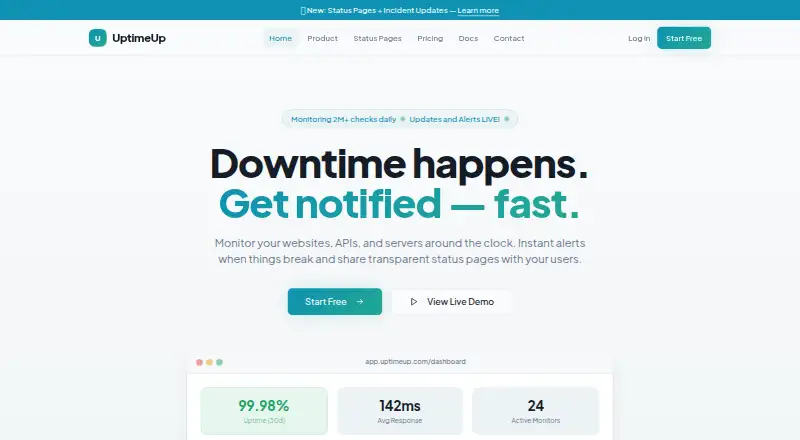
UptimeUp monitors websites, APIs, and servers around the clock and sends alerts when issues occur. HTTP and HTTPS checks run from multiple global regions at configurable intervals. API checks validate status codes, response bodies, headers, and JSON schemas; server checks cover ping, TCP ports, and service-level checks. It also monitors SSL and domain expiry, page keywords, DNS records, latency, and page health. Teams can publish branded public or private status pages, post incidents, and set maintenance windows. Alert channels include email, Slack, webhooks, Telegram, SMS, and Microsoft Teams; SMS, Slack, and Microsoft Teams are described as add-ons on the homepage. Users can set notification order and wait times before escalation. Reports cover uptime and SLA tracking, regional response-time charts, incident timelines, and exports. The homepage describes encryption at rest and in transit, role-based Admin, Member, and Viewer access, incident history, and change logs. UptimeUp says no agents need to be installed and a first monitor can be set up in under 60 seconds. The Free plan costs nothing, requires no credit card, and includes 5 monitors, five-minute checks, one status page, email alerts, seven-day retention, one team member, and a basic uptime dashboard. Paid plans range from $9 a month for Solo to $79 a month for Teams.
Who it suits
The listed plans describe Free for testing and personal projects, Solo for freelancers and solo builders, Pro for growing apps and agencies, and Business for production systems and client-facing apps. It suits teams that need monitoring alongside status pages and maintenance communication.
What it does well
- Checks websites, APIs, and servers.
- API checks validate JSON schemas.
- Reports include uptime and SLA tracking.
- Free plan requires no credit card.
What to know first
- Free plan is limited to 5 monitors.
- Free checks run every five minutes.
- Free plan retains data for 7 days.
Limits
The Free plan includes five monitors, five-minute checks, one status page, email alerts, seven-day data retention, one team member, and a basic dashboard. Paid plans raise monitor, status-page, retention, team-member, and alert limits by tier; additional status pages cost $2 per page per month and additional team members cost $5 per member per month on paid plans.
Plans
| Plan | Billed and limits | Price |
|---|---|---|
| Free | No credit card required · 5 monitors · 5-minute check interval · 1 status page · Email alerts · 7-day data retention · 1 team member · Basic uptime dashboard | Free |
| Pro | Monthly · 50 monitors · 3-minute check interval · 5 status pages · Email + Webhook + Telegram · 90-day data retention · 2 team members · API access · Custom branding | $19 a month |
| Business | Monthly · 100 monitors · 1-minute check interval · 10 status pages · All alert channels · 1-year data retention · 2 team members · API access · Priority support · Custom domain for status pages | $39 a month |
| Teams | Monthly · 200 monitors · 1-minute check interval · 20 status pages · All channels + SMS + Slack · 1-year data retention · 3 team members | $79 a month |
| Solo | Monthly · 10 monitors · 5-minute check interval · 2 status pages · Email + Webhook alerts · 30-day data retention · 1 team member · Custom branding on status pages | $9 a month |
As uptimeup.com lists them, read 9 Oct 2026. The maker's own page has the final word.
Getting started
- Open https://uptimeup.com/ on the web
- Choose the Free, Solo, Pro, Business, or Teams plan
- Add a website, API, or server monitor
- Select HTTP or HTTPS checks and a check interval
- Configure alerts, escalation order, and wait times
- Add a status page or maintenance window
- Review uptime, SLA, response-time, and incident reports
Verdict
UptimeUp combines multi-type monitoring, alert escalation, reporting, and status pages, with a free starting option. Plan limits differ substantially, so check monitor capacity, check interval, retention, and alert channels before choosing.
Questions
Is UptimeUp free?
Yes. The Free plan costs nothing and requires no credit card.
What does the Free plan include?
It includes five monitors, five-minute checks, one status page, email alerts, seven-day retention, one team member, and a basic uptime dashboard.
Which platforms are supported?
UptimeUp is available through the web and an API.
What alert channels are listed?
Email, Slack, webhooks, Telegram, SMS, and Microsoft Teams are listed; SMS, Slack, and Microsoft Teams are described as add-ons on the homepage.
Does it provide status pages?
Yes. Users can publish public or private branded status pages, and plans include different status-page allowances.
What does Teams cost?
Teams costs $79 a month.
Facts from UptimeUp's own pages
- Add-ons
- The pricing page lists additional status pages for $2 per page per month and additional team members for $5 per member per month on paid plans. · uptimeup.com, 9 Oct 2026
- Alerts and integrations
- Alert channels listed are Email, Slack, Webhooks, Telegram, SMS, and Microsoft Teams; SMS, Slack, and Microsoft Teams are described as add-ons on the homepage. · uptimeup.com, 9 Oct 2026
- API checks
- API checks validate status codes, response bodies, headers, and JSON schemas. · uptimeup.com, 9 Oct 2026
- Audience
- The pricing page describes the Free plan as for testing and personal projects, Solo for freelancers and solo builders, Pro for growing apps and agencies, and Business for production systems and client-facing apps. · uptimeup.com, 9 Oct 2026
- Audit history
- The homepage describes incident history and change logs as audit-friendly. · uptimeup.com, 9 Oct 2026
- Escalations
- The homepage says users can define notification order and wait times before escalating to the next responder. · uptimeup.com, 9 Oct 2026
- Expiry and DNS
- The product monitors SSL and domain expiry, page keywords, and DNS records. · uptimeup.com, 9 Oct 2026
- Monitoring
- UptimeUp monitors websites, APIs, and servers around the clock and provides alerts when issues occur. · uptimeup.com, 9 Oct 2026
- Reports
- Reports include uptime percentage and SLA tracking, response-time charts across regions, and incident history timelines and exports. · uptimeup.com, 9 Oct 2026
- Security
- The homepage states that data is encrypted at rest and in transit and that role-based access control includes Admin, Member, and Viewer roles. · uptimeup.com, 9 Oct 2026
- Server checks
- Server monitoring includes ping, TCP port, and service-level checks. · uptimeup.com, 9 Oct 2026
- Setup
- UptimeUp says there are no agents to install and that a first monitor can be set up in under 60 seconds. · uptimeup.com, 9 Oct 2026
- Status pages
- Users can publish public or private branded status pages, incident posts, and maintenance windows. · uptimeup.com, 9 Oct 2026
- Uptime checks
- It checks HTTP/HTTPS endpoints from multiple global regions at configurable intervals. · uptimeup.com, 9 Oct 2026
Where UptimeUp stands on Freedom251
- Website Monitoring Software#35 of 55