Freedom251 › Text-to-speech tools
Unmixr Dubbing
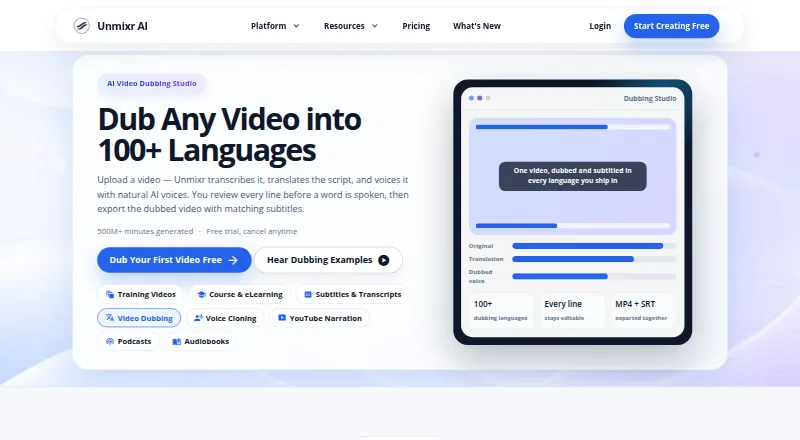
What Unmixr Dubbing is
Unmixr Dubbing turns spoken content into dubbed audio or video by transcribing speech, translating the script, and assigning AI voices to detected speakers. Users can give each speaker a distinct voice, edit translated lines, split or merge segments, and regenerate only the changed sections. Segment timing and speaking speed can be adjusted to align the dub with the video. Exports include dubbed media and translated subtitles in SRT and VTT formats. The dubbing page describes support for more than 100 languages, while plan details list 85. Uploads can be up to 60 minutes and common formats include MP4, MOV, MP3, and WAV. The service does not re-animate speakers' lips or alter video frames. A free account starts with 5,000 credits and allows watermarked exports up to three minutes; it has no trial. The separate seven-day trial includes 20,000 credits. Paid plans start at $9/month, but the Lite plan has no developer API. Background music separation is available on paid recurring plans, not during the trial.
Who it suits
Unmixr Dubbing suits creators and teams translating spoken video or audio who want to edit translations and control speaker voices and timing. It may not suit projects that require lip synchronization or frame changes.
What it does well
- Assign distinct AI voices to detected speakers.
- Edit, split, or merge translated segments.
- Adjust timing and speaking speed per segment.
- Export subtitles in SRT and VTT.
- Uploads can be up to 60 minutes.
What to know first
- Dubbing does not synchronize or re-animate lips.
- Free exports are watermarked and limited to three minutes.
- Lite has no developer API.
- Background music separation is not included in the trial.
Limits
The free account starts with 5,000 credits and allows watermarked exports up to three minutes; it has no trial. The lowest paid plan, Lite at $9.00 per month, includes 100,000 credits monthly, dubbing in 85 languages, and no developer API access.
Plans
| Plan | Billed and limits | Price |
|---|---|---|
| Free | 5,000 signup credits · up to 3-minute watermarked exports · one video up to 1 hour · 500 MB video | Free |
| Lite | $90/year · 100K credits/month · 7 hours transcription · 52 dubbing minutes · 1 voice-clone profile · audio-only MP3/WAV exports | $9 a month |
| Starter | $190/year · 400K credits/month · 28 hours transcription · 208 dubbing minutes · 5 voice-clone profiles · video workflows · API access | $19 a month |
| Pro | $490/year · 2.6M credits/month · 181 hours transcription · 1,354 dubbing minutes · unlimited voice-clone profiles · higher API limits | $49 a month |
| Business | $990/year · 6.5M credits/month · 451 hours transcription · 3,385 dubbing minutes · highest API limits · priority support | $99 a month |
As unmixr.com lists them, read 15 Oct 2026. The maker's own page has the final word.
Getting started
- Open unmixr.com/dubbing/ in a web browser.
- Create a free account for 5,000 credits, or choose a paid plan.
- Upload a video or audio file up to 60 minutes in a listed format.
- Review the translated segments, assign speaker voices, and adjust timing or speed.
- Export dubbed video or audio and translated subtitles.
Unmixr Dubbing is an AI localization workspace for turning spoken video or audio into translated, speaker-specific voice tracks. It is best for creators and teams that need to correct translations and pacing before delivery. Choose it for granular segment control and broad language support; look elsewhere when synchronized mouth movement is essential.
Overview
Unmixr combines transcription, translation and AI voicing, then leaves a review stage before export. You can edit translated lines, split or merge segments, and regenerate only the sections you changed. That makes it more suitable for editorial workflows than for unattended, one-click dubbing, since someone still needs to review the wording and performance.
Speaker detection lets you assign a different voice to each participant. Segment-level timing and speaking-speed controls help fit the new track to the picture. Uploads can run up to 60 minutes and commonly include MP4, MOV, MP3 and WAV. Exports include dubbed video or audio plus translated subtitles in SRT and VTT. Unmixr does not re-animate lips or modify video frames, so it cannot provide visual lip synchronization.
Key features
- Editable translations: Correct lines, split or combine segments, and regenerate only changed portions. This reduces rework when just a few phrases need attention.
- Speaker-specific voices: Detected speakers can receive distinct voices, preserving conversational roles more clearly than a single voice track.
- Timing control: Adjust each segment’s timing and speaking speed to improve alignment, although this remains audio timing rather than lip-sync animation.
- Language coverage: The dubbing page describes support for more than 100 languages, while plan summaries specify 85 output languages. Verify the target language against the plan you intend to buy.
- Background separation: Separation of background music is included on paid recurring plans, but not in the free trial. That makes recurring subscriptions more appropriate for mixes where preserving music matters.
- File and subtitle output: Video or audio dubs and SRT/VTT subtitles cover common publishing and captioning needs.
- Security and support: Data uses TLS encryption, hashed password storage, access controls and production-system isolation. User content and voice data are not used to train AI models. Email and Discord support target replies within 24 hours on business days.
Pricing
Unmixr uses freemium pricing, with a seven-day trial and paid plans from $9 per month. The trial provides 20,000 credits; a free account provides 5,000 credits and is not itself a trial.
| Plan | Price | What you get |
|---|---|---|
| Free | free | 5,000 credits on signup, dubbing, exports up to 3 minutes, watermarked output, no trial |
| Lite | $9 a month ($90/year) | 100K credits/month, dubbing, 85 languages, no developer API |
| Starter | $19 a month ($190/year) | 500K credits/month, 260 listed minutes, 85 languages, seven-day trial and developer API |
| Pro | $49 a month ($490/year) | 2.6M credits/month, 1,354 listed minutes, 85 languages and higher API limits |
| Business | $99 a month ($990/year) | 6.5M credits/month, 3,385 listed minutes, 85 languages, highest API limits and priority support |
Free is mainly for short, watermarked samples. Lite removes that three-minute export ceiling but omits API access, so it fits individual production without automation. Starter is the practical entry point for integrations and larger monthly volume. Pro and Business are aimed at heavy recurring workloads; Business adds priority support and the highest API limits. All paid plans shown use 85 languages, despite the broader language claim on the dubbing page.
Platforms
Unmixr is offered through the web and an API. Developer API access is included on Starter, Pro and Business, with tiered rate limits; Lite does not include it.
Who it's for
Choose Unmixr for multilingual creators, agencies and teams that need to preserve speaker identity, revise machine translations and export subtitles alongside dubbed media. It is also a sensible fit for developers who need API access from Starter upward. It is a poor match for productions requiring mouth movements to be re-timed to translated speech, or for users who want a completely hands-off workflow.
Pros and cons
- Pros: Segment-level translation and regeneration limits unnecessary reprocessing; distinct voices clarify multi-speaker dialogue; timing controls and SRT/VTT exports support post-production; uploads can reach 60 minutes; paid recurring plans can separate background music; voice and content data are excluded from model training.
- Cons: No lip synchronization or frame re-animation; the free tier caps exports at three minutes and adds a watermark; Lite has no API; trial credits and free-account credits are separate, which can complicate expectations; plan language counts are 85 rather than the broader 100-plus marketing claim.
Alternatives
For a broader directory of tools, see AI Dubbing Software and Text-to-Speech Software.
- HeyGen is a better fit if you need mobile apps as well as web and API access, and can work within three one-minute videos per month on its free plan.
- pyVideoTrans suits users wanting GPL-V3 open-source software with no feature limits, provided they pay any third-party API charges.
- VideoLingo is worth considering for a free 15 minutes of English- or Chinese-video translation with bilingual subtitles and 480p output.
- CAMB.AI offers a $5-per-month Essentials plan, making it an alternative for lower-cost credit-based use.
- Perso Dubbing is another freemium dubbing option with a free signup generation and a $6.99-per-month Starter plan.
- Vidby may appeal if 70-language coverage, automatic voice cloning and subtitle downloads are priorities.
- Vozo AI is an alternative with a free allowance of three projects and about six dubbing minutes, plus a $29-per-month Creator plan.
- DubDuck is a web-based paid option with free signup credits.
Verdict
Unmixr Dubbing is a strong choice for localization teams that want editable translations, speaker-aware voices, controllable timing and subtitle exports in one workflow. Its clearest reasons to look elsewhere are the absence of lip sync and the free tier’s short, watermarked exports; choose another tool when either visual mouth matching or unrestricted free output is central.
Verdict
Unmixr Dubbing provides editable translations, speaker-specific voices, and subtitle exports for dubbed media. Note the difference between the free account and trial, and check plan language counts and API availability for your workflow.
Questions
Is Unmixr Dubbing free?
A free account provides 5,000 credits and watermarked exports up to three minutes. It does not include a trial.
How much is the seven-day trial?
The seven-day trial includes 20,000 credits. Background music separation is not available during the trial.
How much do paid plans cost?
Lite is $9.00 per month, Starter is $19.00, Pro is $49.00, and Business is $99.00. Annual prices are listed as $90, $190, $490, and $990 respectively.
Which languages are supported?
The dubbing page describes support for 100+ languages, while plan details list 85 languages.
Does it provide an API?
Developer API access is listed for Starter, Pro, and Business, with tiered rate limits. Lite does not include API access.
Which platforms are available?
Unmixr Dubbing is listed for web and API.
Facts from Unmixr Dubbing's own pages
- AI training privacy
- The privacy policy says user content and voice data are not used to train AI models. · unmixr.com, 15 Oct 2026
- API access
- No · unmixr.com, 20 Sept 2026
- API callbacks
- Long jobs run asynchronously and can send signed per-paragraph completion or failure callbacks. · unmixr.com, 15 Oct 2026
- API endpoints
- Version 2 documents short and long TTS, status, voices, cloned voices, credit balance and credit-estimate endpoints. · unmixr.com, 15 Oct 2026
- API limits
- Short TTS accepts 2,000 characters; long requests range from 30,000 to 200,000 characters by plan and reject excess with HTTP 422. · unmixr.com, 15 Oct 2026
- API protocol
- The developer service is a REST API over HTTPS using JSON and bearer-token authentication, returning MP3 or WAV. · unmixr.com, 15 Oct 2026
- Background audio
- The FAQ says background music separation is available on paid recurring plans but not in the free trial. · unmixr.com, 29 Sept 2026
- Company facts
- LinkedIn describes Unmixr AI as a privately held 2–10-person company founded in 2023 and headquartered in Newark, Delaware. · linkedin.com, 15 Oct 2026
- Content use
- The privacy policy states that user content and voice data are not used to train AI models. · unmixr.com, 29 Sept 2026
- Credit metering
- Dubbing consumes 1,920 credits per video minute and the same wallet also pays for voiceover and transcription. · unmixr.com, 15 Oct 2026
- Editable translation
- Users can edit translated lines, split or merge segments, and regenerate only changed segments. · unmixr.com, 29 Sept 2026
- Exports
- Exports include dubbed MP4, dubbed MP3, SRT or VTT subtitles, burned-in captions and translated transcripts. · unmixr.com, 15 Oct 2026
- File retention
- Terms state dubbing files are automatically deleted one year after creation, while other generated content is retained until deletion requests. · unmixr.com, 15 Oct 2026
- Free plan
- Yes · unmixr.com, 20 Sept 2026
- Input limit
- The dubbing FAQ says uploads can be up to 60 minutes and lists MP4, MOV, MP3, and WAV as common formats. · unmixr.com, 29 Sept 2026
- Integration listing
- GetApp describes Zapier integration and shared team workspaces alongside the REST API. · getapp.com, 15 Oct 2026
- Integrations and API
- The pricing page lists developer API access on Starter, Pro, and Business plans, with tiered rate limits. · unmixr.com, 29 Sept 2026
- Language coverage
- The dubbing workflow supports more than 100 languages and multiple voices per language. · unmixr.com, 15 Oct 2026
- Latest release
- An October 13, 2026 release added script imports for transcripts, screenplays, SRT, VTT, DOCX, EPUB, PDF and PPTX with background processing for large files. · unmixr.com, 15 Oct 2026
- Limit: credit flexibility
- A reviewer requests credit rollover or more flexible top-ups for irregular workloads. · appsumo.com, 15 Oct 2026
- Limit: failed jobs
- One reviewer says four dubbed videos totaling about 200 minutes failed while credits were consumed and were not reimbursed. · appsumo.com, 15 Oct 2026
- Limit: interface
- A reviewer describes the interface as cluttered with many buttons and distracting elements. · appsumo.com, 15 Oct 2026
- Limit: support responsiveness
- Some AppSumo reviewers report unanswered support tickets or email and Discord messages. · appsumo.com, 15 Oct 2026
- Lip sync
- The FAQ states that dubbing does not re-animate speakers’ lips or alter video frames. · unmixr.com, 29 Sept 2026
Where Unmixr Dubbing stands on Freedom251
- Text-to-speech tools#103 of 232
- AI Dubbing Software#16 of 26
- Text-to-Speech Software#143 of 223