Freedom251 › Video Localization Software

pyVideoTrans
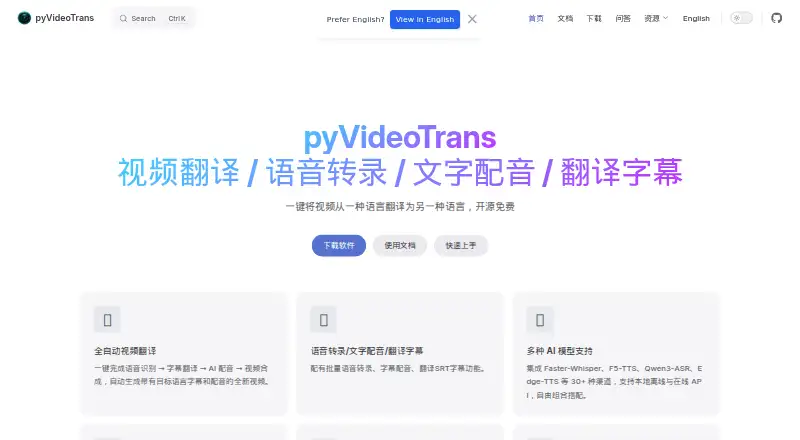
What pyVideoTrans is
pyVideoTrans is free, open-source software for translating videos with clear human speech. It automates speech recognition, subtitle translation, AI dubbing, and video assembly to produce translated audio and subtitles. It can also transcribe speech in batches into timed SRT files, dub subtitles, and translate SRT files while retaining timestamps and formatting. The project lists more than 30 channels, including Faster-Whisper, F5-TTS, Qwen3-ASR, and Edge-TTS, with local offline and online API choices. Interfaces include a desktop GUI, WebUI, and command line, with guidance for remote access, server deployment, and Docker. Documented translation services include DeepL, Google Translate, Microsoft Translate, DeepSeek, ChatGPT, Gemini, and LibreTranslate. Speech options include OpenAI, ElevenLabs, Deepgram, Edge-TTS, Azure TTS, and local models. The software is available for Windows, macOS, and Linux, and is described as having no feature limits or login requirement under GPL-V3. Third-party API charges may apply, and users provide their own accounts and keys.
Who it suits
The software is aimed at content creators, educators, and individuals translating videos into multiple languages. It suits people working with media that contains clear human speech and who want desktop, web, or command-line interfaces.
What it does well
- Automates translated audio and subtitle production.
- Batch SRT translation preserves timestamps and formatting.
- Offers desktop, web, and command-line interfaces.
- Free and open source under GPL-V3.
- Runs with or without an NVIDIA GPU.
What to know first
- Cannot process media without clear human speech.
- Cannot remove hardcoded subtitles.
- Third-party API use may incur charges.
- Some local model channels require model downloads.
Limits
The software is described as having no feature limits and requires no login. Third-party API charges are separate, and some local model channels require downloading model files on first use.
Plans
| Plan | Billed and limits | Price |
|---|---|---|
| pyVideoTrans | Open source under GPL-V3 · no feature limits · third-party API charges are paid separately by the user | Free |
As pyvideotrans.com lists them, read 5 Oct 2026. The maker's own page has the final word.
Getting started
- Open pyvideotrans.com and choose a setup route.
- On Windows, use the provided package for Windows 10/11, or follow the source deployment instructions for Windows, macOS, or Linux.
- Choose the desktop GUI, WebUI, or command line interface.
- Select local or online speech and translation channels; download model files when a local channel requires them.
- For third-party APIs, provide your own accounts and keys.
- Provide audio or video with clear human speech, or use the SRT transcription and translation workflows.
Overview
pyVideoTrans is a video-localization tool for people who want to manage transcription, subtitles, and dubbing in one workflow. It is especially suited to creators, educators, and individuals who are comfortable choosing models and configuring how the work gets done.
Its strongest case is breadth without a software fee: users can work through a desktop app, browser interface, or command line, and choose local or online services. The catch is practical rather than cosmetic: the media needs clear human speech, and using third-party APIs can add costs.
Key features
The main process combines speech recognition, subtitle translation, AI dubbing, and video assembly to create a localized video with translated audio and subtitles. That makes it a more complete option than a transcription-only tool. For narrower jobs, it can also batch-transcribe speech into timed SRT files, dub subtitles, and translate SRT files while retaining timestamps and formatting.
More than 30 model channels include Faster-Whisper, F5-TTS, Qwen3-ASR, and Edge-TTS, with both offline local models and online APIs. Translation options include DeepL, Google Translate, Microsoft Translate, DeepSeek, ChatGPT, Gemini, and LibreTranslate; speech recognition and synthesis options include OpenAI, ElevenLabs, Deepgram, Edge-TTS, Azure TTS, and local models. This selection allows users to match services to their workflow, but some local channels require downloading model files before first use. Local API channels can instead call a model service the user has deployed.
Users can access a desktop GUI, WebUI, or command-line interface. Remote access, server deployment, and Docker use are also described, giving technically capable users ways to place the workflow beyond a single desktop. The range is useful for different operating styles, though it makes the product a better fit for users willing to configure tools than for anyone seeking a tightly managed service.
Voice cloning, API access, subtitle translation, AI dubbing, and a review workflow are supported. The software can run without an NVIDIA GPU; a supported, configured GPU enables CUDA acceleration. That gives users a path to GPU-assisted processing without making NVIDIA hardware a prerequisite.
The essential boundary is source material: pyVideoTrans processes audio or video with clear human speech, but not media consisting only of music or visuals, and it cannot remove hardcoded subtitles. It is therefore a poor choice when the job is cleaning existing burned-in captions or localizing speech-free footage.
Pricing
The sole plan, pyVideoTrans, costs nothing. It is open source under GPL-V3 and has no feature limits or login requirement, so there is no paid software tier to unlock for a larger workflow. There is no free trial because the software itself is free.
That price does not cover third-party services. Users provide their own accounts and API keys, and API providers may charge them separately; the maker says keys are stored locally. Local model options can avoid relying on an online API, though some require model-file downloads and local API channels require a user-deployed model service. The choice is best for people who value control and can manage service costs, rather than those looking for a bundled usage allowance.
Platforms
The maker provides a Windows 10/11 package and source deployment instructions for macOS, Linux, and Windows. The project also supports web access and self-hosted deployment, with remote access and Docker use described. Its command-line interface and API add options for users building or automating workflows. Hardware requirements are flexible: it runs with or without an NVIDIA GPU, with CUDA acceleration available when a supported card is configured.
Who it's for
Content creators and educators translating spoken videos into other languages can use the combined subtitle, dubbing, and assembly workflow without a software subscription. Individuals who need batch SRT work or timed transcription also get focused tools beyond the main video process.
It is less suitable for people who want a managed, no-configuration service, need to process silent or music-only footage, or need burned-in subtitles removed. Users should also account for any API-provider charges and the setup involved in local models or self-hosting.
Pros and cons
- Pros: The software is free under GPL-V3 with no feature limits or login requirement, making the full workflow accessible without a product-tier cap.
- Pros: Desktop, web, command-line, and self-hosted options suit users with different deployment needs.
- Pros: More than 30 model channels and documented translation and speech integrations give users choices between online services and local workflows.
- Cons: Third-party API charges are separate, and users must supply their own accounts and keys.
- Cons: Some local channels require downloading model files; local API channels depend on a model service deployed by the user.
- Cons: The input must contain clear human speech, and hardcoded subtitles cannot be removed.
Alternatives
For a broader shortlist, browse Video Localization Software or AI Dubbing Software.
- HeyGen is a freemium option with a free plan capped at three videos per month and one minute per video; choose it if that allowance fits your needs and you prefer its Android, iOS, web, or API platforms.
- CAMB.AI offers a one-time 5K-credit free plan and paid monthly plans beginning at $5 a month; consider it if you prefer a credit-based service.
- Perso Dubbing provides one free generation on sign-up, including dubbing, speech-to-text, and audio separation; it may suit a user who wants to try those functions before considering its paid tier.
- Translate.Video has a web free plan with zero dubbing minutes, zero auto-caption or subtitle minutes, and zero storage; its paid Basic plan is $29 a month. Choose it only if its paid offering is a better fit than pyVideoTrans's self-managed workflow.
- Vidby offers a free plan with 30 credits, 70 languages, watermarking, downloads, and automatic voice cloning; it is worth considering if those stated allowances match the project.
- videodubbing.com is another freemium option.
- Wavel AI offers a one-time 15-credit trial for seven days with watermarked videos; consider it for a limited trial rather than an unlimited free plan.
- BlipCut AI Video Translator is another option to compare.
Verdict
Choose pyVideoTrans if you want a free, feature-unlimited localization workflow and are willing to select models, manage setup, and pay any API providers you use. Its mix of transcription, subtitle translation, dubbing, and deployment choices is the main reason to pick it. Look elsewhere if the source lacks clear speech, you need hardcoded subtitles removed, or you want a service that bundles usage and avoids configuration.
Verdict
pyVideoTrans combines transcription, subtitle translation, and dubbing, with several interface and model-channel options. It is free with no feature limits, but third-party services may cost extra and the input must contain clear human speech.
Questions
How much does pyVideoTrans cost?
The listed plan is free. The maker describes it as open source under GPL-V3 with no feature limits; third-party API charges are paid separately.
Which operating systems does it support?
It supports Windows, macOS, and Linux. The maker provides a Windows 10/11 package and source deployment instructions for all three systems.
Does it translate subtitles and dub video?
Yes. It supports subtitle translation, AI dubbing, and video assembly, as well as batch SRT translation that preserves timestamps and formatting.
Which translation services are documented?
Documented subtitle translation channels include Microsoft Translate, Google Translate, DeepL, DeepSeek, ChatGPT, Gemini, and LibreTranslate.
Does it require an account or API key?
The maker says the software has no login requirement. Users provide their own accounts and keys for third-party APIs, which may incur separate charges.
What media can it process?
The documentation says it can process audio or video with clear human speech. It cannot process media with no speech or remove hardcoded subtitles.
Facts from pyVideoTrans's own pages
- Audience
- The maker identifies content creators, educators, and individual users translating videos into multiple languages as intended users. · pyvideotrans.com, 5 Oct 2026
- Free and licensing
- The maker describes the software as open-source and free under GPL-V3, with no feature limits and no login requirement. · pyvideotrans.com, 5 Oct 2026
- Hardware
- The maker says it can run with or without an NVIDIA GPU, with CUDA acceleration available when supported hardware is present. · pyvideotrans.com, 5 Oct 2026
- Integrations
- Documented translation channels include DeepL, Google Translate, Microsoft Translate, DeepSeek, ChatGPT, Gemini, and LibreTranslate. · pyvideotrans.com, 4 Oct 2026
- Intended users
- The maker identifies content creators, educators, and individual users who want to translate videos into multiple languages as intended users. · pyvideotrans.com, 4 Oct 2026
- Interfaces
- It offers desktop GUI, WebUI, and command-line interfaces for local use, remote access, server deployment, and Docker. · pyvideotrans.com, 5 Oct 2026
- Local models
- Some integrated model channels require downloading their model files on first use, while local API channels can call a model service deployed by the user. · pyvideotrans.com, 4 Oct 2026
- Model options
- The software supports local offline models and online APIs, including Faster-Whisper, F5-TTS, Qwen3-ASR, and Edge-TTS among 30+ channels. · pyvideotrans.com, 5 Oct 2026
- Other tasks
- It can batch transcribe speech to timed SRT files, synthesize speech from text or subtitles, and translate SRT files while preserving their timecodes and format. · pyvideotrans.com, 5 Oct 2026
- Platforms
- The site offers a prepackaged Windows 10/11 download and source deployment instructions for macOS, Linux, and Windows. · pyvideotrans.com, 5 Oct 2026
- Pricing and licensing
- The maker describes the software as free and open source under GPL-3, with no feature limits or login requirement; third-party API charges are paid by the user. · pyvideotrans.com, 4 Oct 2026
- Privacy
- The website privacy policy says the site may collect IP addresses, browser and device information, cookies, and analytics data. · pyvideotrans.com, 4 Oct 2026
- Processing limitation
- The documentation says it can process audio or video containing clear human speech, cannot process material with only background music or visuals, and cannot remove hard subtitles. · pyvideotrans.com, 4 Oct 2026
- Processing limitations
- The documentation says it can process audio or video with clear human speech, but cannot process media with no speech or remove hardcoded subtitles. · pyvideotrans.com, 5 Oct 2026
- Security
- The website privacy policy says reasonable security measures are used but does not guarantee absolute information security. · pyvideotrans.com, 5 Oct 2026
- Speech integrations
- Documented speech recognition and synthesis channels include OpenAI, ElevenLabs, Deepgram, Edge-TTS, Azure TTS, and local models. · pyvideotrans.com, 5 Oct 2026
- Support
- The maker provides documentation, tutorials, a Q&A forum, and a contact email. · pyvideotrans.com, 5 Oct 2026
- Supported systems
- The maker provides a Windows 10/11 package and source deployment instructions for macOS, Linux, and Windows. · pyvideotrans.com, 4 Oct 2026
- Third-party costs
- Use of third-party APIs may incur charges, and users must provide their own accounts and keys, which the maker says are stored locally. · pyvideotrans.com, 5 Oct 2026
- Translation integrations
- Documented subtitle translation channels include Microsoft Translate, Google Translate, DeepL, DeepSeek, ChatGPT, Gemini, and LibreTranslate. · pyvideotrans.com, 5 Oct 2026
- Video translation
- It automates speech recognition, subtitle translation, AI dubbing, and video composition to produce video with translated subtitles and voiceover. · pyvideotrans.com, 5 Oct 2026
- Website privacy
- The website privacy policy says it may collect IP addresses, browsing and device information, use cookies and analytics, and share information with service providers or advertising partners. · pyvideotrans.com, 5 Oct 2026
Where pyVideoTrans stands on Freedom251
- Video Localization Software#6 of 23
- AI Dubbing Software#7 of 26