Freedom251 › Stem Separation Software

UnMixLabs
What UnMixLabs is
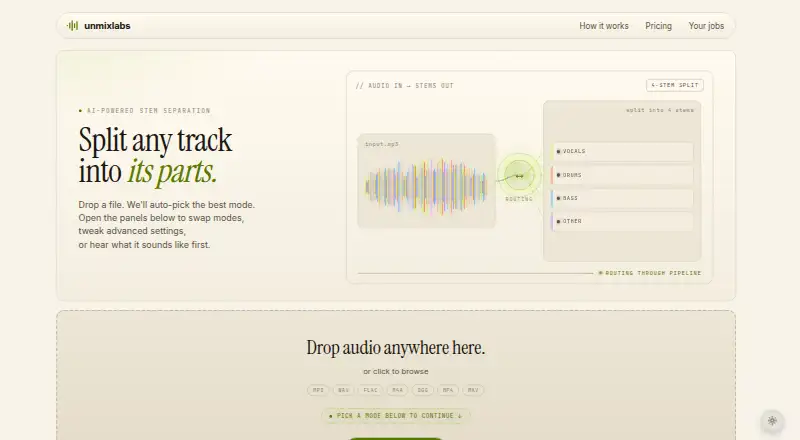
UnMixLabs separates finished audio into vocal and instrument stems through its web service and API. It accepts MP3, WAV, FLAC, M4A, OGG, MP4, and MKV files. Separation choices include 4-stem and 6-stem modes, a 53-stem mode, and vocal isolation; listed stem types include vocals, drums, bass, guitar, piano, other instruments, and instrumental. Each job includes BPM, musical-key, and chord-progression analysis. Optional tools cover vocal dereverb, stem-to-MIDI, beat-grid export, synced lyrics, karaoke video, and audio cleanup presets. Audio exports are WAV, MP3, or FLAC, while additional output options include MIDI, beat-grid TSV, REAPER sessions, lyric SRT files, and karaoke MP4s. Batch processing is available. The pricing page describes Studio as the plan for producers, podcasters, and studios processing volume, with API access for batch automation. The Free plan allows 10 processing minutes per month, one file at a time, and a 100 MB maximum file size. Its privacy information says free-tier uploads are removed after processing and stems are deleted 24 hours after a job completes. It also says uploaded audio is not used for model training by default and email addresses are not collected on the free tier. The pricing page says the service is free-only during beta while payment integration is being prepared.
Who it suits
UnMixLabs suits musicians and audio creators who need to separate finished tracks into stems and analyze tempo, key, and chords. Its Studio plan is described for producers, podcasters, and studios processing volume, with batch processing and API access listed for that plan.
What it does well
- Accepts seven audio and video input formats.
- Offers 4-stem, 6-stem, 53-stem, and vocal-isolation options.
- Every job includes BPM, key, and chord-progression analysis.
- Batch processing is available.
- Free tier uploads are deleted after processing.
- Free-tier audio is not used to train models by default.
What to know first
- Free plan allows 10 processing minutes per month.
- Free plan limits uploads to one 100 MB file at a time.
- Free-tier stems are deleted 24 hours after job completion.
- Pricing page says paid subscriptions are not available during beta.
Limits
The Free plan includes 10 minutes of processing per month, 4-stem separation, one file at a time, a 100 MB maximum file size, WAV/MP3/FLAC output, and 24-hour retention. The pricing page says paid subscriptions are not available during beta while payment integration is being prepared.
Plans
| Plan | Billed and limits | Price |
|---|---|---|
| Free | 10 minutes processing/month · 4-stem split · 100 MB max file · 1 file at a time · WAV/MP3/FLAC output · 24-hour file retention | Free |
| Pro | $99/year (save 24% vs monthly) · 300 minutes/month + rollover · all 4 models · 1 GB max file · up to 20 files per batch · 30-day retention · priority queue | $10.99 a month |
| Studio | $239/year (save 20% vs monthly) · 1500 minutes/month + rollover · all 4 models · 2 GB max file · up to 50 files per batch · 90-day retention · highest priority queue · API access | $24.99 a month |
As unmixlabs.com lists them, read 7 Oct 2026. The maker's own page has the final word.
Getting started
- Visit https://www.unmixlabs.com/.
- Upload an MP3, WAV, FLAC, M4A, OGG, MP4, or MKV file.
- Choose a listed separation mode or vocal-isolation option.
- Select any optional audio tools or output formats you need.
- Use the Free plan within its monthly processing and file limits.
- For batch automation, the Studio plan lists API access; the pricing page invites users to join the first cohort for paid subscriptions.
Verdict
Choose UnMixLabs if you want web-based stem separation with several separation modes and built-in musical analysis. The free plan is limited to 10 minutes per month and one 100 MB file at a time; the pricing page says the service is free-only during beta while payment integration is prepared.
Questions
Is UnMixLabs free?
The Free plan is listed as free and includes 10 processing minutes per month. The pricing page says the service is free-only during beta while payment integration is being prepared.
What are the listed Pro and Studio prices?
Pro is listed at $10.99 a month, billed at $99/year. Studio is listed at $24.99 a month, billed at $239/year. The pricing page says subscriptions are not currently available during beta.
Which file formats can I upload?
The homepage lists MP3, WAV, FLAC, M4A, OGG, MP4, and MKV.
What formats can I export?
Audio exports include WAV, MP3, and FLAC. Optional outputs include MIDI, beat-grid TSV, REAPER sessions, lyric SRT files, and karaoke MP4s.
Does it provide API access?
The site describes a partner API and lists API access for batch automation in the Studio plan.
How long are free-tier files kept?
Free-tier uploads are deleted when processing finishes, and stems are deleted 24 hours after the job completes.
Facts from UnMixLabs's own pages
- Analysis
- The service says every job includes free BPM, musical-key, and chord-progression analysis. · unmixlabs.com, 7 Oct 2026
- API
- The site describes a partner API and lists API access for batch automation in the Studio plan. · unmixlabs.com, 7 Oct 2026
- Audio inputs
- The homepage lists MP3, WAV, FLAC, M4A, OGG, MP4, and MKV as accepted formats. · unmixlabs.com, 7 Oct 2026
- Audio tools
- Optional tools include vocal dereverb, stem-to-MIDI, beat-grid export, synced lyrics, karaoke video, and audio cleanup presets. · unmixlabs.com, 7 Oct 2026
- File retention
- The privacy page says free-tier uploads are deleted when processing finishes and stems are deleted 24 hours after the job completes. · unmixlabs.com, 7 Oct 2026
- Integrations
- The site says optional outputs include MIDI, beat-grid TSV, REAPER sessions, lyric SRT files, and karaoke MP4s. · unmixlabs.com, 7 Oct 2026
- Intended users
- The Studio plan is described as intended for producers, podcasters, and studios processing volume. · unmixlabs.com, 7 Oct 2026
- Plan availability
- The pricing page says the service is free-only during beta while the maker firms up payment integration, and invites users to join the first cohort for paid subscriptions. · unmixlabs.com, 7 Oct 2026
- Privacy
- The privacy page says uploaded audio is not used to train models by default and that the service does not collect email addresses on the free tier. · unmixlabs.com, 7 Oct 2026
- Purpose
- UnMixLabs separates finished audio tracks into vocals, drums, bass, and other instrument stems. · unmixlabs.com, 7 Oct 2026
- Security
- The privacy page states that public connections use HTTPS and that API-layer job isolation limits access to a user's own jobs. · unmixlabs.com, 7 Oct 2026
- Separation modes
- The site offers 4-stem and 6-stem separation, a 53-stem mode, and vocal-isolation options. · unmixlabs.com, 7 Oct 2026
Where UnMixLabs stands on Freedom251
- Stem Separation Software#19 of 21