Freedom251 › Game Compatibility Layers
umu-launcher
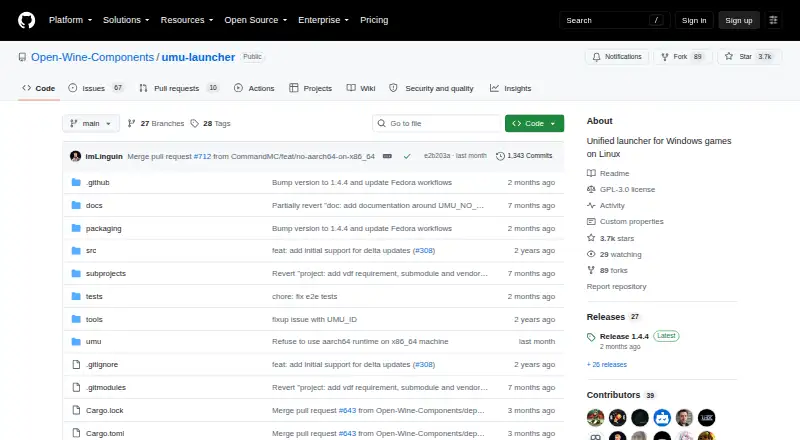
What umu-launcher is
umu-launcher is a free, open-source Linux tool for running Windows games through Proton outside the Steam client. It can run games without Steam or Steam binaries installed, and it downloads the Steam Runtime required by Proton, storing its files under $HOME/.local/share/umu. Users can use UMU-Proton by default, specify a Proton directory or version, or have umu download GE-Proton. When supported, Lutris, Heroic Games Launcher, Bottles, and Rare can use umu. Clients can use a shared online database of game fixes, which umu applies using a game ID and store value. Launch settings can be supplied through environment variables or a TOML configuration file; users can also choose a WINE prefix path or use the default under $HOME/Games/umu. The command-line interface can run Winetricks verbs with GE-Proton or UMU-Proton. For native Linux games, UMU_NO_PROTON runs an executable inside the Steam Linux Runtime. Installation options include packages for Nobara, Arch Linux, and Nix, Linux packages from GitHub releases, and source builds. The project is licensed under GPL-3.0 and welcomes contributions.
Who it suits
umu-launcher suits Linux users who want to run Windows games through Proton without the Steam client. It can also support native Linux game execution inside the Steam Linux Runtime.
What it does well
- Runs games without Steam or Steam binaries
- Can select UMU-Proton, GE-Proton, or a specified Proton version
- Applies game fixes using game ID and store value
- Supports Lutris, Heroic, Bottles, and Rare when supported
What to know first
- Linux only
- Client use depends on support
- Unsupported compatibility-tool issues should go to those tools' maintainers
Plans
| Plan | Billed and limits | Price |
|---|---|---|
| umu-launcher | No price listed · GPL-3.0 licensed open-source software | Free |
As github.com lists them, read 8 Oct 2026. The maker's own page has the final word.
Getting started
- Install a package for Nobara, Arch Linux, or Nix, use a GitHub Linux package, or build from source.
- Choose a supported client such as Lutris, Heroic Games Launcher, Bottles, or Rare, if it supports umu.
- Select UMU-Proton, provide a Proton directory or version, or use GE-Proton.
- Set launch options with environment variables or a TOML configuration file.
- Set a WINE prefix path or use the default under `$HOME/Games/umu`.
- Enable `UMU_LOG=1` when collecting debug logs for a game failure.
Verdict
umu-launcher offers a Steam-independent way to run games through Proton on Linux, with configurable Proton versions and game fixes. Its use through named clients depends on their support for umu.
Questions
Does umu-launcher cost anything?
The listed plan is free, and the project is GPL-3.0 licensed open-source software.
Does umu require Steam?
No. Games can run through umu without Steam or Steam binaries installed.
Which platforms does it support?
Linux is the listed host platform.
Which launchers can use umu?
The project names Lutris, Heroic Games Launcher, Bottles, and Rare as clients that can use umu when supported.
Which Proton versions can I use?
You can use UMU-Proton by default, specify a Proton directory or version, or have umu download GE-Proton.
How can I install it?
The project documents packages for Nobara, Arch Linux, and Nix, Linux packages from GitHub releases, and building from source.
Facts from umu-launcher's own pages
- Additional tool
- The command-line interface can run winetricks verbs when GE-Proton or UMU-Proton is used. · github.com, 8 Oct 2026
- Configuration
- Games can be launched with environment variables or a TOML configuration file. · github.com, 8 Oct 2026
- Distribution packages
- The README lists installation through Nobara, Arch Linux, and Nix; GitHub releases also provide Linux packages. · github.com, 8 Oct 2026
- Game fixes
- The launcher uses a unified online database of game fixes, selected with game ID and store settings. · github.com, 8 Oct 2026
- Installation
- The README documents distribution packages for Nobara, Arch Linux, and Nix, as well as building from source. · github.com, 8 Oct 2026
- Install options
- The project documents distribution packages, user and system builds, uv setup, and a Nix package and flake. · github.com, 8 Oct 2026
- Launcher integrations
- The documentation names Lutris, Heroic Games Launcher, Bottles, and Rare as clients that can use umu when supported. · github.com, 8 Oct 2026
- Launcher support
- The project names Lutris, Heroic Games Launcher, Bottles, and Rare as clients that can use umu. · github.com, 8 Oct 2026
- License
- The GitHub repository identifies the project license as GPL-3.0. · github.com, 8 Oct 2026
- Logging
- UMU_LOG enables launcher debug logs, and the README recommends attaching logs when reporting game failures. · github.com, 8 Oct 2026
- Maintainers
- The manual says umu is maintained by Open Wine Components members with help from other open-source contributors. · github.com, 8 Oct 2026
- Native games
- The UMU_NO_PROTON option runs an executable natively inside the Steam Linux Runtime, and the documentation says it is intended for native Linux games. · github.com, 8 Oct 2026
- Prefix configuration
- Users can set a WINE prefix path; otherwise umu uses a default path under $HOME/Games/umu. · github.com, 8 Oct 2026
- Proton fixes
- Clients can use a unified online database of game fixes, and umu applies fixes using a game ID and store value. · github.com, 8 Oct 2026
- Proton selection
- Users can specify a Proton directory or version, use GE-Proton, or use UMU-Proton by default. · github.com, 8 Oct 2026
- Proton versions
- umu-run can use UMU-Proton by default, a specified Proton directory or version, or automatically download GE-Proton. · github.com, 8 Oct 2026
- Purpose
- umu is a unified launcher for running Windows games on Linux through Proton outside the Steam client. · github.com, 8 Oct 2026
- Runtime
- It automatically downloads the Steam Runtime required by Proton and stores its files under $HOME/.local/share/umu. · github.com, 8 Oct 2026
- Steam independence
- Games can be run without Steam or Steam binaries installed. · github.com, 8 Oct 2026
- Steam requirement
- Games can run through umu without Steam or Steam binaries installed. · github.com, 8 Oct 2026
- Support
- The project asks users to report game failures with UMU_LOG=1 logs and directs unsupported compatibility-tool issues to those tools’ maintainers. · github.com, 8 Oct 2026
- Support and contributions
- The project welcomes contributions and directs users to GitHub issue reports for bugs. · github.com, 8 Oct 2026
- Supported compatibility tools
- The README asks users to report issues with unsupported compatibility tools to those tools’ maintainers first. · github.com, 8 Oct 2026
- Winetricks
- umu-run can run Winetricks verbs when used with GE-Proton or UMU-Proton. · github.com, 8 Oct 2026
Where umu-launcher stands on Freedom251
- Game Compatibility Layers#20 of 27