Freedom251 › Color Palette Generators
UI Palette Generator
What UI Palette Generator is
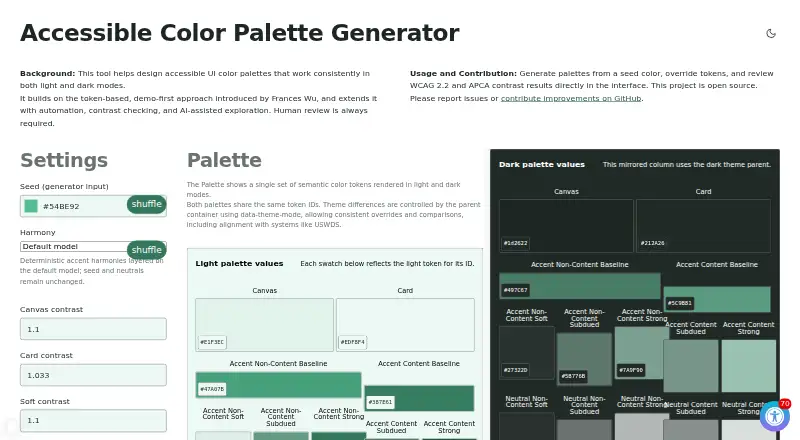
UI Palette Generator is a free, open-source web tool for creating interface color palettes intended for light and dark themes. Users can begin with a seed color, adjust settings, and override individual tokens. The interface reports text contrast results for WCAG 2.2 AA and APCA, but the project says people must review the output. Optional refinement actions can align semantic tokens with USWDS colors or adjust content tokens to meet WCAG 2.2 and APCA thresholds. Both themes use the same semantic token IDs, and the demo applies identical UI markup to show palette values in components. Users can download tokens as CSV, export Penpot-compatible JSON, or copy CSS variables for both themes. CSV and Penpot-compatible JSON files made by the tool can also be imported. The project uses HTML, CSS, and vanilla JavaScript; basic use needs no framework or build tools. It can run as a static site on GitHub Pages or another static web server, including by copying its docs folder to a host. The repository lists an AGPL-3.0 license and invites issue reports and contributions on GitHub.
Who it suits
This tool suits designers and developers generating accessible interface palettes for light and dark modes. It may also suit people who want CSV, Penpot-compatible JSON, or CSS variable exports.
What it does well
- Generates palettes from a seed color.
- Reports WCAG 2.2 AA and APCA contrast.
- Exports CSV, Penpot-compatible JSON, and CSS variables.
- Can be self-hosted as a static site.
What to know first
- Human review is still required.
- Basic use has no framework or build tools, but no application integrations beyond listed formats are specified.
Limits
The project requires human review of palette results, including AI-assisted exploration. Basic use has no framework or build-tool requirement, but self-hosting depends on a static web server.
Getting started
- Open the web tool at its website
- Choose a seed color and generate a palette
- Adjust settings or override individual tokens
- Review WCAG 2.2 AA and APCA results
- Export CSV, Penpot-compatible JSON, or CSS variables
- For self-hosting, copy the docs folder to GitHub Pages or another static server
Verdict
UI Palette Generator provides palette generation, contrast reporting, and several export formats at no charge. Treat its contrast results as a review aid, not a replacement for human review.
Questions
Is UI Palette Generator free?
Yes. It is free, and the project is open source.
Where can it run?
It runs on the web and can be self-hosted. The static site works on GitHub Pages or any static web server.
Which contrast standards does it report?
The interface reports WCAG 2.2 AA and APCA text-contrast results.
What files can it export?
You can download CSV tokens, export Penpot-compatible JSON, or copy CSS variables for both themes.
Can existing palettes be imported?
Yes. CSV and Penpot-compatible JSON files generated by the tool can replace the displayed palette.
What license does the project use?
The public repository lists an AGPL-3.0 license.
Facts from UI Palette Generator's own pages
- Accessibility checks
- The interface reports WCAG 2.2 AA and APCA text contrast results, and the project says human review is always required. · mgifford.github.io, 9 Oct 2026
- Contrast checks
- The interface reports WCAG 2.2 AA and APCA text contrast results. · mgifford.github.io, 9 Oct 2026
- Deployment
- The repository says the static site works on GitHub Pages or any static web server, and can be deployed by copying its docs folder to a host. · github.com, 9 Oct 2026
- Exports
- Users can download palette tokens as CSV, export Penpot-compatible JSON, or copy CSS variables for both themes. · mgifford.github.io, 9 Oct 2026
- Hosting
- The repository says the static site works on GitHub Pages or any static web server and can be deployed by copying the docs folder to a host. · github.com, 9 Oct 2026
- Human review
- The project description says human review is always required for AI-assisted palette exploration. · github.com, 9 Oct 2026
- Imports
- Users can import CSV or Penpot-compatible JSON files generated by the tool to replace the displayed palette. · mgifford.github.io, 9 Oct 2026
- Integration
- The repository says the palette supports comparisons and alignment with systems such as USWDS. · github.com, 9 Oct 2026
- Integrations
- The page describes Penpot-compatible JSON export and alignment with systems such as USWDS. · mgifford.github.io, 9 Oct 2026
- Intended users
- The repository describes the tool as automating accessible enterprise UI color palette generation. · github.com, 9 Oct 2026
- License
- The public repository lists an AGPL-3.0 license. · github.com, 9 Oct 2026
- Light and dark themes
- The same semantic token IDs are used in both themes, and the demo uses identical UI markup to show how palette values behave in components. · mgifford.github.io, 9 Oct 2026
- Open source
- The project is open source and the repository identifies its license as AGPL-3.0. · github.com, 9 Oct 2026
- Palette generation
- Users can generate palettes from a seed color, adjust settings, and override individual tokens. · mgifford.github.io, 9 Oct 2026
- Purpose
- The tool generates accessible UI color palettes designed to work in light and dark modes. · mgifford.github.io, 9 Oct 2026
- Refinement
- The repository describes optional refinements to align tokens with USWDS colors or adjust content tokens to meet WCAG 2.2 and APCA thresholds. · github.com, 9 Oct 2026
- Support
- The project asks users to report issues or contribute improvements on GitHub. · mgifford.github.io, 9 Oct 2026
- Technology
- The repository says the project uses HTML, CSS, and vanilla JavaScript, with no framework or build tools required for basic use. · github.com, 9 Oct 2026
Where UI Palette Generator stands on Freedom251
- Color Palette Generators#28 of 34
- AI Color Palette Generators#22 of 22