Freedom251 › Color Palette Generators
UI Colors
What UI Colors is
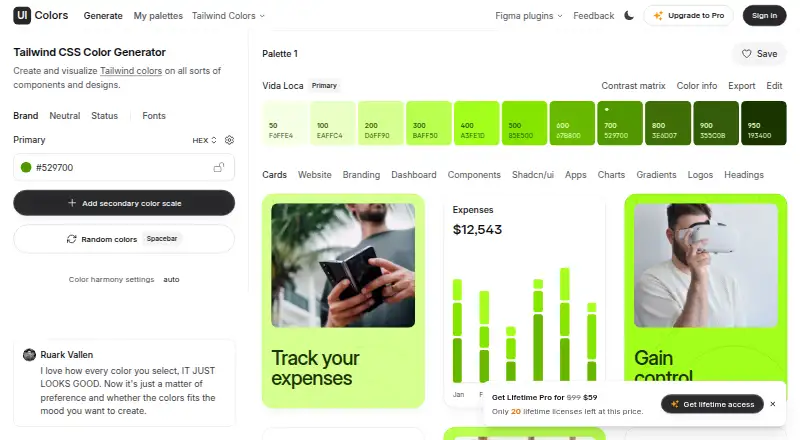
UI Colors is a Tailwind CSS color generator for building and previewing palettes across interface designs. It can generate success, info, warning, and error scales, alongside a custom neutral scale for text, borders, and surfaces. Preview tabs cover cards, websites, branding, dashboards, components, Shadcn/ui, apps, charts, gradients, logos, and headings. Users can pick base and heading fonts from a curated selection; choosing custom fonts is an unlockable feature. A separate Tailwind Colors page covers v3 and v4 colors, with click-to-copy values in OKLCH, hex, and HSL. It also offers real-world UI previews and accessible contrast checks. The API accepts a hex value and returns shades 50–950 in hex and HSL, with a limit of 1,000 requests per minute. API use is restricted from creating a competing app, plugin, or browser extension primarily for generating color scales. The site links to a Figma plugin. A free plan is listed, and pricing starts from $99. UI Colors is available on the web, as an API, and as an extension.
Who it suits
UI Colors suits designers and developers who need to generate Tailwind palettes and inspect how colors appear in interface examples. Its API and extension may also suit workflows that use color scales beyond the web generator.
What it does well
- Generates status and neutral color scales
- Previews palettes in multiple interface contexts
- Offers accessible contrast checks
- Copies OKLCH, hex, and HSL values
- Free plan listed
What to know first
- Custom font selection is an unlockable feature
- API limited to 1,000 requests per minute
- API barred from competing color-scale generators
Verdict
UI Colors brings palette generation, interface previews, and contrast checking together, with an API for returning complete shade scales. Buyers should note the API rate limit and its restriction on competing color-scale products.
Facts from UI Colors's own pages
- API
- The API accepts a hex code and returns a color scale from shade 50 to 950 in hex and HSL formats. · uicolors.app, 11 Oct 2026
- API access
- The API example uses a POST request and an x-api-key, and the page offers an API subscription. · uicolors.app, 11 Oct 2026
- API limit
- The API terms set a rate limit of 1,000 requests per minute. · uicolors.app, 11 Oct 2026
- API restriction
- The API may not be used to create a competing application, plugin, or browser extension whose primary purpose is generating color scales. · uicolors.app, 11 Oct 2026
- Color scales
- The generator supports success, info, warning, and error color scales, plus a custom neutral scale for text, borders, and surfaces. · uicolors.app, 11 Oct 2026
- Contrast
- The Tailwind Colors page says users can preview colors in real-world UI examples and check accessible contrast ratios. · uicolors.app, 11 Oct 2026
- Data processors
- The listed subprocessors are Supabase, Lemon Squeezy, Resend, and PostHog. · uicolors.app, 11 Oct 2026
- Data retention
- Website visitor data is stored for 14 months and pseudonymized where possible; legally required financial data is kept for at least seven years. · uicolors.app, 11 Oct 2026
- Data security
- The privacy policy says data is secured with measures such as encrypted storage where possible and secure TLS connections. · uicolors.app, 11 Oct 2026
- Design previews
- The generator lists design previews including cards, websites, branding, dashboards, components, charts, gradients, logos, and headings. · uicolors.app, 11 Oct 2026
- Figma plugin
- The maker’s site links to a UI Colors Figma plugin. · uicolors.app, 11 Oct 2026
- Fonts
- Users can choose fonts for base text and headings from a curated selection, and custom font selection is an unlockable feature. · uicolors.app, 11 Oct 2026
- Maker
- The privacy policy identifies UI Colors as a product built by Erik de Vries. · uicolors.app, 11 Oct 2026
- Neutral scale
- It can add a custom neutral color scale for text, borders, and surfaces. · uicolors.app, 11 Oct 2026
- Preview tabs
- The generator includes previews for Cards, Website, Branding, Dashboard, Components, Shadcn/ui, Apps, Charts, Gradients, Logos, and Headings. · uicolors.app, 11 Oct 2026
- Privacy and security
- The privacy policy says UI Colors uses encrypted storage where possible and secure TLS connections, alongside organizational measures to protect data. · uicolors.app, 11 Oct 2026
- Purpose
- UI Colors is a Tailwind CSS color generator for creating and visualizing colors in components and designs. · uicolors.app, 11 Oct 2026
- Status scales
- The generator can add success, info, warning, and error color scales and preview them in the Components tab. · uicolors.app, 11 Oct 2026
- Subprocessors
- The listed subprocessors are Supabase, Lemon Squeezy, Resend, and PostHog. · uicolors.app, 11 Oct 2026
- Support
- The privacy policy provides [email protected] for privacy questions and says data access requests receive a response within four weeks. · uicolors.app, 11 Oct 2026
- Tailwind colors
- The Tailwind Colors page covers Tailwind CSS v4 and v3 colors and provides click-to-copy OKLCH, hex, and HSL values. · uicolors.app, 11 Oct 2026
Where UI Colors stands on Freedom251
- Color Palette Generators#26 of 34