Freedom251 › Typing Tutor Software
typing.io
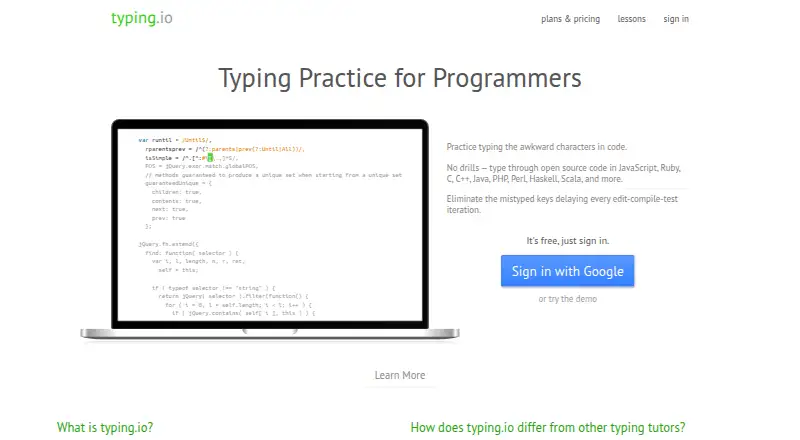
What typing.io is
typing.io is a web-based typing tutor for programmers, with practice lessons built around open source code. Exercises include programming symbols as well as keys such as backspace and delete, so practice involves correcting errors and entering code. Lessons are available in 16 languages. The free Scissor Switch Plan includes lessons, realistic key processing, and typo cost analysis. The Mechanical Plan costs $9.99 a month and adds code uploads, a typo heatmap, a touch-typing fingering guide, and progress tracking. Typing.io records measures such as WPM, unproductive keystrokes, lesson totals, and time spent, with JSON export. The heatmap and fingering guide support Qwerty, Colemak, and Dvorak layouts. Typing is restricted beyond an error until it is corrected, while typo cost analysis counts extra keystrokes such as backspacing or moving through text. Users can make custom lessons from code, including by exploring a starred GitHub project. JavaScript must be enabled or whitelisted for typing analysis.
Who it suits
typing.io suits programmers who want typing practice with code, symbols, and error correction. The paid plan may suit learners who want to upload code or track progress.
What it does well
- Free plan includes lessons in 16 languages.
- Exercises include backspace and delete keys.
- Tracks WPM, unproductive keystrokes, lessons, and time.
- Heatmap and fingering guide support three layouts.
- Exports typing analytics as JSON.
What to know first
- Mechanical Plan costs $9.99 a month.
- Typing analysis requires JavaScript enabled or whitelisted.
- Available on web.
Limits
The free Scissor Switch Plan includes lessons, realistic key processing, and typo cost analysis. Uploading and typing any code, the typo heatmap, the fingering guide, and progress tracking are included in the Mechanical Plan at $9.99 a month.
Plans
| Plan | Billed and limits | Price |
|---|---|---|
| Scissor Switch Plan | Typing lessons in 16 languages · Realistic key processing engine · Typo cost analysis | Free |
| Mechanical Plan | Monthly; first bill on upgrade date, then the same day of each month · Upload and type any code · Typo heatmap · Touch typing fingering guide · Track typing progress · Typing lessons in 16 languages · Realistic key processing engine · Typo cost analysis | $9.99 a month |
As typing.io lists them, read 8 Oct 2026. The maker's own page has the final word.
Getting started
- Open the typing.io website in a browser with JavaScript enabled or whitelisted.
- Start with the free Scissor Switch Plan for lessons and typo cost analysis.
- Choose the Mechanical Plan at $9.99 a month for custom code uploads and its additional tools.
- Use a starred GitHub project to explore creating a custom lesson.
Verdict
typing.io focuses typing practice on code and the correction of mistakes, with a free plan and additional customization and tracking in the Mechanical Plan. Check the JavaScript requirement and plan features before choosing.
Questions
Is typing.io free?
Yes. The Scissor Switch Plan is free and includes lessons in 16 languages, realistic key processing, and typo cost analysis.
What does the Mechanical Plan cost?
It costs $9.99 a month, billed monthly. It adds code uploads, a typo heatmap, a fingering guide, and progress tracking.
What platforms does typing.io support?
Typing.io is listed for the web.
Can I practice with my own code?
Yes. The Mechanical Plan lets users upload and type any code. The pricing page says its custom lesson creator supports multiple languages.
Which keyboard layouts are supported by the heatmap and fingering guide?
They support Qwerty, Colemak, and Dvorak layouts.
Does typing.io work without JavaScript?
No. Typing.io says JavaScript must be enabled or whitelisted for its typing analysis.
Facts from typing.io's own pages
- Analytics
- Typing.io tracks typing progress, including WPM, unproductive keystrokes, lesson totals, and time spent, and offers JSON export. · typing.io, 8 Oct 2026
- Browser requirement
- Typing.io uses JavaScript to analyze typing and says JavaScript must be enabled or whitelisted. · typing.io, 8 Oct 2026
- Cancellation
- The pricing page says future bills stop immediately after cancellation. · typing.io, 8 Oct 2026
- Custom lessons
- The Mechanical Plan lets users upload and type any code, and the pricing page says the custom lesson creator supports multiple languages. · typing.io, 8 Oct 2026
- Integrations
- The pricing page says users can explore a starred project on GitHub to create a custom lesson. · typing.io, 8 Oct 2026
- Keyboard layouts
- The typo heatmap and fingering guide support Qwerty, Colemak, and Dvorak layouts. · typing.io, 8 Oct 2026
- Languages
- Typing lessons are offered in 16 languages. · typing.io, 8 Oct 2026
- Payment security
- Typing.io says Stripe processes payments and payment information is sent directly to Stripe over SSL without touching its servers. · typing.io, 8 Oct 2026
- Privacy
- The privacy policy says the service collects browser and request information, may collect IP addresses, and does not rent or sell personally identifying information. · typing.io, 8 Oct 2026
- Product
- Typing.io is a typing tutor for programmers whose lessons use open source code. · typing.io, 8 Oct 2026
- Support
- The pricing page invites questions and feature requests at [email protected], and the site lists [email protected]. · typing.io, 8 Oct 2026
- Typing practice
- Lessons let users practice code symbols and include keys such as backspace and delete for realistic typing practice. · typing.io, 8 Oct 2026
- Typos
- The typing engine limits typing beyond an error so that users correct mistakes, and typo cost analysis counts collateral keystrokes such as backspacing or arrowing over text. · typing.io, 8 Oct 2026
Where typing.io stands on Freedom251
- Typing Tutor Software#23 of 36