Freedom251 › AI Stem Splitters
TuneStems
What TuneStems is
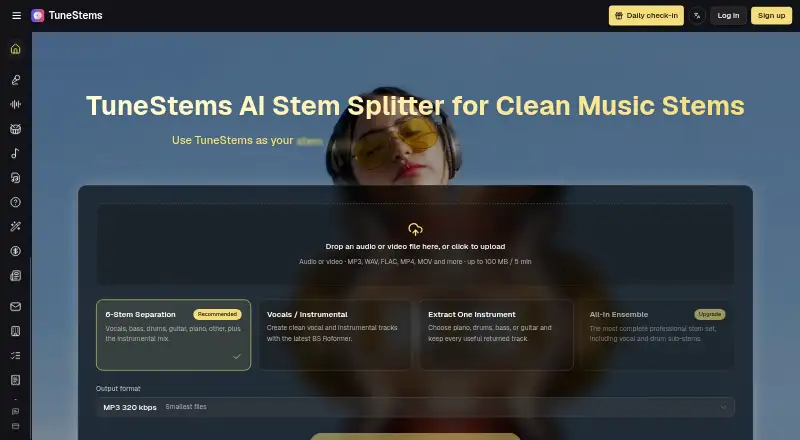
TuneStems separates songs into vocals, drums, bass, guitar, piano, and other instrument stems in a web browser. Its listed modes cover six-stem separation, vocals or instrumental, extracting one instrument, and All-In Ensemble. You can preview each stem in the results area or a share view before downloading individual parts in MP3, WAV, FLAC, or M4A. The homepage accepts audio and video, including MP3, WAV, FLAC, MP4, and MOV, and lists uploads up to 100 MB and five minutes; plan details show different file limits. TuneStems says you can try it without signing up, with up to five minutes per track, but downloads on the Free plan unlock only after a purchase. Uses described by the product include remixing, DJ edits, music practice, creator clips, production preparation, and song analysis. Plans include one-time credit packs and monthly subscriptions, with paid options from $5.90. The pricing FAQ says generated data is deleted within 24 hours and user data is not used for AI training.
Who it suits
TuneStems suits musicians, DJs, creators, and listeners who want to isolate or preview song parts for remixing, practice, editing, or analysis. It is for people comfortable working through a web service and choosing among credit packs or subscriptions for downloads.
What it does well
- Separates vocals and multiple instrument stems.
- Offers four separation modes.
- Previews stems before download.
- Exports MP3, WAV, FLAC, and M4A.
- Free access without signing up.
What to know first
- Free-plan downloads require a purchase.
- Homepage upload limit is five minutes.
- Web is the only listed platform.
Limits
The Free plan provides 151 welcome credits and up to eight minutes of standard MP3 separation; files can be up to 10 minutes or 200 MB, and downloads unlock after a purchase. Paid plans set higher credit, file-length, and storage allowances, with each plan’s limits varying by tier.
Plans
| Plan | Billed and limits | Price |
|---|---|---|
| Free | 151 welcome credits · up to 8 minutes of standard MP3 separation · files up to 10 minutes / 200 MB · downloads unlock after any purchase · temporary cloud storage | Free |
| Credit Packages | One-time payment · No renewal · 3,000 credits · credits never expire | $19.90, paid once |
| Premium | $29.9, Billed annually · 7,000 credits · up to 388 minutes of standard MP3 separation · files up to 100 minutes / 1 GB · cloud storage up to 15 days | $19.90 a month |
| Ultimate | $59.9, Billed annually · 17,000 credits · up to 944 minutes of standard MP3 separation · files up to 100 minutes / 1 GB · cloud storage up to 30 days | $39.90 a month |
| Starter Pack | One-time payment · No renewal · 500 credits · credits never expire | $5.90, paid once |
| Pro | $9.9, Billed annually · 2,000 credits · up to 111 minutes of standard MP3 separation · files up to 10 minutes / 200 MB · cloud storage up to 7 days | $6.99 a month |
| Creator Pack | One-time payment · No renewal · 1,300 credits · credits never expire | $9.90, paid once |
As tunestems.com lists them, read 8 Oct 2026. The maker's own page has the final word.
Getting started
- Open the TuneStems website
- Upload an audio or video file
- Choose a separation mode
- Play the separated stems in the results or share view
- Download individual stems in MP3, WAV, FLAC, or M4A
- Purchase a pack if Free-plan downloads are locked
Verdict
TuneStems combines several separation modes with preview and individual stem exports. Check the plan-specific limits and purchase requirement for Free downloads before choosing it.
Questions
Can TuneStems be used without signing up?
Yes. TuneStems says users can try it without signing up, with up to five minutes per track.
What does the Free plan include?
The Free plan includes 151 welcome credits and up to eight minutes of standard MP3 separation. Downloads unlock after any purchase, and temporary cloud storage is included.
What export formats are available?
TuneStems lists MP3, WAV, FLAC, and M4A exports, with individual stem downloads.
Are TuneStems subscriptions recurring?
Starter Pack, Creator Pack, and Credit Packages are one-time payments with no renewal. Pro, Premium, and Ultimate are monthly plans billed annually at their listed rates.
Does TuneStems use uploads for AI training?
The pricing FAQ says user data is not used for AI training, the company has no access to generated content, and generated data is automatically deleted within 24 hours.
Facts from TuneStems's own pages
- Cancellation and refunds
- The pricing FAQ says subscriptions can be canceled at any time and describes refunds based on the proportion of credits used. · tunestems.com, 8 Oct 2026
- Commercial use
- The homepage displays “100% Commercial Use.” · tunestems.com, 8 Oct 2026
- Exports
- The homepage lists MP3, WAV, FLAC, and M4A exports and individual stem downloads. · tunestems.com, 8 Oct 2026
- Free access
- TuneStems says users can try it without signing up, with up to 5 minutes per track. · tunestems.com, 8 Oct 2026
- Headquarters
- Sheridan, Wyoming, United States · tunestems.com, 28 Sept 2026
- Maker
- TuneStems is a venture operated by BMTech Nexus LLC, a team based in the United States. · tunestems.com, 8 Oct 2026
- Preview
- Users can play each separated stem in the results area or a share view before downloading. · tunestems.com, 8 Oct 2026
- Privacy
- The pricing FAQ says user data is not used for AI training, the company has no access to generated content, and generated data is automatically deleted within 24 hours. · tunestems.com, 8 Oct 2026
- Purpose
- TuneStems separates songs into vocals, drums, bass, guitar, piano, and other instrument stems. · tunestems.com, 8 Oct 2026
- Separation modes
- The site lists 6-Stem Separation, Vocals / Instrumental, Extract One Instrument, and All-In Ensemble modes. · tunestems.com, 8 Oct 2026
- Support
- The pricing FAQ says the team typically responds to email inquiries within 24 hours. · tunestems.com, 8 Oct 2026
- Upload limit
- The homepage says audio or video uploads can be up to 100 MB and 5 minutes, and lists MP3, WAV, FLAC, MP4, MOV, and more. · tunestems.com, 8 Oct 2026
- Use cases
- The product describes workflows for remixing, DJ edits, music practice, creator clips, production prep, and song analysis. · tunestems.com, 8 Oct 2026
Where TuneStems stands on Freedom251
- AI Stem Splitters#23 of 26