Freedom251 › Mood Board Software
TTO Moodboard
What TTO Moodboard is
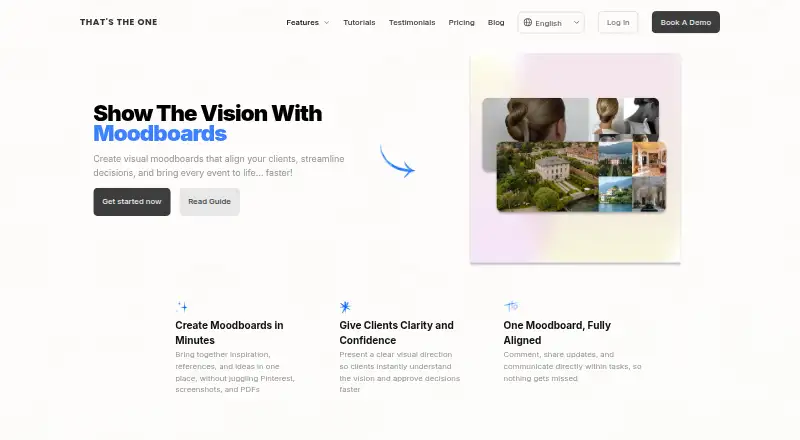
TTO Moodboard helps event planners shape an event’s visual style and share it with clients, vendors, and teams. Boards are managed within an event’s TTO planning workspace, alongside timelines, guest lists, budgets, and floor plans. Planners can upload inspiration images or other visual references, then add or remove elements, rearrange the layout, and revise the board as the design changes. Sharing gives clients and vendors a common view of the creative direction and a way to provide feedback. For wedding planning, the board can communicate the intended colour palette, style, and atmosphere to couples. Planners can use their own images to maintain their studio branding. The feature is web-based and supports real-time collaboration, guest access, and a brand kit. TTO’s wider planner subscription lists unlimited weddings and events, guest management, wedding websites and e-cards, floor and seat plans, budget and payment tracking, vendor CRM, task lists, timelines, and personal customer support. Pricing is listed from £45/mo, with a 30-day trial; there is no free plan.
Who it suits
It suits event planners who want to develop an event’s look in a shared planning workspace. Wedding planners can use it to show couples the intended palette, style, and atmosphere.
What it does well
- Boards sit alongside event planning tools.
- Upload images and revise board layouts.
- Share direction with clients and vendors.
- Supports real-time collaboration and guest access.
- Brand kit supports studio identity.
What to know first
- No free plan is listed.
- The subscription starts at £45/mo.
- Access is web-only.
Limits
The homepage advertises a 30-day free trial that can be cancelled at any time.
Plans
| Plan | Billed and limits | Price |
|---|---|---|
| Professional planner subscription | Unlimited weddings & events · personal customer support · free for your clients · cancel anytime | On request |
As thatstheone.com lists them, read 8 Oct 2026. The maker's own page has the final word.
Getting started
- Open the TTO Moodboard website
- Start the advertised 30-day free trial
- Create or open an event in the TTO planning workspace
- Upload inspiration images or add visual references
- Edit the board and share it with clients or vendors
Verdict
TTO Moodboard combines visual direction with an event’s wider planning workspace. It is a fit for planners who want clients and vendors to review and comment on a shared design board.
Questions
Is there a free plan?
No free plan is listed. The homepage advertises a 30-day free trial that can be cancelled at any time.
What does the planner subscription include?
It lists unlimited weddings and events, a planning dashboard, guest management, wedding websites and e-cards, floor and seat plans, payment and budget tracking, vendor CRM, task lists, timelines, and personal customer support.
Which platforms are supported?
TTO Moodboard is available on the web.
Can clients and vendors access a moodboard?
Boards can be shared with clients and vendors, and the feature supports guest access.
Who founded TTO Moodboard?
The about page identifies Kat Trefilova as CEO and founder.
Facts from TTO Moodboard's own pages
- Branding
- The moodboard page says planners can upload their own images and keep the board on-brand for their studio. · thatstheone.com, 8 Oct 2026
- Client alignment
- The maker says moodboards help couples see the colour palette, style direction, and atmosphere being designed, supporting faster feedback and confidence in the creative direction. · thatstheone.com, 8 Oct 2026
- Collaboration
- Moodboards can be shared with clients and vendors so they can see the same visual direction and provide feedback. · thatstheone.com, 8 Oct 2026
- Editing
- Moodboards are editable, and users can add images, rearrange the layout, remove elements, and update the board as the design evolves. · thatstheone.com, 8 Oct 2026
- Headquarters
- United States · thatstheone.com, 28 Sept 2026
- Images and references
- Users can upload inspiration images or add visual references to a moodboard. · thatstheone.com, 8 Oct 2026
- Intended users
- The moodboard feature is presented for event planners, with examples and guidance focused on wedding planning and couples. · thatstheone.com, 8 Oct 2026
- Maker
- The about page identifies Kat Trefilova as CEO and founder and describes the product as built with planners. · thatstheone.com, 8 Oct 2026
- Planning workspace
- Moodboards are created and managed inside an event’s TTO planning workspace alongside timelines, guest lists, budgets, and floor plans. · thatstheone.com, 8 Oct 2026
- Pricing scope
- The pricing page lists unlimited weddings and events, a planning dashboard, guest management, wedding websites and e-cards, floor and seat plans, payment and budget tracking, vendor CRM, task lists, timelines, and personal customer support. · thatstheone.com, 8 Oct 2026
- Privacy
- The privacy policy says the company collects account, contact, and payment information, and that payment data is stored by its payment processor. · thatstheone.com, 8 Oct 2026
- Purpose
- TTO Moodboards let planners create visual moodboards to define an event’s style and align clients, vendors, and teams on its creative direction. · thatstheone.com, 8 Oct 2026
- Support
- The maker lists personal customer support with its planner subscription and provides a moodboard guide that links to its support center. · thatstheone.com, 8 Oct 2026
- Trial
- The maker’s homepage advertises a 30 day free trial that can be cancelled at any time. · thatstheone.com, 8 Oct 2026
Where TTO Moodboard stands on Freedom251
- Mood Board Software#21 of 24