Freedom251 › Peer-to-Peer Payment Apps
tricount
What tricount is
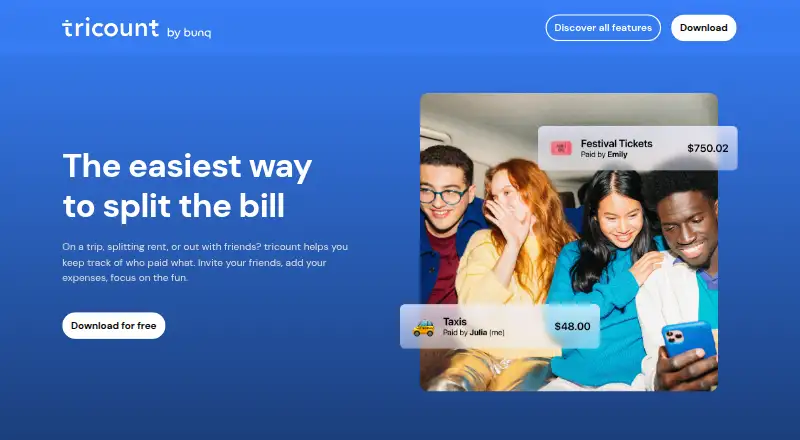
tricount is an expense-sharing app for keeping group costs organized across trips, dinners, shared homes, couples, events, and clubs. Its shared expense list records each cost and who paid, while custom splits let members assign individual shares when an equal division does not fit. For travel, users can enter expenses in multiple currencies and follow the trip total in one currency. Expenses can be added offline and synced after a connection returns, and existing Splitwise group expenses can be imported. When someone owes money, a payment request can be shared with them; tricount also supports split payments. Linking a bunq Card can automatically add shared purchases. The features page also describes optional paid travel eSIM data plans provided by bunq. tricount is available on Android and iOS, with a free plan listed as free, with no ads and no limits. bunq B.V. owns, develops, and operates the app from Amsterdam, Netherlands. Its contact page offers 24/7 live chat support and email contact.
Who it suits
tricount suits friends, couples, and groups that need to track who paid and divide shared costs. Its multi-currency totals and offline expense entry also fit trips, while shared homes, dinners, events, and clubs are among the groups it presents itself for.
What it does well
- Free plan at no cost, with no ads and no limits.
- Custom shares accommodate bills that are not divided equally.
- Tracks travel expenses in multiple currencies with a one-currency total.
- Offline expenses sync when the device is back online.
- Imports existing Splitwise group expenses.
- bunq Card linking can add shared purchases automatically.
What to know first
- Available platforms are Android and iOS.
- Automatic purchase entry requires connecting a bunq Card.
Plans
| Plan | Billed and limits | Price |
|---|---|---|
| tricount | Free · no ads · no limits | Free |
As tricount.com lists them, read 3 Oct 2026. The maker's own page has the final word.
Getting started
- Open the tricount website.
- Install tricount on Android or iOS.
- Create a group expense list and record who paid.
- Set each person’s share when an equal split does not fit.
- Share a payment request with anyone who needs to pay you back.
Verdict
Choose tricount if your group wants a free shared expense list, flexible splits, and payment requests. Its offline entry and multi-currency totals are useful for trips. Look elsewhere if you need an app on a platform other than Android or iOS.
Questions
Is tricount free?
Yes. Its free plan is listed as free, with no ads and no limits.
Which platforms support tricount?
tricount is available on Android and iOS.
Can tricount split expenses unevenly?
Yes. Users can set each person’s share when an equal split does not fit.
Can I use tricount while offline?
Yes. You can add expenses without a signal and sync them when you are back online.
Can tricount import Splitwise expenses?
Yes. Users can import existing Splitwise group expenses.
Who owns tricount?
bunq B.V. owns, develops, and operates tricount. Its registered office is in Amsterdam, Netherlands.
Facts from tricount's own pages
- Audience
- The site presents tricount for trips, dinners, shared homes, couples, events, and groups or clubs. · tricount.com, 3 Oct 2026
- bunq integration
- Connecting a bunq Card can add shared purchases to tricount automatically. · tricount.com, 3 Oct 2026
- Company
- The privacy policy says bunq B.V. owns, develops, and operates tricount and gives its registered office as Amsterdam, Netherlands. · tricount.com, 3 Oct 2026
- Custom splits
- Users can set each person’s share when an equal split does not fit the bill. · tricount.com, 3 Oct 2026
- Expense tracking
- Groups can keep expenses in a shared list that records who paid. · tricount.com, 3 Oct 2026
- Headquarters
- Amsterdam, Netherlands · tricount.com, 28 Sept 2026
- Import
- Users can import existing Splitwise group expenses into tricount. · tricount.com, 3 Oct 2026
- Multiple currencies
- Users can record costs in different currencies and follow the trip total in one currency. · tricount.com, 3 Oct 2026
- Offline use
- Users can add expenses without a signal and sync them when back online. · tricount.com, 3 Oct 2026
- Payments
- Users can share a payment request with a friend who needs to pay them back. · tricount.com, 3 Oct 2026
- Platforms
- The download page offers tricount for iPhone and Android. · tricount.com, 3 Oct 2026
- Privacy and security
- The privacy policy identifies bunq B.V. as data controller and says it uses technical and organizational security measures, including access controls, backups, and network security. · tricount.com, 3 Oct 2026
- Purpose
- Tricount helps people split shared expenses with friends, on trips, or at home. · tricount.com, 3 Oct 2026
- Support
- The contact page says live chat support is available 24/7 and provides an email contact. · tricount.com, 3 Oct 2026
- Travel add-on
- The features page describes optional paid travel eSIM data plans provided by bunq. · tricount.com, 3 Oct 2026
Where tricount stands on Freedom251
- Peer-to-Peer Payment Apps#18 of 24