Freedom251 › Taskbar Customization Software

TranslucentTB
What TranslucentTB is
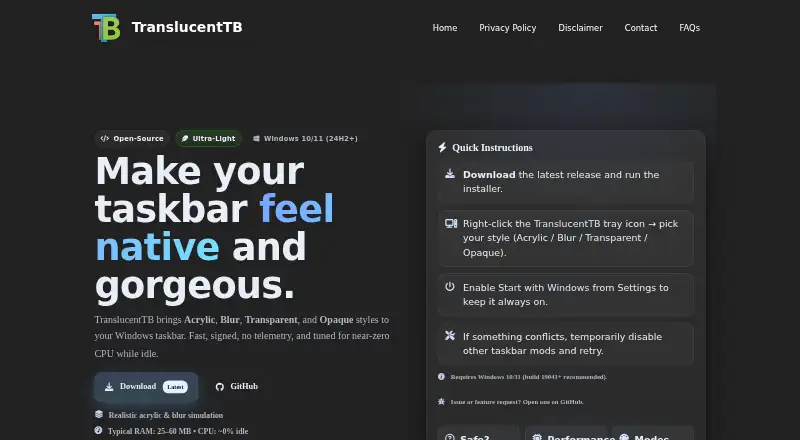
TranslucentTB is a free Windows utility for adjusting the appearance of the taskbar on Windows 10 and Windows 11. Choose from Normal, Opaque, Clear, Blur, and Acrylic styles, then use dynamic modes to change the appearance when a window is visible or maximized, or when Start, Search, or Task View is open. A color picker provides alpha adjustment and a live preview, with colors customizable for different taskbar states. Dynamic modes can also show or hide the Aero Peek button on Windows 10 and the taskbar line on Windows 11. The project recommends Windows build 19041 or newer; some visual effects depend on the build and graphics hardware or driver capabilities. TranslucentTB is available free from the Microsoft Store, which provides background auto-updates, and through GitHub releases as an installer or portable ZIP. The ZIP works only on Windows 11. The software is GPLv3 free software, and the project describes it as compatible with RoundedTB and ExplorerPatcher. GitHub issues and discussions are available for bug reports, feature requests, and support.
Who it suits
TranslucentTB suits Windows users who want to customize taskbar transparency, color, or behavior in different desktop states. It may also suit users of RoundedTB or ExplorerPatcher, which the project says are compatible with it.
What it does well
- Offers five taskbar styles, including Blur and Acrylic.
- Dynamic modes respond to windows and Windows interface states.
- Color picker includes alpha adjustment and live preview.
- Free software under the GPLv3 license.
- Available through the Microsoft Store and GitHub releases.
What to know first
- The portable ZIP works only on Windows 11.
- Some visual effects depend on the Windows build and graphics capabilities.
- Some antivirus products may flag the program.
Limits
The portable ZIP works only on Windows 11. The project recommends Windows build 19041 or newer, and some visual effects depend on the build and graphics hardware or driver capabilities.
Plans
| Plan | Billed and limits | Price |
|---|---|---|
| Free | Windows taskbar customization | Free |
As translucenttb.net lists them, read 7 Oct 2026. The maker's own page has the final word.
Getting started
- Visit the TranslucentTB website.
- Download it free from the Microsoft Store, or get the installer or portable ZIP from GitHub releases.
- Use Windows 10 or Windows 11; the portable ZIP is for Windows 11 only.
- Choose a taskbar style and customize colors for taskbar states.
Verdict
Choose TranslucentTB if you want free taskbar appearance controls for Windows 10 or Windows 11, including state-based styles and colors. Check the Windows 11 restriction if you want the portable ZIP, and note that some effects depend on your build and graphics hardware or driver.
Questions
Is TranslucentTB free?
Yes. It is available free, and the project describes it as free software under the GPLv3 license.
Which Windows versions does it support?
The project describes support for Windows 10 and Windows 11 and recommends build 19041 or newer.
Where can I download it?
It is available from the Microsoft Store and as an installer or portable ZIP through GitHub releases.
Does it have a portable version?
Yes. The portable ZIP works only on Windows 11.
Does it work with other taskbar tools?
The project says it is compatible with RoundedTB and ExplorerPatcher.
How does the Microsoft Store version update?
The project README says the Microsoft Store version offers background auto-updates.
Facts from TranslucentTB's own pages
- Color controls
- The color picker supports alpha and live preview, and colors can be customized for taskbar states. · github.com, 7 Oct 2026
- Distribution
- The project says it is free to download from the Microsoft Store and also offers an app installer and a portable ZIP through GitHub releases. · github.com, 7 Oct 2026
- Dynamic modes
- Dynamic modes can change the taskbar’s appearance when a window is visible or maximized, or when Start, Search, or Task View is open. · github.com, 7 Oct 2026
- Integrations
- The project says TranslucentTB is compatible with RoundedTB and ExplorerPatcher. · github.com, 7 Oct 2026
- License
- The project says the software is free software under the GPLv3 license. · github.com, 7 Oct 2026
- Maker identity
- The GitHub README describes TranslucentTB as a team effort and names contributors, but the opened pages do not state a headquarters or founding date. · github.com, 7 Oct 2026
- Purpose
- TranslucentTB is a lightweight utility that makes the Windows taskbar translucent or transparent. · github.com, 7 Oct 2026
- Security
- The project says its source is open and welcomes security reviews; it also notes that some antivirus products may flag the program. · github.com, 7 Oct 2026
- Support
- The project directs users to GitHub issues for bug reports and feature requests, and provides GitHub discussions. · translucenttb.net, 7 Oct 2026
- Supported platform
- The project describes support for Windows 10 and Windows 11; its portable ZIP version is stated to work only on Windows 11. · github.com, 7 Oct 2026
- System requirements
- The maker’s site lists Windows 10/11 and recommends build 19041 or newer; it says some visual effects depend on the build and GPU or driver capabilities. · translucenttb.net, 7 Oct 2026
- Taskbar styles
- Styles include Normal, Opaque, Clear, Blur, and Acrylic. · github.com, 7 Oct 2026
- Updates
- The Microsoft Store version offers background auto-updates, according to the project README. · github.com, 7 Oct 2026
- Windows-specific features
- On Windows 10, the app can show or hide the Aero Peek button by dynamic mode; on Windows 11, it can show or hide the taskbar line by dynamic mode. · github.com, 7 Oct 2026
Where TranslucentTB stands on Freedom251
- Taskbar Customization Software#17 of 34