Freedom251 › Interactive Video Software
TouchPoint Studio
What TouchPoint Studio is
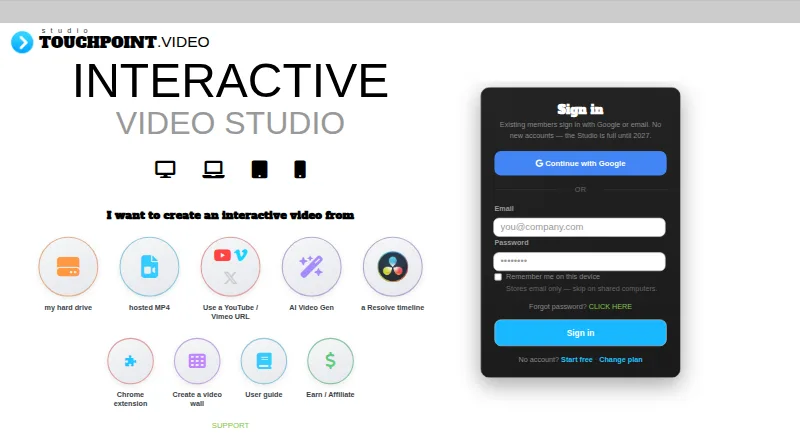
TouchPoint Studio creates interactive videos with clickable hotspots, buttons, popups and social links. It accepts videos from a local drive, hosted MP4 URLs, YouTube, Vimeo, X/Twitter and DaVinci Resolve timelines. Hotspots can be text, buttons, images or invisible masks. Popup setups can connect to booking links such as Calendly, iframe URLs and add-on providers for bookings, signup forms, payments and reviews. A free DaVinci Resolve plugin for Mac, Windows and Linux lets users mark hotspot points on a timeline, then bring the video into Studio for refinement and publishing. The Chrome extension can show hotspots on YouTube, Vimeo and X videos when their descriptions contain a TouchPoint code. The free tier allows unlimited Studio design and one public hotspot live. The Studio page says the platform requires desktop access, is not accepting new accounts and will reopen in 2027. Usage analytics are listed at $10 per month per video. Video Wall is a separate branded gallery for interactive videos and TV, Chromecast and AirPlay viewing; the page says it has no analytics.
Who it suits
TouchPoint Studio is for users creating interactive videos with hotspots, popups or social links. Its desktop requirement and current pause on new accounts are important considerations for prospective users.
What it does well
- Accepts videos from multiple listed sources.
- Hotspots include text, button, image and invisible mask types.
- Free Resolve plugin supports Mac, Windows and Linux.
- Free tier allows unlimited design and one public hotspot.
What to know first
- No new accounts are being accepted currently.
- Studio requires desktop access.
- Analytics cost $10 per month per video.
- Video Wall has no analytics.
Limits
The free tier allows unlimited Studio design and one public hotspot live. The Studio page says it is not accepting new accounts and will reopen in 2027.
Plans
| Plan | Billed and limits | Price |
|---|---|---|
| Pro | m/o; monthly or annual billing option shown · 3 hotspots · unlimited videos · cancel any time | $39 a month |
| Wall | 1 hotspot · unlimited videos · no subscription listed | $5, paid once |
| Agency | m/o; monthly or annual billing option shown · unlimited hotspots · unlimited videos · cancel any time | $97 a month |
As create.touchpoint.video lists them, read 29 Sept 2026. The maker's own page has the final word.
Getting started
- Visit the TouchPoint Studio website on a desktop.
- Choose a video source: local drive, hosted MP4 URL, YouTube, Vimeo, X/Twitter, or a DaVinci Resolve timeline.
- Add hotspots, buttons, popups, or social links in Studio.
- Use the free tier for unlimited design and one public hotspot live, if you have access to an account.
- Publish the interactive video.
Verdict
TouchPoint Studio offers video hotspot authoring, with a Resolve plugin and browser extension for supported video sources. However, the Studio page says new accounts are not being accepted and will reopen in 2027.
Questions
Is TouchPoint Studio free?
It has a free tier with unlimited Studio design and one public hotspot live. Paid plans are listed as Wall at $5, paid once, Pro at $39 a month, and Agency at $97 a month.
Can I sign up for Studio now?
The Studio page says no new accounts are being accepted and that it will reopen in 2027.
What video sources does Studio accept?
It accepts local files, hosted MP4 URLs, YouTube, Vimeo, X/Twitter, and DaVinci Resolve timelines.
Which platforms support the DaVinci Resolve plugin?
The free plugin is available for Mac, Windows, and Linux.
How much does usage analytics cost?
Usage analytics are listed at $10 per month per video. Video Wall has no analytics.
Does Studio work on mobile?
The Studio page says users need to visit on desktop to use the platform.
Facts from TouchPoint Studio's own pages
- Analytics
- Usage analytics are listed as available for $10 per month per video. · create.touchpoint.video, 29 Sept 2026
- Browser extension
- The Chrome extension shows hotspots on YouTube, Vimeo, and X videos when the video description contains a TouchPoint code. · create.touchpoint.video, 29 Sept 2026
- DaVinci Resolve
- A free Resolve plugin is available for Mac, Windows, and Linux to mark hotspots on a timeline and bring it into Studio for refinement and publishing. · create.touchpoint.video, 29 Sept 2026
- Device requirement
- The Studio page says users need to visit on desktop to use the platform. · create.touchpoint.video, 29 Sept 2026
- Free tier
- The free tier allows unlimited Studio design and one public hotspot live. · create.touchpoint.video, 29 Sept 2026
- Headquarters
- Victoria, Australia · create.touchpoint.video, 28 Sept 2026
- Hotspots
- The plan comparison lists text, button, image, and invisible mask hotspot types. · create.touchpoint.video, 29 Sept 2026
- Intake limit
- The Studio page says no new accounts are being accepted and that it will reopen in 2027. · create.touchpoint.video, 29 Sept 2026
- Integrations
- Popup setup includes Calendly or another booking link, iframe URLs, and add-on providers for booking, signup forms, payments, and reviews. · create.touchpoint.video, 29 Sept 2026
- Product
- TouchPoint Studio creates interactive videos with clickable hotspots, buttons, popups, and social links. · create.touchpoint.video, 29 Sept 2026
- Support
- The page offers a support link and says priority support is included on the Pro and Agency plans. · create.touchpoint.video, 29 Sept 2026
- Video sources
- The Studio accepts videos from a local hard drive, hosted MP4 URLs, YouTube, Vimeo, X/Twitter, and DaVinci Resolve timelines. · create.touchpoint.video, 29 Sept 2026
- Video Wall
- Video Wall is a separate branded gallery for interactive videos with TV, Chromecast, and AirPlay viewing; the page says it has no analytics. · create.touchpoint.video, 29 Sept 2026
Where TouchPoint Studio stands on Freedom251
- Interactive Video Software#6 of 26