Freedom251 › Interactive Video Software

Interakly
What Interakly is
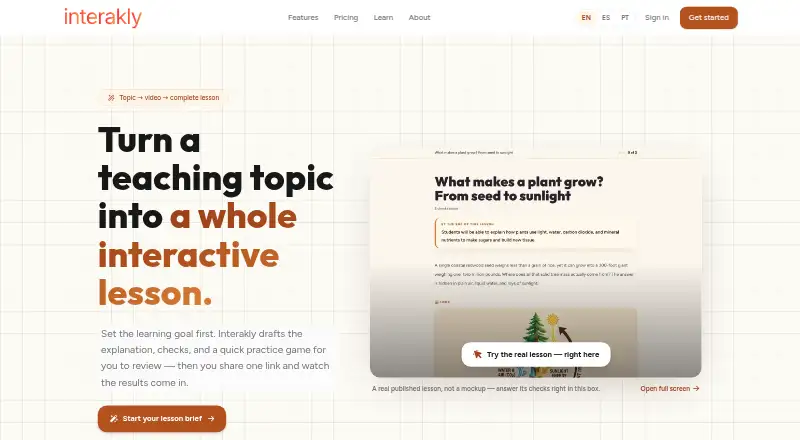
Interakly is a web-based interactive video platform for educators, corporate trainers and content creators. It adds activities such as quizzes, polls, hotspots, books and branching paths to video, and lists 35 interaction types across video, quizzes and interactive images. A lesson workflow can draft an explanation, checks and a practice game from a teaching topic for the creator to review. Creators can use public or unlisted YouTube videos that allow embedding, or upload MP4 videos up to 40 minutes long. Published videos can be shared through a unique link or embedded, and viewers do not need to sign up. Analytics include per-question breakdowns, completion rates, score distributions, heatmaps and CSV exports. Compatible learning management systems can connect through LTI 1.3 and AGS grade passback; webhooks are also included in the free plan. Interakly says data is encrypted in transit and at rest, and that it does not sell personal data or use student data to train AI or machine learning models. Its responsive interface is described as working on desktop, tablet and phone.
Who it suits
Interakly suits educators, corporate trainers and content creators who want to add learning activities and analytics to video. It may also suit teams using compatible learning management systems.
What it does well
- Free plan includes unlimited uploads up to 40 minutes.
- Viewers can watch without signing up.
- Analytics include heatmaps and CSV exports.
- Free plan includes webhook integrations.
What to know first
- Full branching paths require uploaded video.
- Spatial activities such as hotspots require uploaded video.
- YouTube videos support overlay interactions.
Limits
The Free plan includes unlimited video uploads and viewers, with all features during early access. Full branching paths and spatial activities such as hotspots require uploaded video; YouTube supports overlay interactions.
Plans
| Plan | Billed and limits | Price |
|---|---|---|
| Pro | Pricing announced soon · Planned: team accounts, shared libraries, custom branding, priority support, SSO, and advanced access controls | On request |
| Free | Unlimited video uploads, up to 40 minutes each · unlimited viewers · all features included during early access | On request |
As interakly.com lists them, read 4 Oct 2026. The maker's own page has the final word.
Getting started
- Open the Interakly website in a web browser.
- Start with a public or unlisted embeddable YouTube video, or upload an MP4 up to 40 minutes long.
- Add video interactions, quizzes, or interactive image activities.
- Publish and share the unique link or iframe embed with viewers.
- Connect a compatible learning management system through LTI 1.3 and AGS grade passback if needed.
Interakly turns ordinary video into interactive lessons for educators, corporate trainers, and content creators. It suits teams that want quizzes, branching activities, and detailed learner data in one web tool. The free early-access plan is unusually broad, but creators who rely on YouTube alone will meet important interaction limits.
Overview
Interakly combines video playback with quizzes, polls, hotspots, books, branching paths, and analytics. Its browser-based interface is responsive across desktop, tablet, and phone, while published activities can be shared by a unique link or embedded with an iframe. Viewers do not need accounts, which removes a common barrier for public courses, internal training links, and guest audiences.
Security measures include encryption in transit and at rest, secure authentication, and access controls. Interakly says it does not sell personal data or use student data to train AI or machine-learning models. Email support covers authoring, playback, access, billing, and connected agents.
Key features
The lesson workflow can generate a draft explanation, knowledge checks, and a practice game from a teaching topic. That is a useful way to get a lesson outline moving, although the creator must review the generated material before publishing. The feature catalogue contains 35 interaction types spanning video, quizzes, and interactive images, including branching paths, hotspots, quizzes, assessments, and annotations.
Video can come from a public or unlisted YouTube link that permits embedding, or from an uploaded MP4 of up to 40 minutes. YouTube is suitable for overlay interactions, but complete branching paths and spatial activities such as hotspots require an uploaded file. If a scenario depends on clickable locations or multiple routes, an upload-based workflow is therefore essential.
Analytics go beyond a single score: authors receive per-question results, completion rates, score distributions, heatmaps, and CSV export. Educators can diagnose where learners struggle, while trainers can move data into reporting processes. LTI 1.3 and AGS grade passback connect compatible learning-management systems, and webhooks are included on the free plan.
Pricing
Free
The Free plan has no published monetary price and is offered during early access. It includes unlimited video uploads, with each upload capped at 40 minutes, unlimited viewers, and all features. That combination makes it a strong fit for individual educators, pilot courses, and small training programs that can work within the video-length ceiling. The early-access terms mean users should confirm how the offer changes when standard plans arrive.
Pro
Pro pricing is custom, with pricing announced soon. Planned additions include team accounts, shared libraries, custom branding, priority support, single sign-on, and advanced access controls. Those capabilities target organizations that need coordinated authoring, branded delivery, or centralized identity management; they are not a reason for a solo creator to move plans before pricing and availability are clear.
Platforms
Interakly is delivered on the web, with a responsive experience intended for desktop, tablet, and phone use. Its LTI, AGS, and webhook connections also make it suitable for workflows that begin in a learning-management system or continue in external reporting tools.
Who it's for
Educators can build video lessons with checks, practice games, and grade passback, while corporate trainers can use branching scenarios and exported analytics to review participation. Content creators benefit from account-free viewing and iframe distribution. It is less suitable when the required material must remain a YouTube-only source and depends on hotspots or full branching.
Pros and cons
- Pro: Unlimited uploads and viewers on the early-access Free plan remove common adoption and distribution caps.
- Pro: Thirty-five interaction types, branching, hotspots, and assessments support more than simple video questions.
- Pro: Question-level analytics, heatmaps, and CSV exports provide actionable performance data.
- Pro: LTI 1.3, AGS passback, and free-plan webhooks support connected training workflows.
- Con: Uploaded MP4 video is mandatory for full branching and spatial hotspots, limiting what can be built from YouTube links.
- Con: Uploaded videos cannot exceed 40 minutes per file.
- Con: Pro’s price and final availability are not yet published, making future team budgeting uncertain.
Alternatives
Choose Adventr instead if you need a freemium product spanning Android, iOS, macOS, Windows, and web, with a published Creator price of $29 a month. Edpuzzle is the better fit for classroom assignments when a free Basic plan covering 20 interactive activities and 10 supported assignments is sufficient, or when its 13.75 USD monthly Pro Teacher plan suits you.
Cinema8 offers a free tier with one seat, 2 GB storage, 500 GB bandwidth, and 10 videos, making it preferable when fixed hosting quotas and a published 15.00 USD monthly Starter plan are useful. Pick H5P for free, MIT-licensed, self-hosted authoring, or for a premium service supporting three to ten authors.
Interactive Video Suite suits self-hosted deployments whose freemium tier allows three course participants, while Near-Life is an option for web projects needing a forever-free tier with one project, 2D media, 5 GB storage, and 100 plays. Quiz.video is preferable for lightweight quiz production when one free quiz per month is enough, with paid plans removing watermarks. Show by Animaker fits email-led distribution with a free allowance of 100 emails and contacts per month, 5 GB video bandwidth, and basic analytics.
See the Interactive Video Software and Interactive Lesson Makers lists for broader comparisons.
Verdict
Interakly is a strong choice for educators and trainers who want extensive interactive authoring, learner analytics, and account-free sharing without an upfront plan price. Choose it especially when unlimited early-access usage and LMS connections matter. Look elsewhere if your workflow must stay on YouTube while using hotspots or complete branching, or if you need firm, published team pricing today.
Verdict
Interakly offers a broad set of video interactions, learning analytics and sharing options. Note that full branching paths and spatial activities require uploaded video.
Questions
What does Interakly do?
It adds quizzes, polls, hotspots, books, branching paths, and analytics to video.
Does Interakly have a free plan?
Yes. The Free plan includes unlimited video uploads and viewers, with all features available during early access.
How long can uploaded videos be?
Uploaded MP4 videos can be up to 40 minutes long.
Do viewers need accounts?
No. Published videos can be shared by link or embedded with iframe code, and viewers do not need to sign up.
Can Interakly connect to learning management systems?
It supports LTI 1.3 and AGS grade passback for compatible learning management systems.
Which devices can run the interface?
The maker describes the responsive interface as working on desktop, tablet, and phone.
Facts from Interakly's own pages
- Analytics
- Analytics include per-question breakdowns, completion rates, score distributions, heatmaps, and CSV exports. · interakly.com, 4 Oct 2026
- Audience
- The maker describes the product as built for educators, corporate trainers, and content creators. · interakly.com, 4 Oct 2026
- Integrations
- Interakly supports LTI 1.3 and AGS grade passback for compatible learning management systems. · interakly.com, 4 Oct 2026
- Interactions
- The features page lists 35 interaction types across video, quizzes, and interactive images. · interakly.com, 4 Oct 2026
- Lesson creation
- Its lesson workflow can draft an explanation, checks, and a practice game from a teaching topic for the creator to review. · interakly.com, 4 Oct 2026
- Notable limit
- Full branching paths and spatial activities such as hotspots require uploaded video; YouTube videos support overlay interactions. · interakly.com, 4 Oct 2026
- Platform
- The maker describes the interface as responsive and working on desktop, tablet, and phone. · interakly.com, 4 Oct 2026
- Privacy
- The privacy policy says Interakly does not sell personal data or use student data to train AI or machine learning models. · interakly.com, 4 Oct 2026
- Security
- The maker states that data is encrypted in transit and at rest, with secure authentication and access controls. · interakly.com, 4 Oct 2026
- Sharing
- Published videos can be shared by unique link or embedded with iframe codes, and viewers do not need to sign up. · interakly.com, 4 Oct 2026
- Support
- Interakly offers email support at [email protected] for authoring, playback, access, billing, and connected agents. · interakly.com, 4 Oct 2026
- Video sources
- Creators can use public or unlisted YouTube videos that allow embedding, or upload MP4 videos up to 40 minutes long. · interakly.com, 4 Oct 2026
- Webhooks
- The free plan includes webhook integrations. · interakly.com, 4 Oct 2026
- What it does
- Interakly is an interactive video platform that adds quizzes, polls, hotspots, books, branching paths, and analytics to video. · interakly.com, 4 Oct 2026
Where Interakly stands on Freedom251
- Interactive Video Software#7 of 26
- Interactive Lesson Makers#13 of 31