Freedom251 › AI Sketch-to-Image Generators
Tool67 Sketch to Image
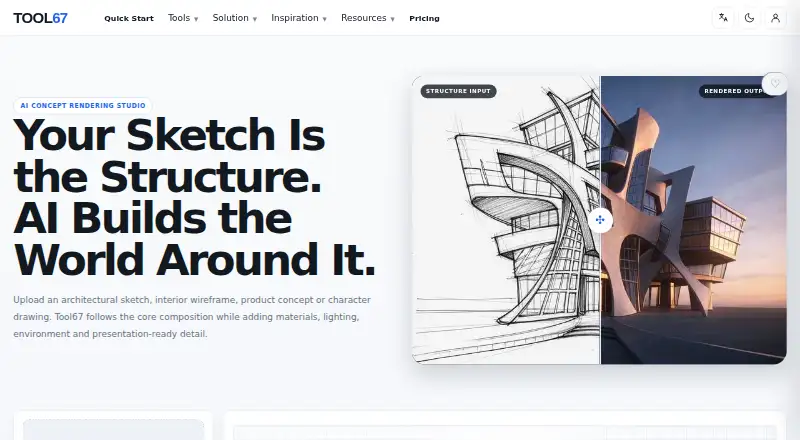
What Tool67 Sketch to Image is
Tool67 Sketch to Image converts structural drawings into AI-rendered visuals for concept exploration and presentation. It accepts hand sketches, CAD views, line art, and blockouts, including architectural sketches, interior wireframes, product concepts, and character drawings. An optional second image can guide palette, materials, atmosphere, or rendering style while the uploaded drawing remains the structural source. Controls include source, discipline, render style, aspect ratio, and a prompt. The page states that each generation costs 4 credits, though costs can vary by model, quality, duration, and workflow; they are shown before generation whenever possible. Generation time also varies with model, image complexity, and the processing queue. The free plan costs nothing and includes 15 subscription credits each month. Monthly and annual subscription credits refresh monthly and do not roll over; one-time credits are separate and do not expire. Results can vary, so proportions and important details should be reviewed before professional use. The renders are not construction drawings, engineering calculations, manufacturing specifications, or safety certifications.
Who it suits
It suits designers and concept creators in architecture, landscape, interiors, industrial and product design, and game or character development. It is for visual exploration and presentation, not production or safety documentation.
What it does well
- Accepts sketches, CAD views, line art, and blockouts.
- Optional reference image guides visual direction.
- Includes 15 monthly subscription credits on the free plan.
- Covers architecture, interiors, products, and character concepts.
What to know first
- Generated images are not construction or engineering documents.
- Results can vary and require review.
- Subscription credits do not roll over.
- Commercial use depends on plan, model terms, materials, and laws.
Limits
The Free plan includes 15 subscription credits per month, and the page states that each generation costs 4 credits. Subscription credits refresh monthly without rollover; generated images are for concept exploration and presentation, not technical or safety documentation.
Plans
| Plan | Billed and limits | Price |
|---|---|---|
| Free | 15 subscription credits each month | Free |
As tool67.com lists them, read 7 Oct 2026. The maker's own page has the final word.
Getting started
- Open the Tool67 Sketch to Image website.
- Use the web-based tool.
- Choose a main structural image such as a sketch, CAD view, line art or blockout.
- Optionally add a second image as a visual reference.
- Set the source, discipline, render style and aspect ratio, then add a prompt.
- Use the Free plan's monthly subscription credits, or select another available credit option.
Verdict
Tool67 Sketch to Image pairs structural drawings with optional visual references and adjustable rendering controls. Treat its outputs as concepts, and review proportions and details before professional use.
Questions
Is there a free plan?
Yes. The Free plan costs nothing and includes 15 subscription credits each month.
How much does a generation cost?
The page states that each generation costs 4 credits. It also says costs can vary by model, quality, duration and workflow, and are shown before generation whenever possible.
Which platforms does it support?
The listed platform is web.
What images can I use as input?
It accepts hand sketches, CAD views, line art and blockouts. A second image can optionally guide palette, materials, atmosphere or rendering style.
Can I use the results for construction or manufacturing?
The renders are for concept exploration and presentation, not construction drawings, engineering calculations, manufacturing specifications or safety certifications.
Do unused credits carry over?
Monthly and annual subscription credits refresh monthly and do not roll over. One-time credits are stored separately and do not expire.
Facts from Tool67 Sketch to Image's own pages
- Billing
- Tool67 says subscription payments are processed by Stripe and that it does not store full credit card details on its own servers. · tool67.com, 7 Oct 2026
- Commercial use
- Commercial use depends on the Tool67 plan, model terms, uploaded materials and applicable laws. · tool67.com, 7 Oct 2026
- Controls
- Rendering controls include source, discipline, render style, aspect ratio and a prompt. · tool67.com, 7 Oct 2026
- Credit rollover
- Monthly and annual subscription credits refresh monthly and unused subscription credits do not roll over; one-time credits do not expire. · tool67.com, 7 Oct 2026
- Credit rules
- Monthly and annual subscription credits refresh monthly without rollover, while one-time credits are stored separately and do not expire. · tool67.com, 7 Oct 2026
- Credits
- Tool67 says credit costs vary according to selected model, quality, duration, and workflow, and are shown before generation whenever possible. · tool67.com, 7 Oct 2026
- Free plan
- The pricing page says the Free plan includes 15 subscription credits each month. · tool67.com, 7 Oct 2026
- Generation cost
- The page states that each generation costs 4 credits. · tool67.com, 7 Oct 2026
- Generation time
- Generation time varies by model, image complexity, and the current processing queue. · tool67.com, 7 Oct 2026
- Inputs
- The tool accepts hand sketches, CAD views, line art or blockouts as the main structural image. · tool67.com, 7 Oct 2026
- Limits
- Generated renderings are visual concepts for exploration and presentation, not construction drawings, engineering calculations, manufacturing specifications, or safety certifications. · tool67.com, 7 Oct 2026
- Output limitation
- Generated renders are for concept exploration and presentation, not construction drawings, engineering calculations, manufacturing specifications or safety certifications. · tool67.com, 7 Oct 2026
- Output variability
- The workflow is designed to follow the uploaded structure, but results can vary and the page advises reviewing proportions and important details before professional use. · tool67.com, 7 Oct 2026
- Payment and security
- Tool67 says subscription payments are processed by Stripe and that it does not store full credit card details on its own servers. · tool67.com, 7 Oct 2026
- Reference image
- An optional second image can guide palette, materials, atmosphere, and rendering style while the sketch remains the main structural source. · tool67.com, 7 Oct 2026
- Result variability
- The workflow is designed to follow the uploaded structure, but results can vary and important proportions and details should be reviewed before professional use. · tool67.com, 7 Oct 2026
- Style reference
- An optional second image can guide palette, materials, lighting mood or atmosphere. · tool67.com, 7 Oct 2026
- Support
- Tool67 lists [email protected] for support, billing, subscription, credit and general questions. · tool67.com, 7 Oct 2026
- Use cases
- The page describes use for architecture, landscape, interior design, industrial and product design, and game or character concept development. · tool67.com, 7 Oct 2026
- What it does
- Tool67 turns architectural sketches, interior wireframes, product concepts and character drawings into AI rendered visuals while following the input composition. · tool67.com, 7 Oct 2026
Where Tool67 Sketch to Image stands on Freedom251
- AI Sketch-to-Image Generators#20 of 29